Group settings agreements - District level
 Updated
by
Daniel Sjögren
Updated
by
Daniel Sjögren
What's new
You can assign districts to have their own agreement templates, separate from account-level (global) templates. District managers can create, copy, edit, and delete templates specific to their district, while still having read-only access to shared global templates.
Why is this useful to me?
Organizations with district structures (such as franchises or regional operations) often need local control over working time rules and agreement settings. Previously, all agreement templates were managed at the account level, which meant:
- Districts couldn't “own” and customize templates for local regulations or labor agreements
- Parent organizations had to manage templates for all districts centrally
- You had to create separate global agreement templates for each district
How to use it
- Navigate to Group settings for a district.
- Select Agreement templates from the menu.
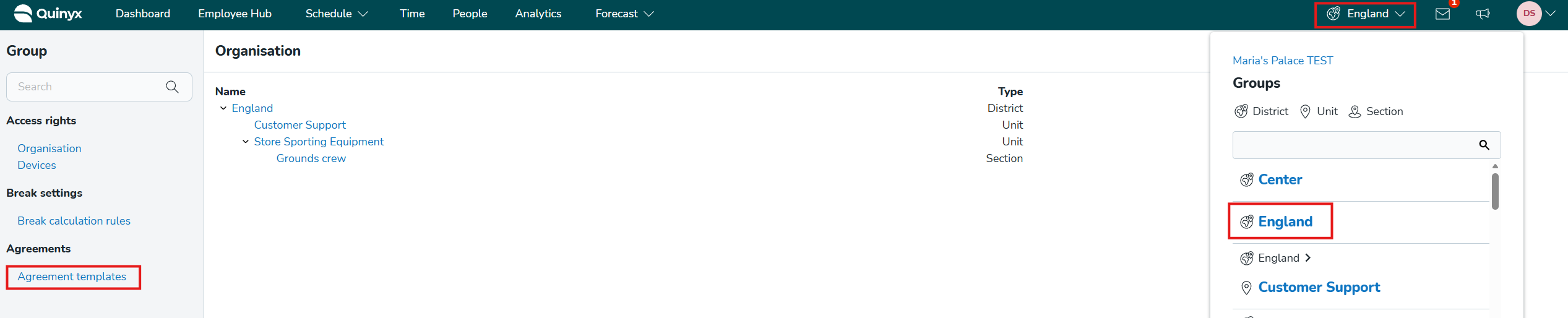
- Create new templates, or copy existing global templates as a starting point
- District templates are automatically available when creating employee agreements within that district
Permissions
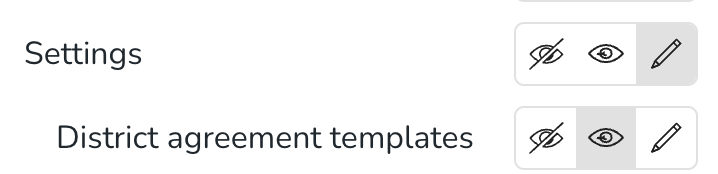
Users will need the District agreement templates permission on the district to manage district-level templates. This can be toggled on/off in: Account settings > Role management > Edit role > Settings > District level agreements
Important notes
- If an employee has agreement that is connected to a district-level agreement template, and they are moved to another district, their agreement will be disconnected from the district-level agreement template, as it is not valid in the new district.
- If you, via wsdlUpdateAgreementsV2, try to connect an employee’s agreement to a district-level agreement template that belongs to a district outside of the employee’s home district, you will receive a validation error
