Version 0230
 Updated
by
Daniel Sjögren
Updated
by
Daniel Sjögren
Release summary
Release date February 18 2026
Short on time and want a high-level summary? 🚀 Quinyx web app Version 0230 New functionality
New functionality requiring configuration updates
Updates and performance improvements
Bug fixes
Employee Hub Version 0230 New functionality
New functionality requiring configuration updates
Updates and performance improvements
Bug fixes
REST API / Web service updates
|
Important information
Upcoming Webinar: Quinyx Unlocked
Join us for the March installment of Quinyx Unlocked, our monthly webinar series built exclusively for our customer community. In just 30 minutes, we’ll dive into how our latest updates simplify complex scheduling and improve your workforce planning accuracy.
- When: March 11th at 16:00 CET (10:00 EST)
- Duration: 30 minutes
We’ll break down:
- During the session, we’ll explore why fragmented data limits AI accuracy (and how to fix it), and define the core elements of a strong workforce data foundation.
👉 Register here!
Navigate 2026: Save the date
Navigate is back – our flagship workforce management event for customers, partners, and industry leaders.
Join us as we explore the challenges – and opportunities – shaping frontline industries, and hear directly from the people driving innovation across the sector. Navigate puts customers firmly at the centre, showcasing real-world impact, product innovation shaped by user input, and market insights that help organisations move forward with confidence.
What to expect
- Inspiring customer stories that show what’s possible when WFM comes to life
- A first look at product innovations shaped by customer feedback
- Insightful discussions on the trends impacting frontline industries
- Time to connect, learn, and exchange ideas with peers across the community
Event details
- 📅 Date: May 6, 2026
- 📍 Location: At Six, Stockholm — or join virtually
- 👉 Please join us: Register here!
Updated Communication: Swedish Collective "Additional Time" Agreement Changes
We are developing a solution to support the upcoming changes in the Swedish collective agreement, ensuring continued compliance and seamless scheduling for our customers.
Our teams are actively working on the technical implementation within Quinyx. We will have this solution available by 1 April 2026, in line with the agreement change.
To support a smooth rollout, we will host dedicated training sessions in March. These sessions will provide clear, step-by-step guidance on how to configure and manage the new requirements in your environment.
Quinyx web app Version 0230
Release date February 18 2026
New functionality
District-level agreements templates
With this release, you can now assign districts to have their own agreement templates, separate from account-level (global) templates. District managers can create, copy, edit, and delete templates specific to their district, while still having read-only access to shared global templates.
Why we added this
Organizations with district structures (such as franchises or regional operations) often need local control over working time rules and agreement settings. Previously, all agreement templates were managed at the account level, which meant:
- Districts couldn't “own” and customize templates for local regulations or labor agreements
- Parent organizations had to manage templates for all districts centrally
- You had to create separate global agreement templates for each district
How to use it
- Navigate to Group settings while being on a district.
- Select Agreement templates from the menu.
- Create new templates, or copy existing global templates as a starting point.
- District templates are automatically available when creating employee agreements within that district.
Important notes
- If an employee has agreement that is connected to a district-level agreement template, and they are moved to another district, their agreement will be disconnected from the district-level agreement template, as it is not valid in the new district.
- If you, via wsdlUpdateAgreementsV2, try to connect an employee’s agreement to a district-level agreement template that belongs to a district outside of the employee’s home district, you will receive a validation error.
Section-level opening hours
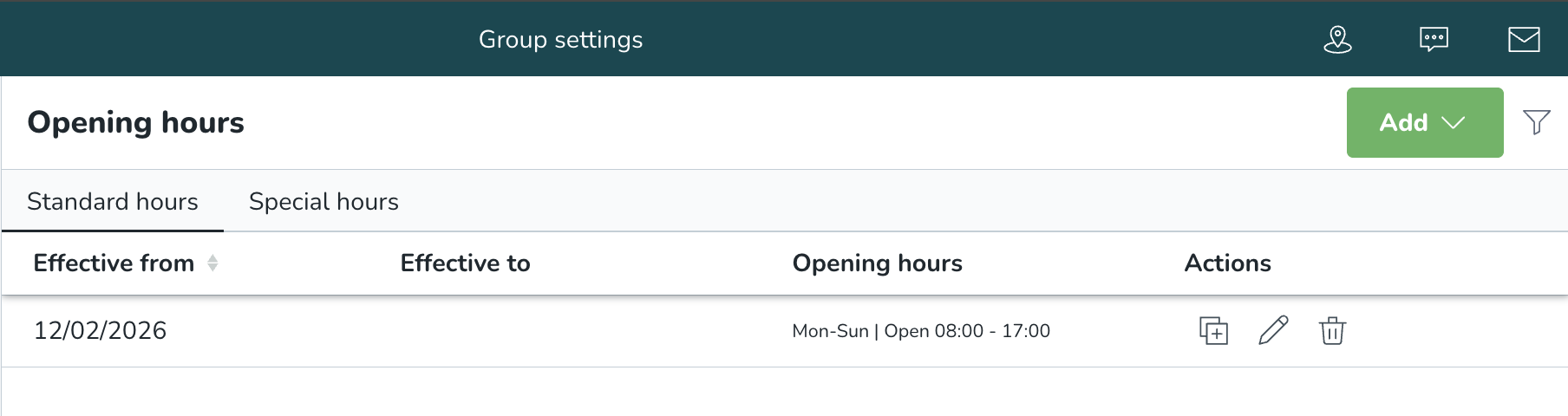
You can now define Opening Hours at the Section level, giving you more localized control over forecasting, optimal headcount calculations, and auto-scheduling.
This is particularly useful for units where sections (e.g., kitchen, drive-thru, bar, service areas) operate on different opening hours than the overall unit.
How to use it
If you open the Group Settings for a section, a new option will be visible in the left-hand menu: Opening hours. There, you can define both Standard and Special opening hours.
The layout and behavior mirror the existing Unit opening hours setup.
Important notes
If Section-level Opening hours are defined, these hours are used in demand forecasting, in labor standards to calculate optimal headcount, and in auto-scheduling. If Section-level Opening hours are not defined, the system falls back to unit-level opening hours.
When previewing the data on the Forecast tab, if a forecast exists on the Section level, it will be shown at the Unit level as well. This applies even if the forecast falls outside the Unit’s opening hours to ensure that the section-level demand is not hidden just because unit hours differ.
API:s
The same public REST API endpoints used for Unit-level Opening hours can also be used for Section-level Opening hours. Technical documentation is available here.
New functionality requiring configuration updates
None at this time.
Updates and performance improvements
Dashboard widget updates
As part of ongoing improvements to the Dashboard, we’re simplifying and streamlining some widgets.
Changes in this release:
Some widgets are being phased out and are now hidden from the Dashboard. These widgets are no longer part of the recommended Dashboard experience.
- Shift Coverage: The Shift Coverage widget has been removed from the Dashboard. Coverage information is already available in Summary of Locations, where it’s shown in clearer and more relevant time views (Today, Tomorrow, and Next 24 hours).
- Needs approval: The Needs approval widget has been removed from the Dashboard. Approval-related actions are now covered in Needs Attention, including both absence requests and shift requests, giving you one consolidated place to act.
These updates reduce duplication and bring related actions together in fewer, clearer places.
Free days no longer shown as a “No show”
We have improved how Free Day shifts are handled in Today’s Overview > Employee attendance list on the Dashboard.
Shifts marked as Free Day are now excluded from attendance alerts, since employees are not expected to punch in on these shifts.
If an employee does punch in on a Free Day, the shift will:
- Appear in the list
- Get the status “Punched in”
- Behave like a normal shift for all other attendance statuses
This results in clearer and more accurate attendance insights, while still supporting scenarios where employees work or replace someone on short notice.
Base schedule warning filter improvement
We improved the warning titles in the filter feature for reviewing compliance issues in Base Schedule. This change simplifies handling filtering violation types and speeds up the process with more descriptive names.
Compliance checker "Employee Name" support
Employee name details are back in the Advanced Analytics Compliance Checker! You can now query on employee name or badge number to better surface insights for you and your organization on the go.
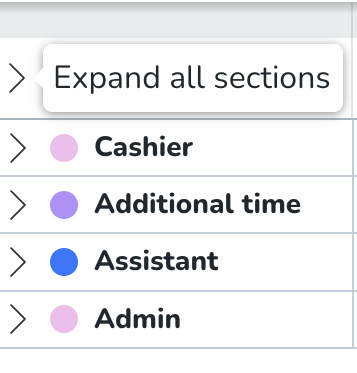
New "Collapse All" option in Business view
We've added a new "Collapse all" option in Business view, allowing you to collapse all groups with a single click.
Previously, you had to collapse each group individually, which required multiple clicks to get an overview of assigned and unassigned shift counts.
Your collapse preference now also persists across sessions and when switching between weeks or dates-no need to reconfigure your view each time.
The new “arrow” button is placed above all groups and on the right side of the group count. Additionally, we provide an explanation of the action as part of the tool tip hover.

Shift section now visible in Shift bookings
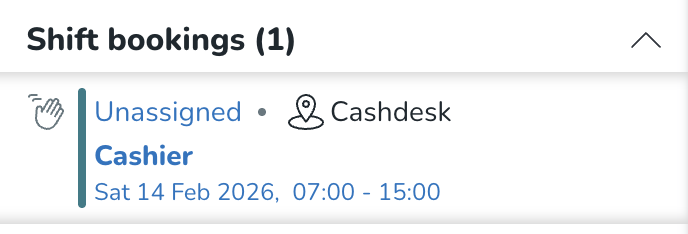
Shift bookings now display the section assigned to each shift directly in the list. This makes it easier to identify which section a shift belongs to at a glance. Shifts without an assigned section will continue to display as before.
Bug fixes
- Resolved an issue with the schedule period report showing different scheduled hours than the employee metric scheduled hours.
- Resolved an issue in Statistics where the Expected cost variable wouldn't generate for parts of a month.
- Resolved an issue where it wasn't possible to offer shifts on the last day of the published schedule period.
New HelpDocs content
Employee Hub web app Version 0230
Release date February 18 2026
New functionality
None at this time.
New functionality requiring configuration updates
None at this time.
Updates and performance improvements
None at this time.
Bug fixes
- Resolved an issue that caused the "Send now" button to be greyed out after setting the audience of a story.
- Resolved an issue which caused you to be unable to save changes to an existing task template after adding an upload field.
- Resolved an issue that caused task submission download fails.
- Resolved an issue for the mobile apps where sometimes the "Back" button wouldn't be visible for tasks when using a tablet.
- Resolved an issue where you couldn't archive stories.
- Resolved an issue with scheduled tasks and stories not being published as scheduled.
New HelpDocs content
None at this time.
REST API / Web service updates
Tag Categories API update: Deprecation postponement
We are providing an update regarding the deprecation timeline for the unpaginated Tag Categories API endpoint.
The change
The planned deprecation date for the old API endpoint, GET /categories/{categoryExternalId}/tags has been postponed.
Detail | Original | Updated |
Old Deprecation Date | December 10, 2025 (Release 0226) |
|
Updated Deprecation Date | February 4, 2026 (Version 0229) | March 4, 2026 (Version 0231) |
Why the Change?
This extension to the dual-run period is being implemented to provide our customers with additional time to successfully migrate their integrations to the new, performant, and paginated API (GET /v2/categories/{categoryExternalId}/tags).
We remain committed to supporting a smooth transition to the new endpoint, which resolves critical performance issues (such as 504 Gateway Timeouts and OutOfMemoryError) experienced by customers using the old endpoint with large datasets.
Action required (for users still on the old API)
Customers using the old API are strongly encouraged to complete their migration to the paginated API as soon as possible.
- Old Endpoint (No Pagination, to be deprecated):
GET /categories/{categoryExternalId}/tags - New Endpoint (With Pagination, required for future stability):
GET /v2/categories/{categoryExternalId}/tags
The deprecation warning will be updated in our official Swagger documentation to reflect the new February 4, 2026, date.
Please make sure to forward this information to the party within your company responsible for integrations.
