Audit logs
 Updated
by
Leigh Hutchens
Updated
by
Leigh Hutchens
Quinyx previously provided logging data for some features in Account settings. These are now referred to as old audit logs. The logs described in this article are referred to as current audit logs.
What's the purpose of the audit logs?
Audit logs provide a record of actions taken in the system, showing:
- What changed
- Who made the change
- When the change occurred
In Quinyx, audit logs help managers:
- Investigate scheduling or attendance issues
- Resolve disputes
- Understand how changes were made over time
By providing visibility into historical activity, audit logs support better oversight, accountability, and more informed workforce planning.
When would I use audit logs?
Audit logs are useful whenever you need to understand what happened in the schedule or why a change occurred. Common scenarios include:
- Investigating unexpected schedule changes If a shift was modified, reassigned, or removed, audit logs let you see what changed, who made the change, and when it happened. This helps managers quickly understand the reason for differences between planned and actual schedules.
- Resolving questions or disputes Employees may ask when a request was approved, who swapped a shift, or why an assignment changed. Audit logs provide a clear timeline of actions, making it easier to answer questions and resolve issues confidently.
- Reviewing staffing decisions and activity Managers can use audit logs to review how schedules were adjusted over time, identify patterns in shift changes, and better understand how staffing decisions were made. This visibility supports more consistent planning and operational oversight.
How do I navigate to the audit logs?
Accessing each of the five types of audit logs: shifts, shift bookings, shift swaps, shift unassignments, and shift assignments on away unit, all follow the same navigation process.
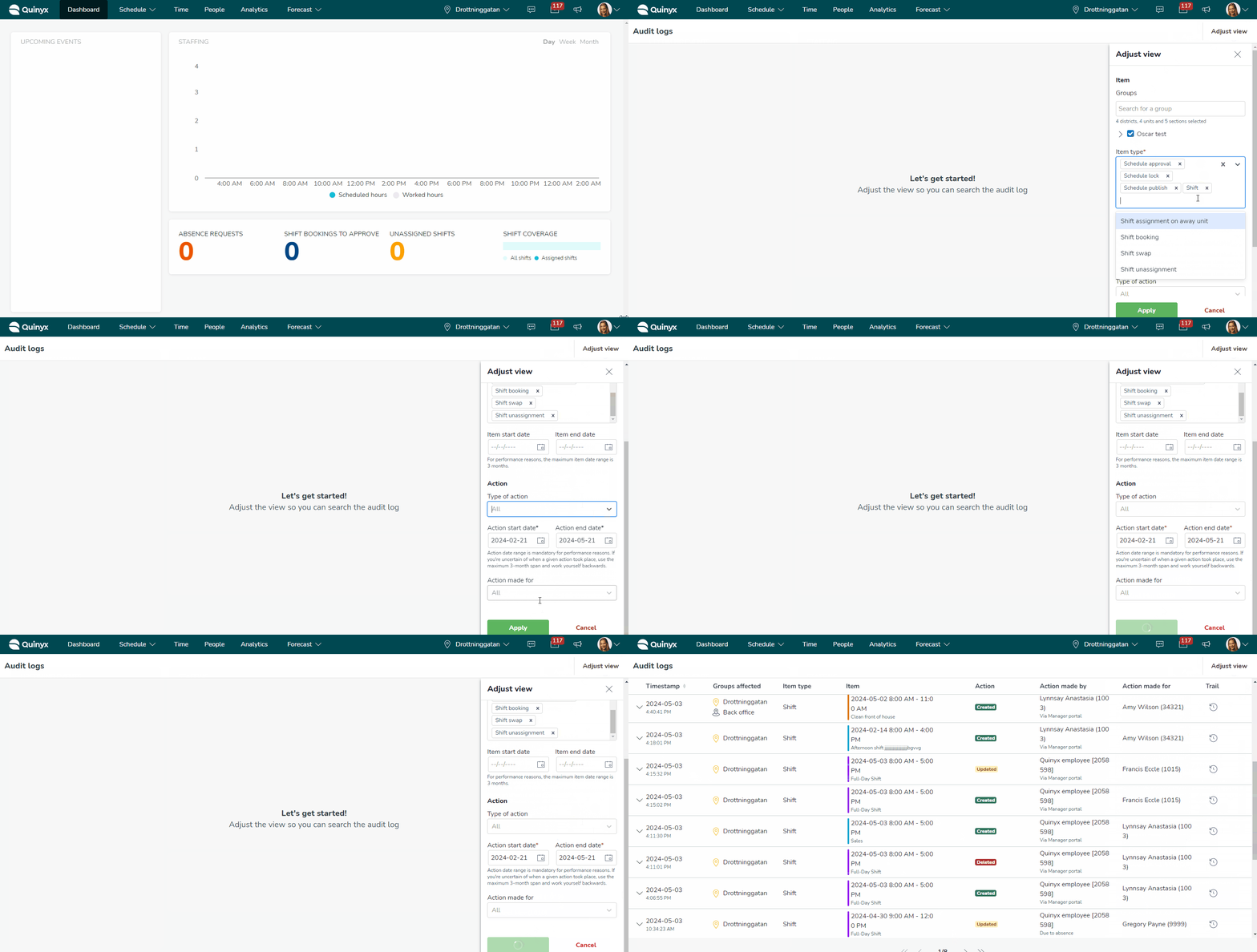
To view these logs, click the chevron located in the top right corner of your screen. Then, click Adjust view to get started. The information you can see depends on which audit log you're viewing.
Audit log types
The following table describes the different types of audit logs available and the kind of activity each one tracks.
Item | Explanation |
Records a period when an employee is not available to work, ensuring schedules reflect real staffing capacity. | |
A workflow where employees submit time-off requests for approval, helping managers control coverage before confirming leave. | |
Defines when employees are able or willing to work, allowing the scheduling engine to build more accurate schedules. | |
A classification used to group employees or define hierarchy, often influencing rules, qualifications, or access. | |
Defines a job function or responsibility, helping ensure the right skills are scheduled in the right shifts. | |
Links employees to specific roles so the system can match qualified staff to required work. | |
A configurable condition that controls scheduling behavior, helping enforce labor policies or business requirements. | |
A collection of rules applied together, making it easier to manage complex scheduling policies consistently. | |
A step where schedules are reviewed and approved before being finalized or published, supporting governance and accuracy. | |
Prevents further edits to a schedule or time period, protecting finalized plans from unintended changes. | |
Makes schedules visible to employees, enabling them to see assigned shifts and plan accordingly. | |
A defined work period assigned to an employee or left open for assignment. | |
Assigns an employee to work a shift in a different unit or location, helping balance staffing across the organization. | |
Allows employees to claim or book available shifts, increasing flexibility and reducing manager workload. | |
Makes a shift available for others to take, typically when an employee cannot work it, helping maintain coverage. | |
Enables two employees to exchange shifts, usually with approval, preserving coverage while increasing flexibility. | |
Removes an employee from a shift, returning it to an open or unfilled state so it can be reassigned. |
Permissions and audit log search results
Audit log results reflect your Quinyx permissions.
For example, when viewing shift logs:
- You will only see log data for groups where you have at least read access to Scheduling permissions.
- If your permission applies only to part of the selected date range, results will only appear for the dates when your permission was active.
If no results are found, the page displays an error message indicating that no data matches your search criteria.
