Understanding X and V days in Finnish hospitality law
 Updated
by
Leigh Hutchens
Updated
by
Leigh Hutchens
X and V days is a concept that is used by the Finnish hospitality sector and is required by law. For each week of five working days, the employee earns two days off: one is a weekly rest day ‘V’ of minimum 30 hours and the other an additional day off ‘X’ of minimum 24 hours.
The Basic Concept: For every week consisting of five working days, an employee earns two distinct days off:
- V-Day (weekly rest): A mandatory weekly rest period of at least 30 continuous hours.
- X-Day (additional free day): An additional day off of at least 24 continuous hours.
Correctly tracking these days is essential for payroll compliance and ensuring employees are not overworked.
How to configure X and V days
To automate this logic within your workforce management tool, follow the setup steps below.
Step 1: Enable the logic on the agreement
First, you must tell the system to apply this specific rule to the relevant employee contracts.
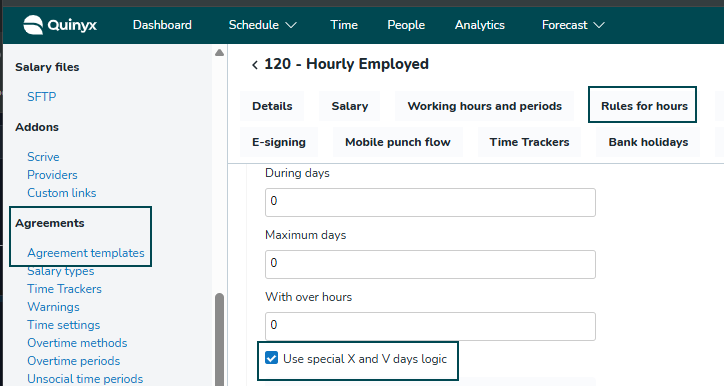
- Navigate to Account settings > Agreement > Agreement template.
- Go to the section Rules for hours.
- Check the box to activate "Use X and V days logic".
Step 2: Create the shift types
You need specific shift types in your system to represent these off days so they can be tracked on the roster.
- Navigate to Account settings > Shift types.
- Create two new shift types (e.g., named "X Day" and "V Day").
- Configuration requirements:
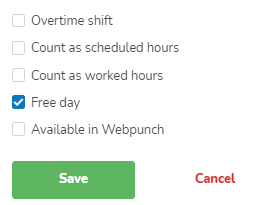
- Hours: These shifts should not count as scheduled hours or worked hours (set value to 0).
- Type: Ensure they are marked as a "Free day shift" (or "Day off") in Advanced settings.
Step 3: Assign shift types to the unit
Finally, link the shift types you created in Step 2 to the specific business unit to make them available for scheduling.
- Go to Account settings > Group management.
- Select the correct [Unit].
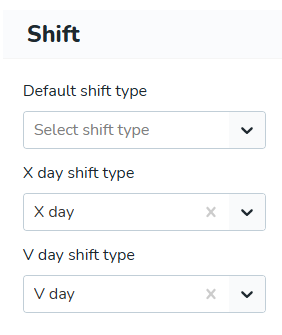
- Navigate to Advanced unit settings > Shift.
- In the corresponding fields for X and V days, select the shift types you created in the previous step.