Version 0227
 Updated
by
Victor Jespersen
Updated
by
Victor Jespersen
Release summary
Short on time and want a high-level summary? 🚀 Quinyx web app Version 0227 New functionality
New functionality requiring configuration updates
Updates and performance improvements
Bug fixes
Employee Hub Version 0227 New functionality
Updates and performance improvements
Bug fixes
SOAP API / Webservice updates
|
Important information
Quinyx Unlocked: Employee absence management 🎉
Master your workforce planning in just 30 minutes. Join our deep dive on January 14th at 16:00 CET to see how our latest updates simplify complex scheduling:
- Ready to try! Shared Employee Absence Management (SEAM)
- Upcoming! Automated handling of absences & absence planner
Swedish collective agreement change
We’re aware of recent changes in the Swedish collective agreement that may impact scheduling and compliance for some of our customers. Our teams are actively investigating how we can address these updates within Quinyx. Once we have a confirmed plan of action, we’ll share more details. Our intention is to have a solution in place by 1 April 2026. However, as we explore the technical feasibility of a solution, the timeline is subject to change - but we’ll do everything we can to deliver before the agreement change date.
Quinyx web app Version 0227
Release date January 8, 2026
New functionality
None at this time.
New functionality requiring configuration updates
Shared Employees Absence Management
We're excited to announce the launch of Shared Employees Absence Management (SEAM), also referred to as Cross-unit absence management in the UI! This new module is included at no extra cost and significantly simplifies the process for managing shared employees' absences across multiple units.
- Easier absence request routing: Shared employees submitting an absence request via the mobile app can now choose which manager from their shared units should an absence request be routed to. Note: Employees can select only one manager per absence request.
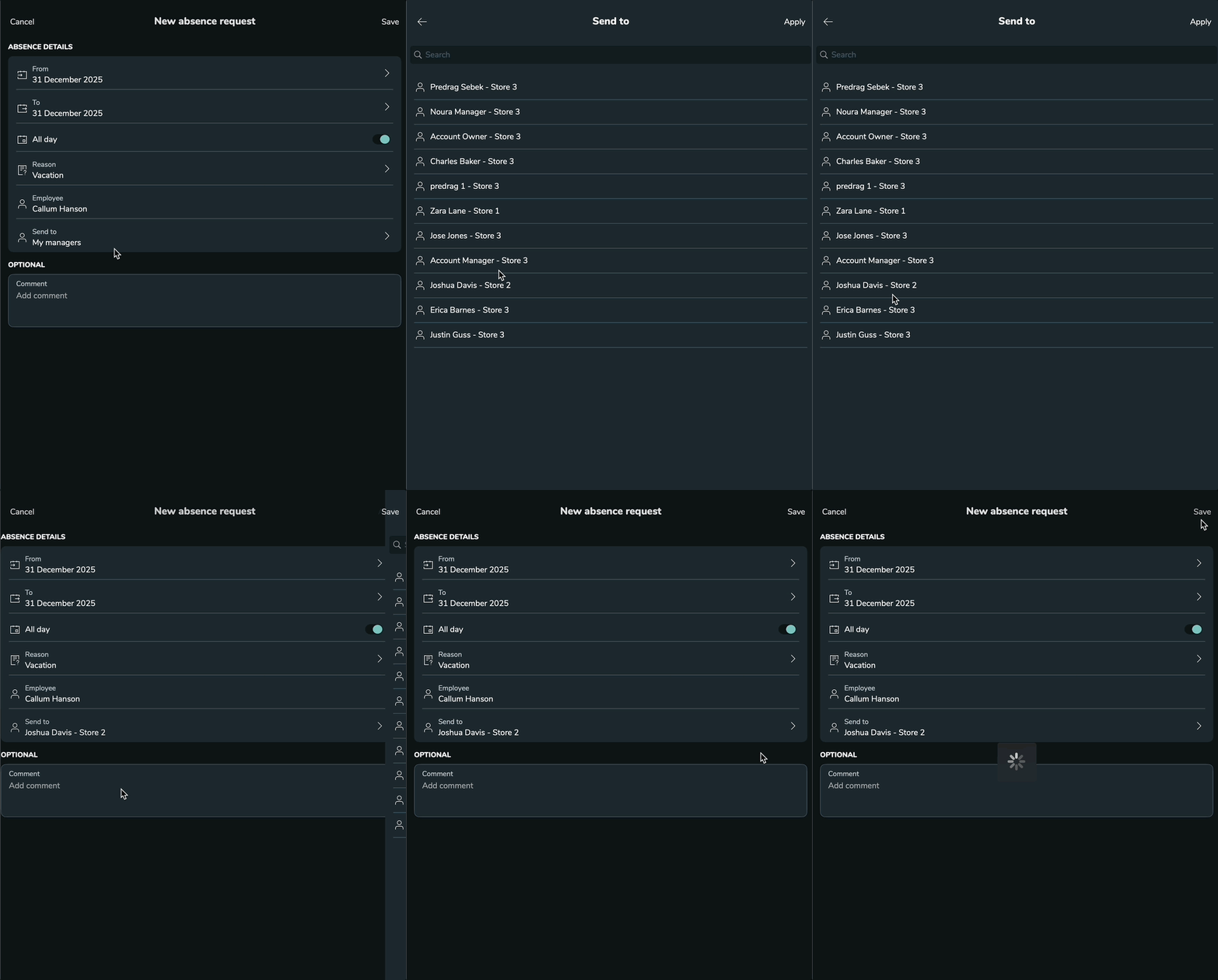
- Cross-unit manager action: Managers from any of an employee's shared units can receive, approve, or deny the absence request.
- Updates to shift management: When an absence request is approved by the selected manager:
- The manager can take action on shifts within their own unit.
- The employee's scheduled shifts in other units that are affected by the absence request approval are automatically set to unassigned by default.
- New notifications: Affected unit managers (who have a scheduled shift for the absent employee) will now receive a notification that their shift has become 'unassigned' due to the absence approval, prompting them to take action.
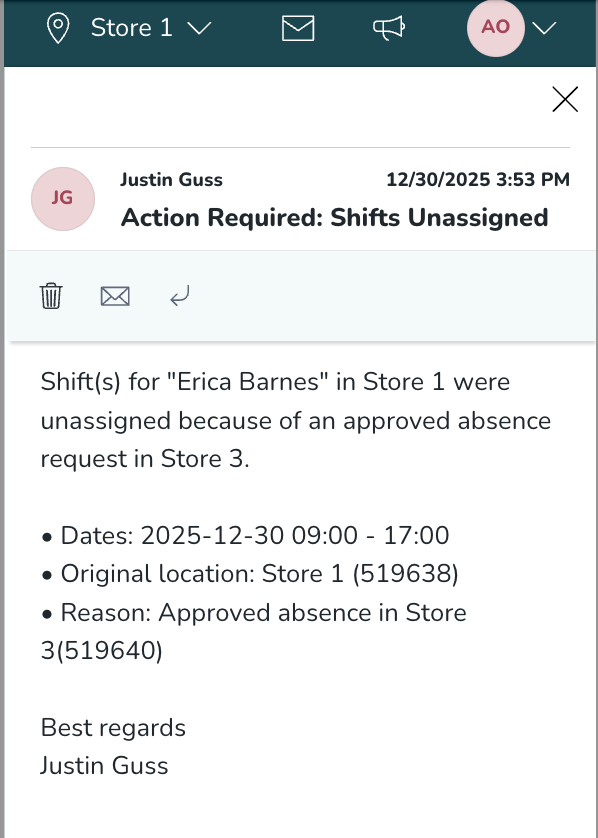
The image above shows a notification to the Store 1 manager highlighting the shift impact of approving employee Erica Barnes’ absence.
- Visibility updates: All shared unit Managers can now view the pending absence request in the schedule view for planning purposes (only selected manager & home unit manager can act on the request).
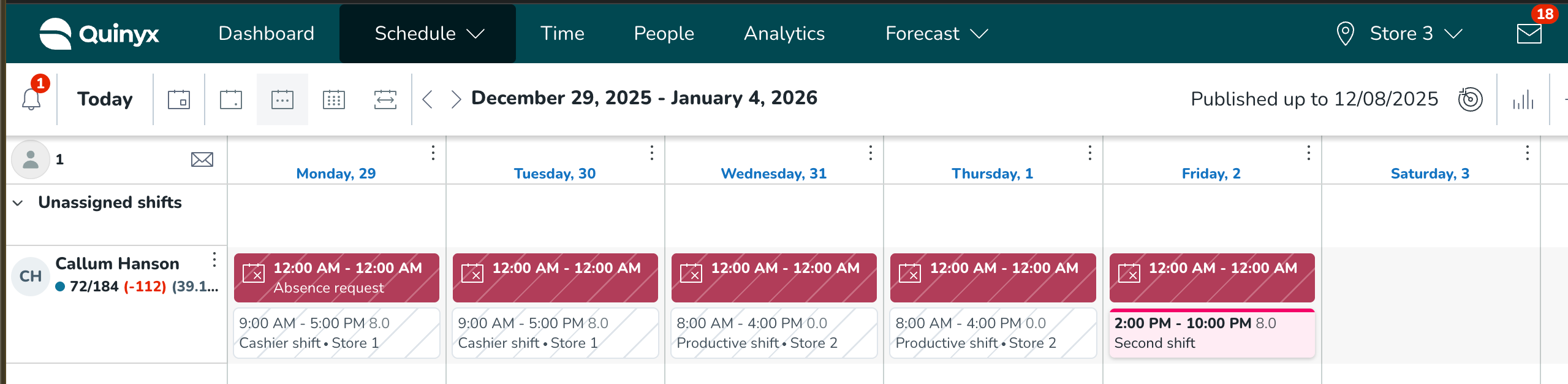
In the image above, Callum is an employee shared across Stores 1, 2, and 3. He has submitted an absence request to the manager in Store 2. The pending request is also visible to the manager in Store 3, along with an indication of the potential impact if the request is approved.
Updates and performance improvements
None at this time.
Bug fixes
- Resolved an issue that caused X and V day shifts created automatically in the schedule to not include salary type rules from the shift type template. This meant extra pay rules weren’t applied if an employee worked on these designated days off.
- Resolved an issue that caused the "minimum weekends off per period" rule to trigger incorrectly. The system only showed a warning after scheduling a third weekend in a two-week period, instead of alerting on the second. The rule now correctly checks calendar weeks (Monday to Sunday) as intended.
- Resolved an issue that allowed managers to create shifts that split absences already transferred to payroll, without triggering a hard stop warning. The system now correctly blocks this action with a non-overridable warning, ensuring payroll data integrity.
- Resolved an issue where employee availability was incorrectly reflected in the schedule, causing false "not available" warnings. The system now correctly interprets availability based on the employee's agreement settings, without misapplying the daybreak adjustment.
New HelpDocs content
Employee Hub web app Version 0227
Release date December 8, 2026
New functionality
Employee Hub Tasks in the Schedule View
We’re excited to introduce a major step in our unified product strategy: Employee Hub Tasks are now available directly inside the Schedule View in Quinyx.
This update brings schedules and daily operational tasks together in one place, reducing context-switching, improving decision-making, and giving managers a smoother, more efficient workflow.
Store managers work heavily with both schedules and tasks, often at the same time. Until now, they needed to move back and forth between modules to understand:
- What tasks need to be done
- Who is available to do the work
- Whether staffing needs to be adjusted based on the amount of employee hub tasks
With this release, Employee hub tasks and schedules finally meet - in a single, unified workspace.
What's new
You can now open a dedicated Employee Hub task panel directly from the Schedule view. This panel shows the same task list you would normally find under the Employee Hub Overview, including the standard sorting, filters, and actions you’re used to.
A new task button appears in the schedule toolbar, showing a red dot + number when you have ongoing tasks.

View, Sort, & Filter Your Tasks
Inside the Employee Hub task side panel in the Schedule view, you can:
See and work with all tasks sent to your group
The “Ongoing” list shows the same information as the Employee Hub “Overview”, showing the same set of tasks and is sorted by due date by default. You will be able to see tasks sent to you and your group, perform and finish all the task or forward them to one of your colleagues like you can do in the Employee Hub.
Filter by status
- Ongoing (default), matching the “Overview” facet in the Employee Hub
- Completed, matching the "Done" facet in the Employee Hub
Focus on your personal tasks
- Enable Assigned to me to show only tasks specifically assigned to you
Sort your tasks
Choose between:
- Due date (first to last) (default)
- Date received (newest first)
Settings & Requirements
To use this feature, you must have:
- The Employee hub activated in your tenant.
- The Employee hub permission enabled.
- The new setting available under Employee Hub account settings activated called “Show Employee Hub tasks in the schedule view”.
- Collaboration groups set up in your tenant.
Delete a folder with contents
Prior to this release, you were unable to delete a folder with contents i.e., a parent folder containing subfolders and files. Each item of contents had to be deleted individually before deleting the parent folder, taking time and causing frustration.
As the creator of a parent folder (or a member of the creator’s group), you are now able to more easily tidy up your files and folders by deleting a folder with contents.
- Select folder with contents and then select the Delete option from the action bar.

- To confirm deletion, select Delete.
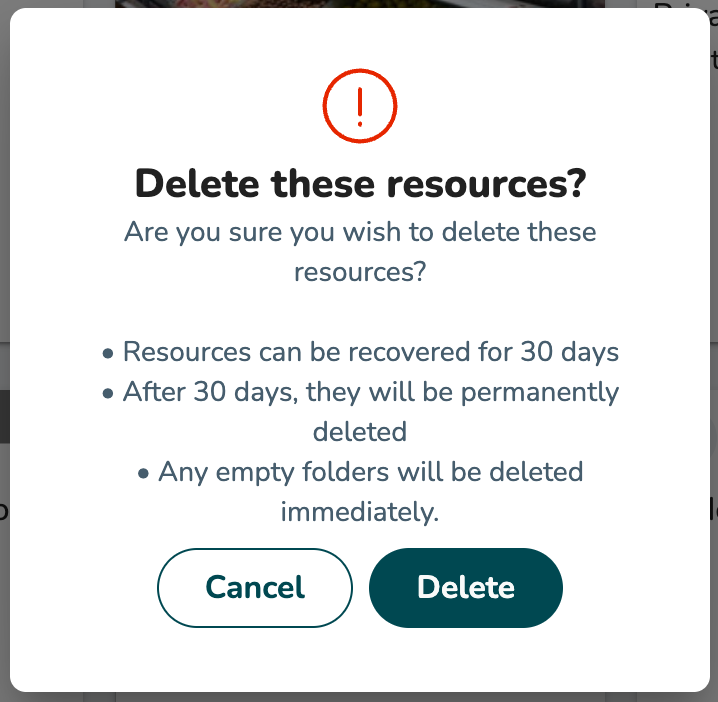
- The deleted folder will appear greyed out with the "Deleted" label.
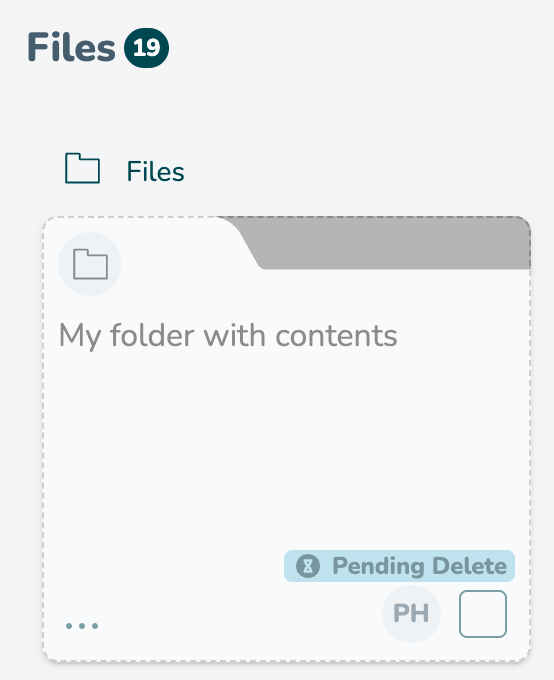
Pending Delete status. Once 30 days have surpassed from the date they were deleted, then these assets will be removed from the platform as expectedReinstate deleted item within 30 days
- Select context menu for deleted file/folder (within the 30 day window).
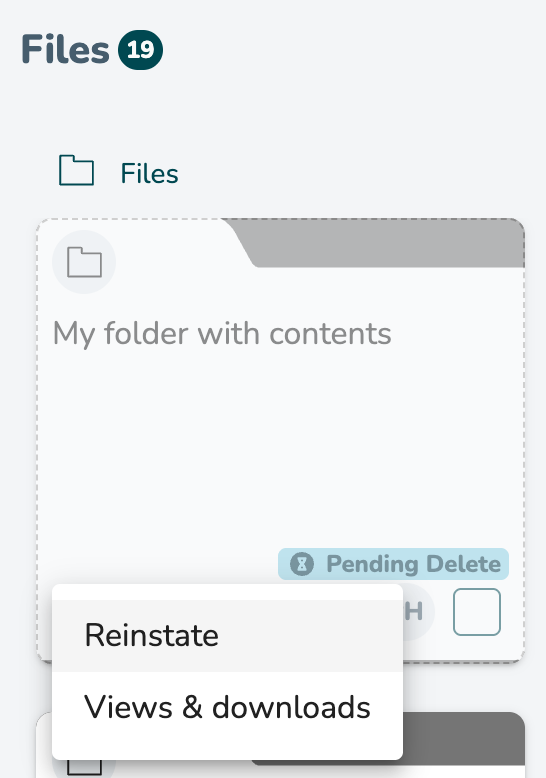
- Select Reinstate.
- If the parent folder has been deleted, select a new location for reinstated item, select "Reinstate".
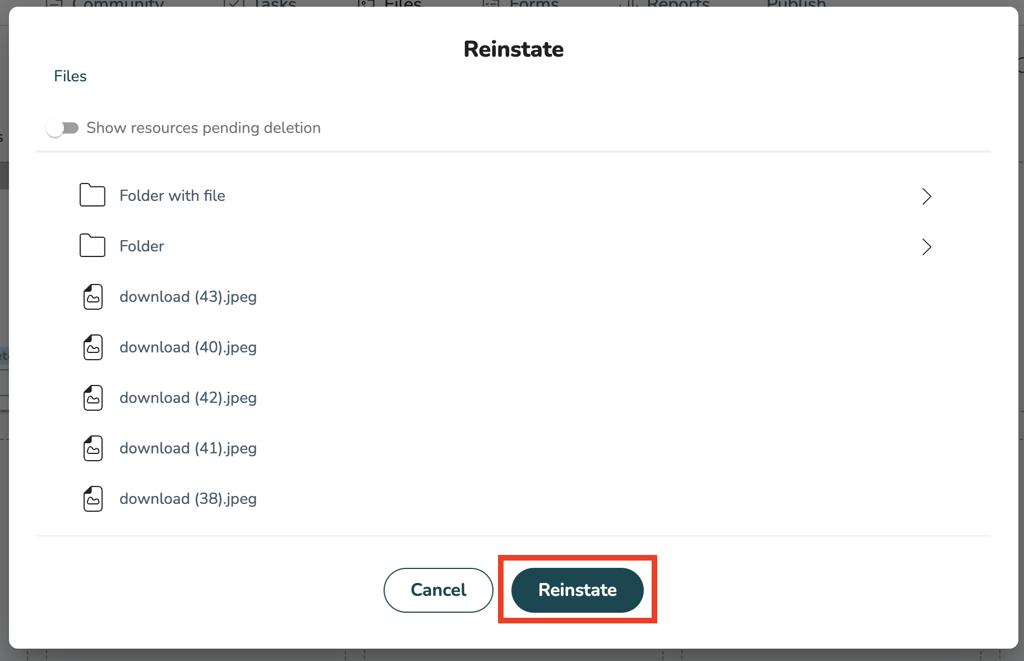
- The file/folder will appear reinstated in the chosen location i.e. a tile in active form, not greyed out, and the ‘deleted’ label removed.
New functionality requiring configuration updates
None at this time.
Updates and performance improvements
Update to Employee Hub account settings
We’ve made it easier to manage your Employee Hub configuration by gathering all related on/off settings in one place. Under Account settings > Employee hub settings, we've created a new section called Employee Hub account settings. This section now contains all checkbox-based settings, giving administrators a clearer and more consistent overview of available options.
The following settings are now grouped under Employee Hub account settings:
- Hide engagement statistics
- Activate Messenger with collaboration groups
- Activate Employee Hub tasks in the schedule
New setting: Show Employee Hub tasks in the schedule view
As part of this update, we’ve introduced a new setting called Show Employee Hub tasks in the schedule view. When enabled, Employee Hub tasks can be displayed directly in the schedule view, helping managers work with schedules and tasks side by side.
This change does not alter any existing behavior by default - your current setup remains unchanged unless you enable or disable these settings.
Bug fixes
None at this time.
New HelpDocs content
None at this time.
SOAP API / Web service updates
Tag Categories API update: Deprecation postponement
We are providing an update regarding the deprecation timeline for the unpaginated Tag Categories API endpoint.
The change
The planned deprecation date for the old API endpoint, GET /categories/{categoryExternalId}/tags has been postponed.
Detail | Original | Updated |
Old Deprecation Date | December 10, 2025 (Release 0226) |
|
New Deprecation Date |
| February 4, 2026 (Release 0229) |
Why the Change?
This extension to the dual-run period is being implemented to provide our customers with additional time to successfully migrate their integrations to the new, performant, and paginated API (GET /v2/categories/{categoryExternalId}/tags).
We remain committed to supporting a smooth transition to the new endpoint, which resolves critical performance issues (such as 504 Gateway Timeouts and OutOfMemoryError) experienced by customers using the old endpoint with large datasets.
Action required (for users still on the old API)
Customers using the old API are strongly encouraged to complete their migration to the paginated API as soon as possible.
- Old Endpoint (No Pagination, to be deprecated):
GET /categories/{categoryExternalId}/tags - New Endpoint (With Pagination, required for future stability):
GET /v2/categories/{categoryExternalId}/tags
The deprecation warning will be updated in our official Swagger documentation to reflect the new February 4, 2026, date.
Please make sure to forward this information to the party within your company responsible for integrations.
