Version 0228
 Updated
by
Leigh Hutchens
Updated
by
Leigh Hutchens
Release summary
Short on time and want a high-level summary? 🚀 Quinyx web app Version 0228 New functionality
New functionality requiring configuration updates
Functional expansion
Updates and performance improvements
Bug fixes
Employee Hub Version 0228 New functionality
Updates and performance improvements
Bug fixes
SOAP API / Webservice updates
|
Important information
Upcoming Webinar: Quinyx Unlocked
Join us for the February installment of Quinyx Unlocked, our monthly webinar series built exclusively for our customer community. In just 30 minutes, we’ll dive into how our latest updates simplify complex scheduling and improve your workforce planning accuracy.
- When: February 11th at 16:00 CET (10:00 EST)
- Duration: 30 minutes
- Key Topics: Deep dive into Absence opportunities, custom sorting, and much more!
Why attend? Learn firsthand how these updates benefit both managers and employees, ensuring you get the most out of the Quinyx platform.
Navigate 2026: Save the date
We're excited to share that Navigate is back for 2026 — Quinyx’s annual WFM gathering for customers, partners, and industry leaders.
Why it matters
Navigate brings our community together to explore the biggest opportunities shaping frontline work. Expect forward-thinking ideas, honest conversations, and real examples of innovation powered by Quinyx.
What to look forward to
- Customer spotlights that showcase what’s possible when WFM comes to life.
- Product innovation first looks, shaped directly by your feedback.
- .Industry-shaping discussions on the trends impacting frontline organizations.
- Collaboration and networking, with space to connect, learn, and exchange ideas.
Event details
- 📅 Date: May 6, 2026
- 📍 Location: At Six, Stockholm — or join virtually
More details and registration information will follow soon. We can’t wait to see you there!
Updated Communication: Swedish Collective "Additional Time" Agreement Changes
We are developing a solution to support the upcoming changes in the Swedish collective agreement, ensuring continued compliance and seamless scheduling for our customers.
Our teams are actively working on the technical implementation within Quinyx. We will have this solution available by 1 April 2026, in line with the agreement change.
To support a smooth rollout, we will host dedicated training sessions in March. These sessions will provide clear, step-by-step guidance on how to configure and manage the new requirements in your environment.
We are committed to delivering this update before the agreement change date and will provide further instructions on the training schedule very soon.
Quinyx web app Version 0228
Release date January 21, 2026
New functionality
Dashboard widget: Needs attention
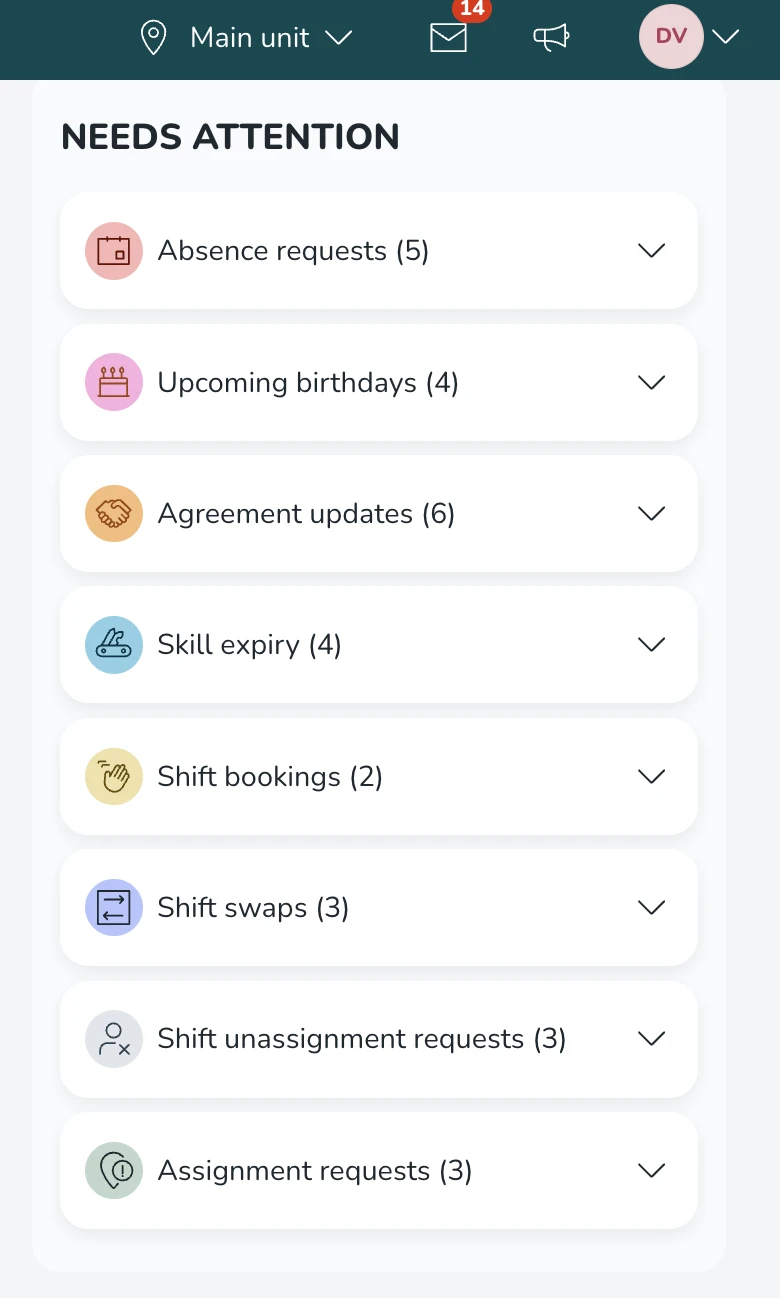
We’re introducing Needs Attention in the web app: a new Dashboard widget designed to help managers quickly identify and act on the most important operational follow-ups in the coming weeks. Instead of searching across multiple areas in Quinyx, managers get a single, prioritized overview of items that typically require timely action (for example approvals and upcoming employee related events).
PS! Needs Attention replaces the “Upcoming events” widget, which will be hidden starting with this release.
What’s included
Depending on the role and permission, the widget can show these sections:
- Absence requests
- Agreement updates:
- Upcoming (new!)
- Expiring agreements
- Birthdays
- Skill expiries
- Shift unassignment requests
- Shift booking requests for unassigned shifts
- Shift swap requests
- Assignment requests
General behavior
In the list, sections are displayed as a collapsible list (accordion) with a title and count of items in collapsed state.
- Most sections show up to five items, with a scroll to view all.
- In this first version, we're keeping the logic from Upcoming events, and only showing items that are happening within the next 28 days.
- Selecting a request based item (e.g. absence requests) opens the tab Schedule with the notifications panel focused on that request (where supported).
- The default behavior for the list is that all sections are collapsed.
- The widget is refreshed when the Dashboard reloads.
Interactions
Request based items in the list open the Schedule page with the notification panel focused on the selected item. In this case, this is supported for:
- Absence requests
- Shift unassignment requests
- Shift booking requests for unassigned shifts
- Shift swap requests
- Assignment requests
The following actions do not trigger any action:
- Agreement updates (starting/expiring)
- Birthdays
- Skill expiries
Permissions
- If the user lacks permission for all sections, there will be a No permission message.
- If the user lacks permission for a specific section, that section is hidden entirely.
Visibility
- Shown on the Local Manager Dashboard
- Shown on the Section Manager Dashboard
- For other levels, the Dashboard is shown without the widget
New functionality requiring configuration updates
Absence Opportunities
We're excited to introduce Absence Opportunities, a new functionality developed in close collaboration with our customers. It gives managers a way to proactively offer employees optional time off when demand drops unexpectedly.
Why it matters
In industries where demand changes quickly, operational needs can shift at short notice. Until now, the main option was to cancel shifts last minute, which often leads to lost pay and frustrated employees. Absence Opportunities gives employees a choice, helping maintain trust and morale while still aligning staffing to demand.
How it works
- A manager identifies overstaffing and creates an absence opportunity for a specific shift or time period.
- Selected employees receive a notification and can accept or decline the offer.
- If accepted, an absence request is created and sent to the manager for approval.
- The manager reviews and approves or denies the absence request, useful when more employees request than slots are available.
- Once approved, the absence is reflected in the schedule.
Configuration requirements
Before using Absence Opportunities, ensure the following is set up:
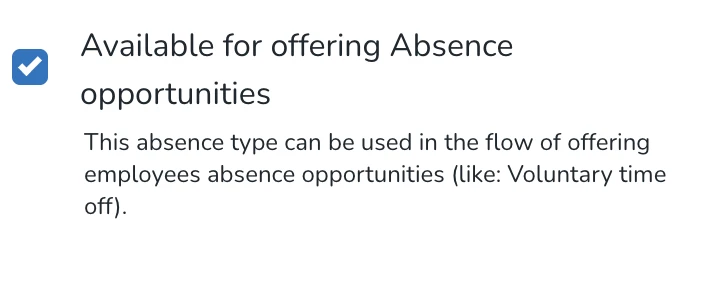
- In the absence type configuration, enable "Available for offering Absence opportunities" for the relevant absence types (e.g. Voluntary Time Off). Only absence types with this setting enabled will appear as options when creating an opportunity.
- Ensure the absence type is available on the employee's agreement template. Employees without the absence type on their agreement won't receive the offer, for example, if 4 employees have a shift but only 3 have the absence type on their agreement, only those 3 will be notified.
How to get started
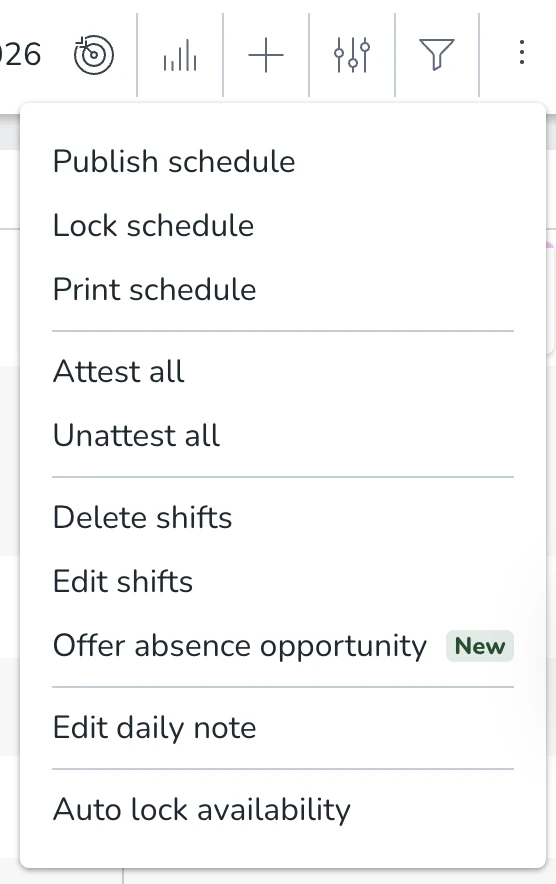
- In the Schedule view, click the three-dot menu and select "Offer absence opportunity".
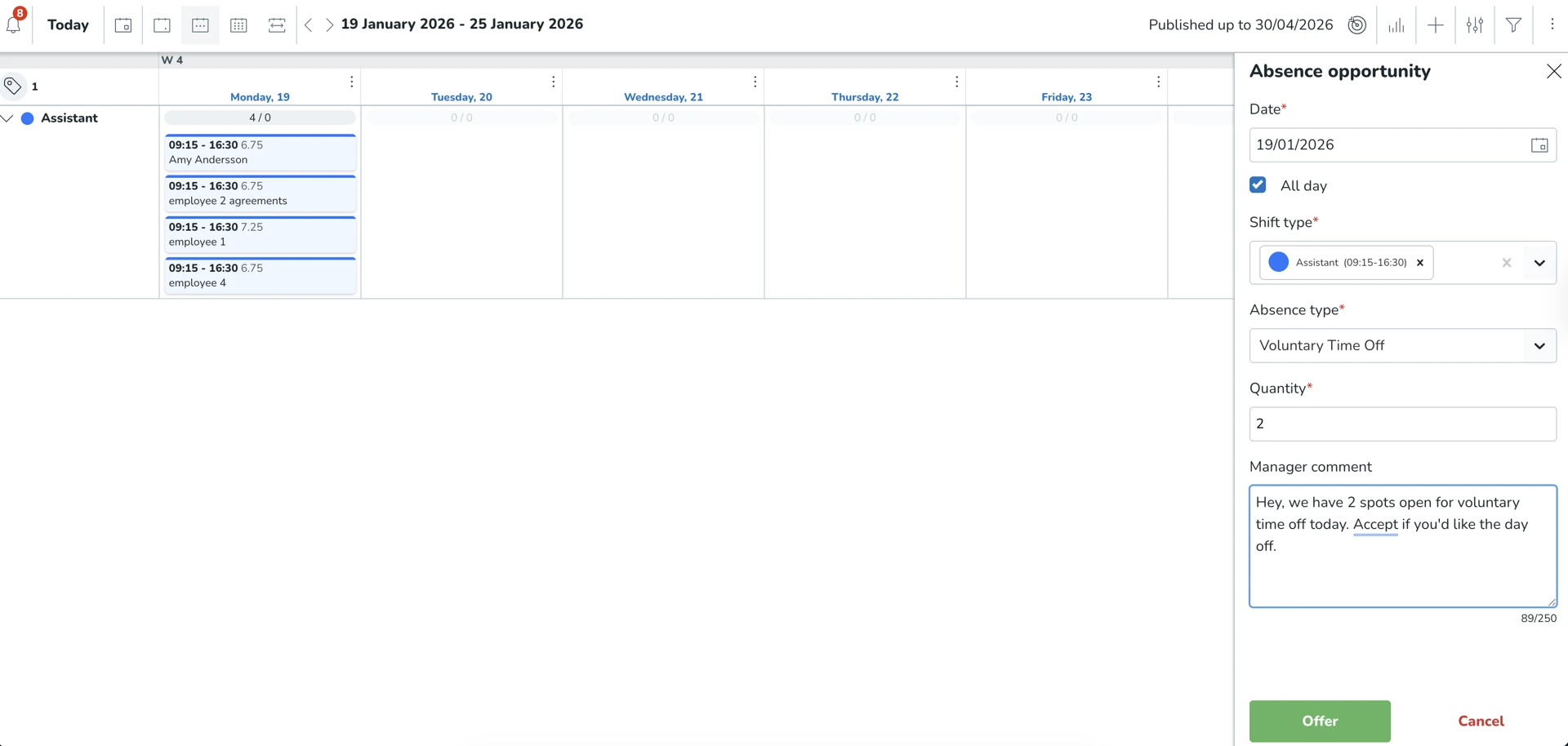
- Fill in the details: date, shift type, absence type, and quantity (number of slots available). Optionally add a comment to inform employees (e.g. "2 spots open for voluntary time off today").
- Click "Offer" to send the opportunity to eligible employees.
- Track progress in the Notifications panel under "Absence opportunities", see active/expired offers, how many have accepted or been denied, and which employees received the offer.
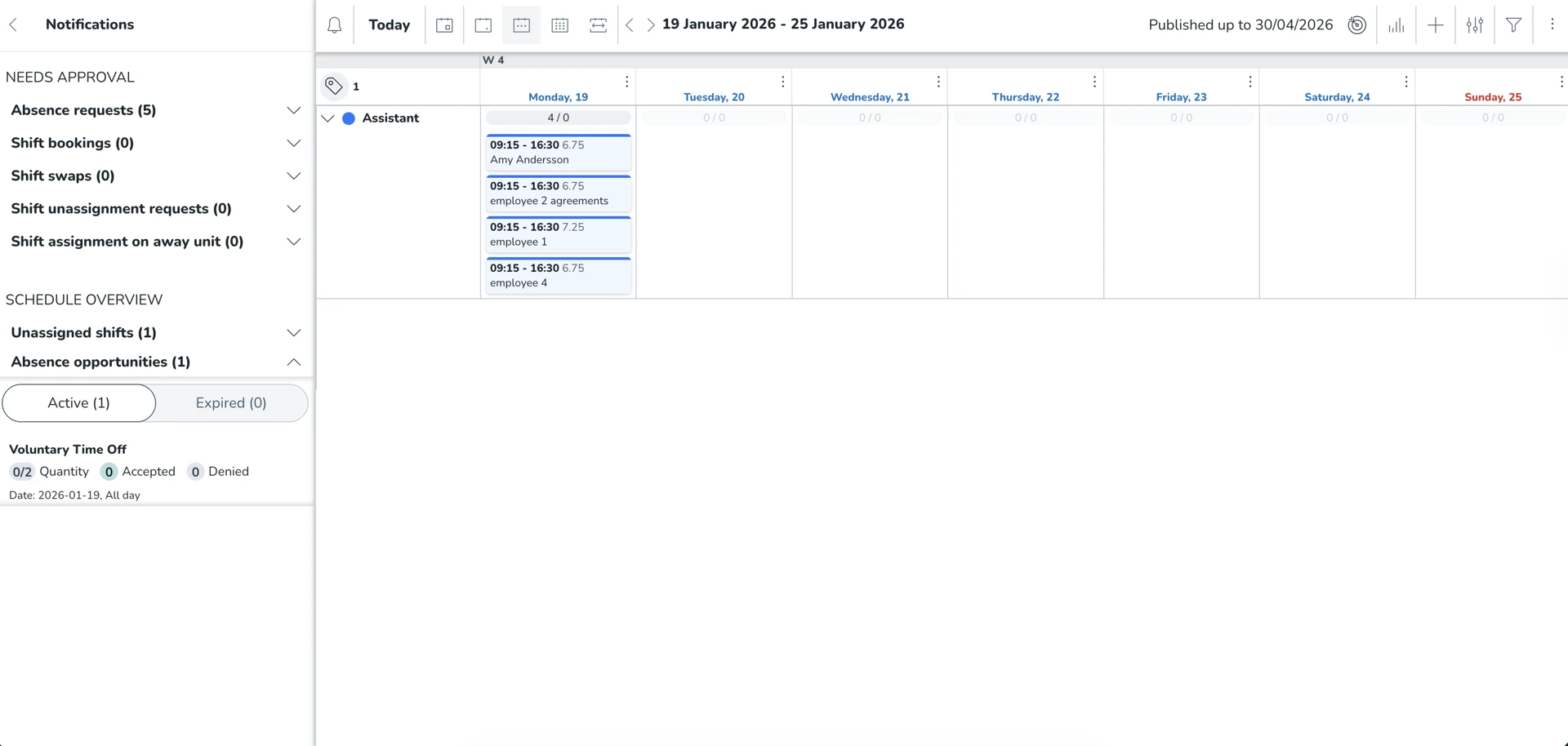
- When employees accept via the mobile app, an absence request is created. Review and approve or deny as needed.
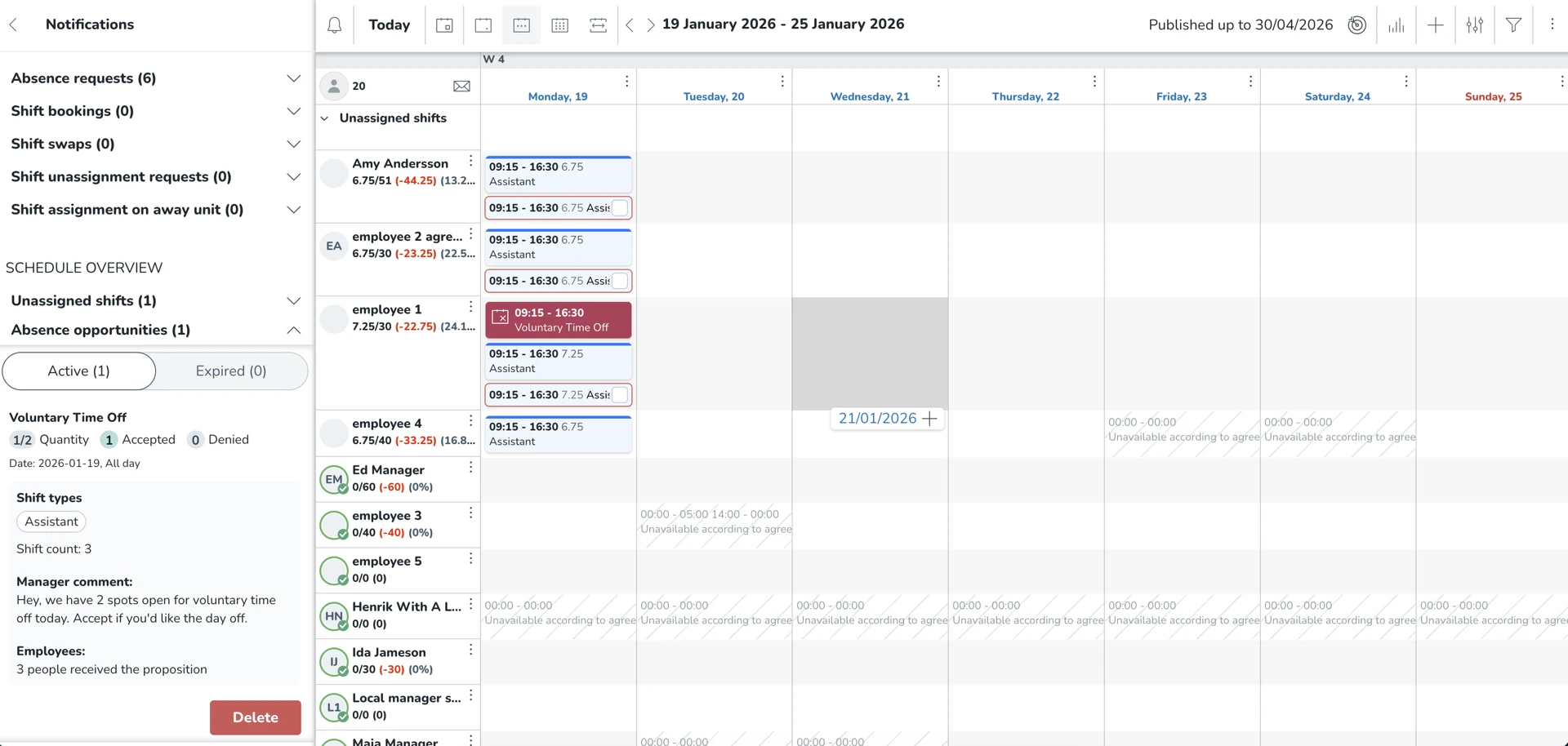
Good to know
- Opportunities can be for a full day or part of a shift, the absence request will always match employee’s assigned shift.
- Employees accept or decline via the mobile app.
- Managers retain full control over approvals, so if more employees accept than slots available, you decide who gets the time off
This is our initial release. As part of continuous discovery, we'd love to hear your feedback to help us improve it further.
Mobile - Accept/Decline Absence Opportunities
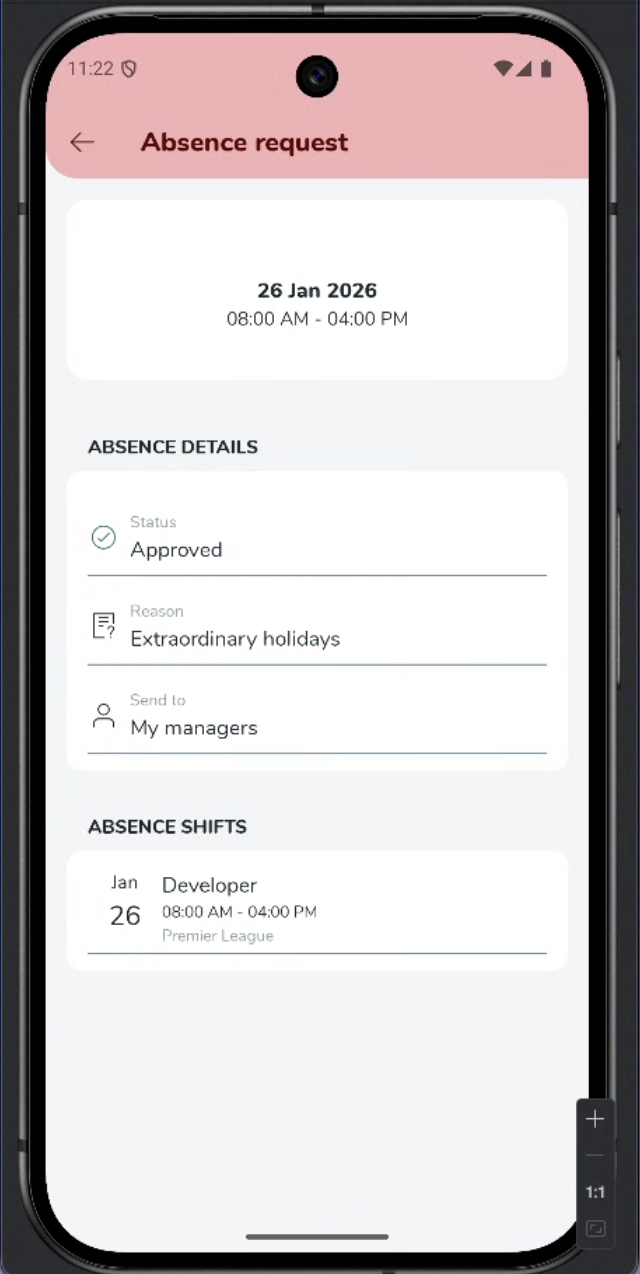
As an employee, you can either decline or submit a request to be considered for an absence opportunity via the mobile app.
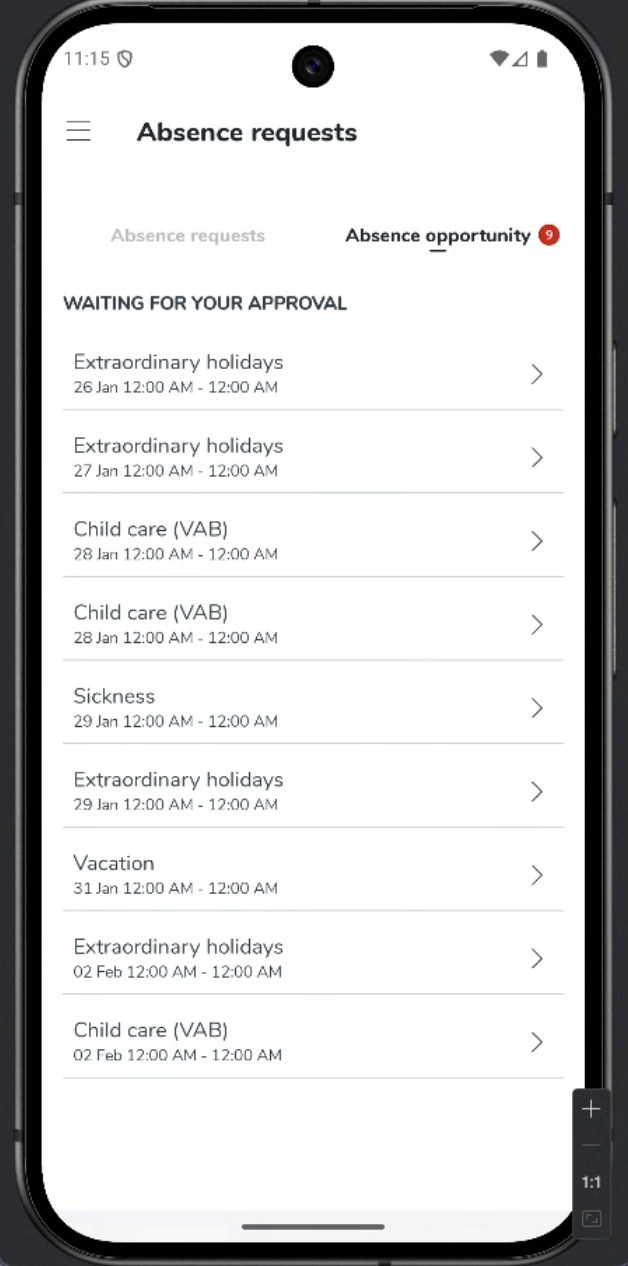
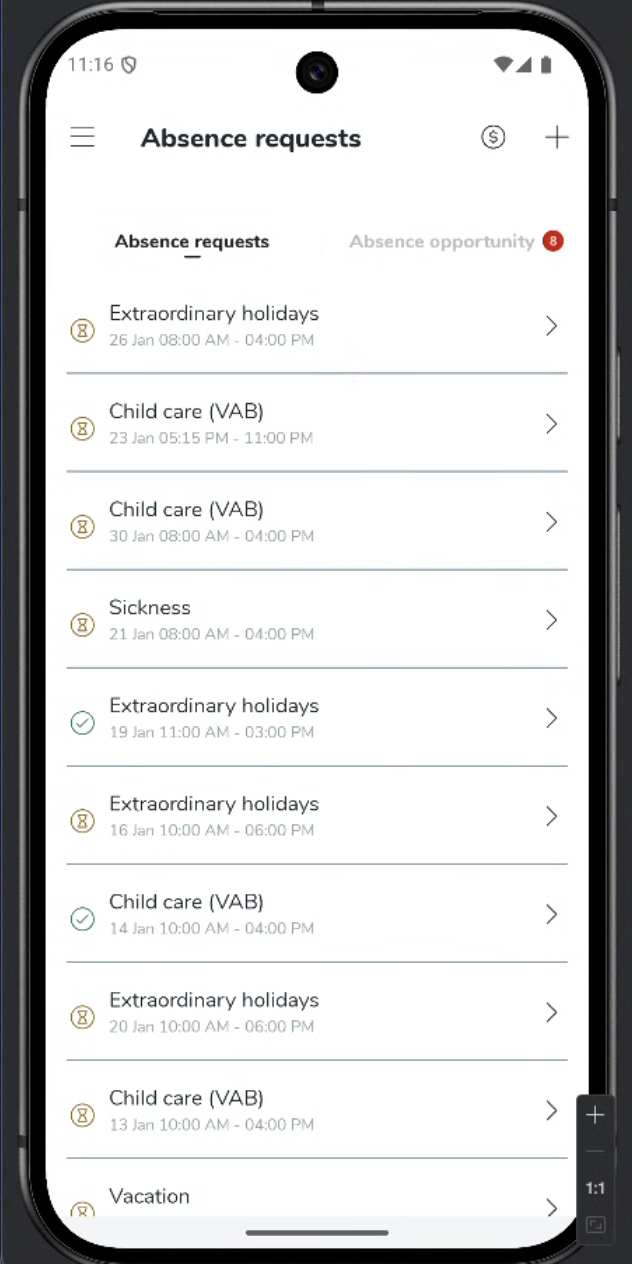
See new absence request notifications in the side menu.
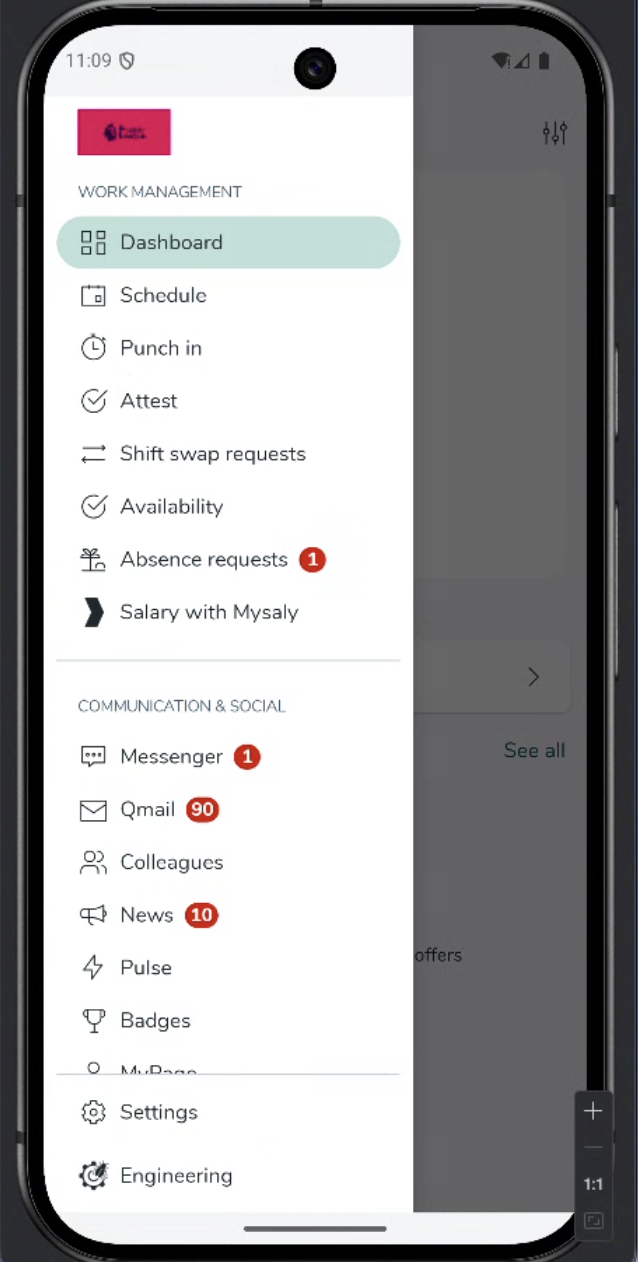
Select Absence requests to navigate to the tab, select new Absence opportunity tab.
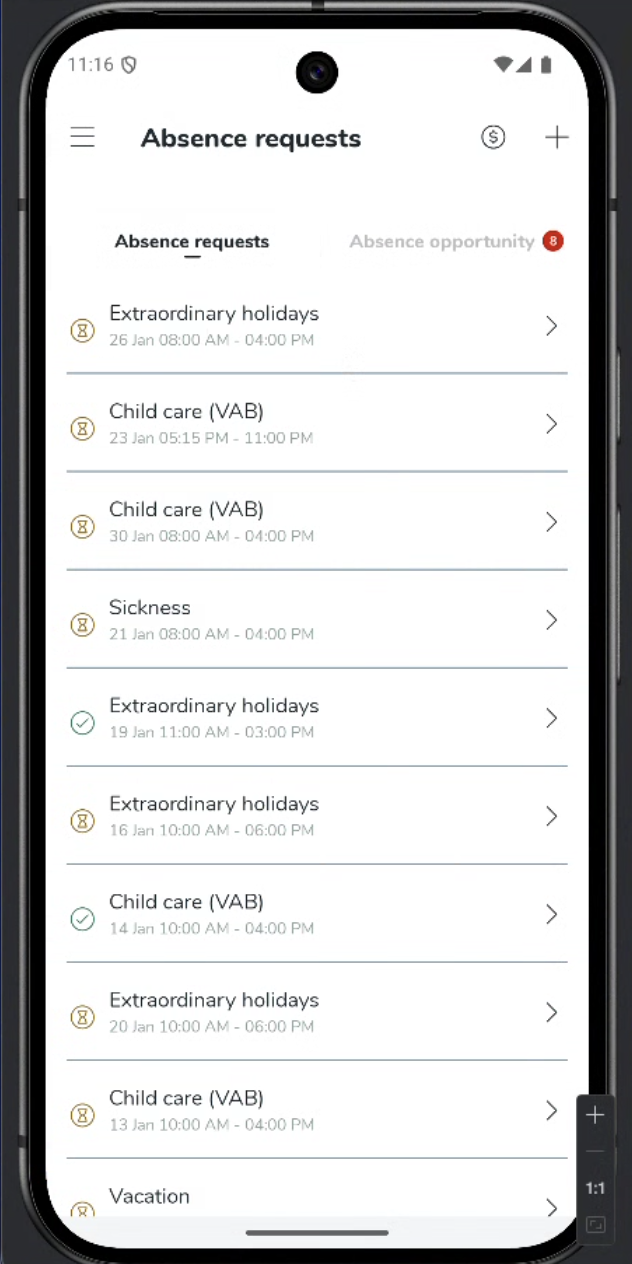
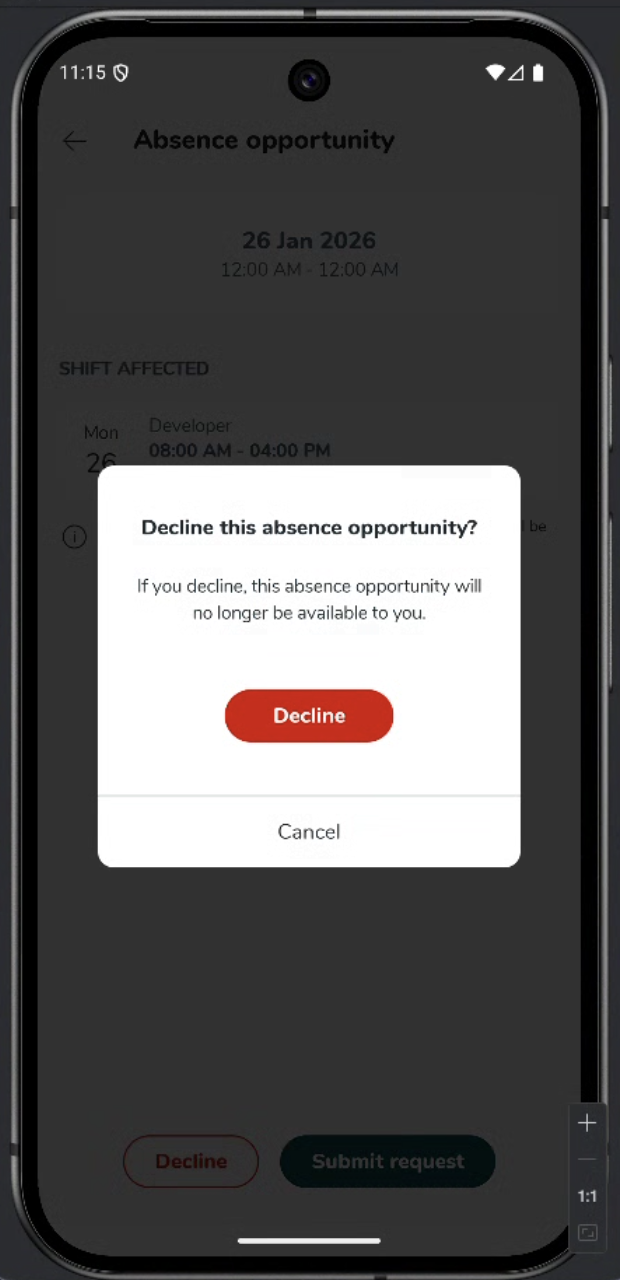
Select any absence opportunity to view its details. If you do not want to be considered for an absence opportunity, select decline and confirm your wish to decline.
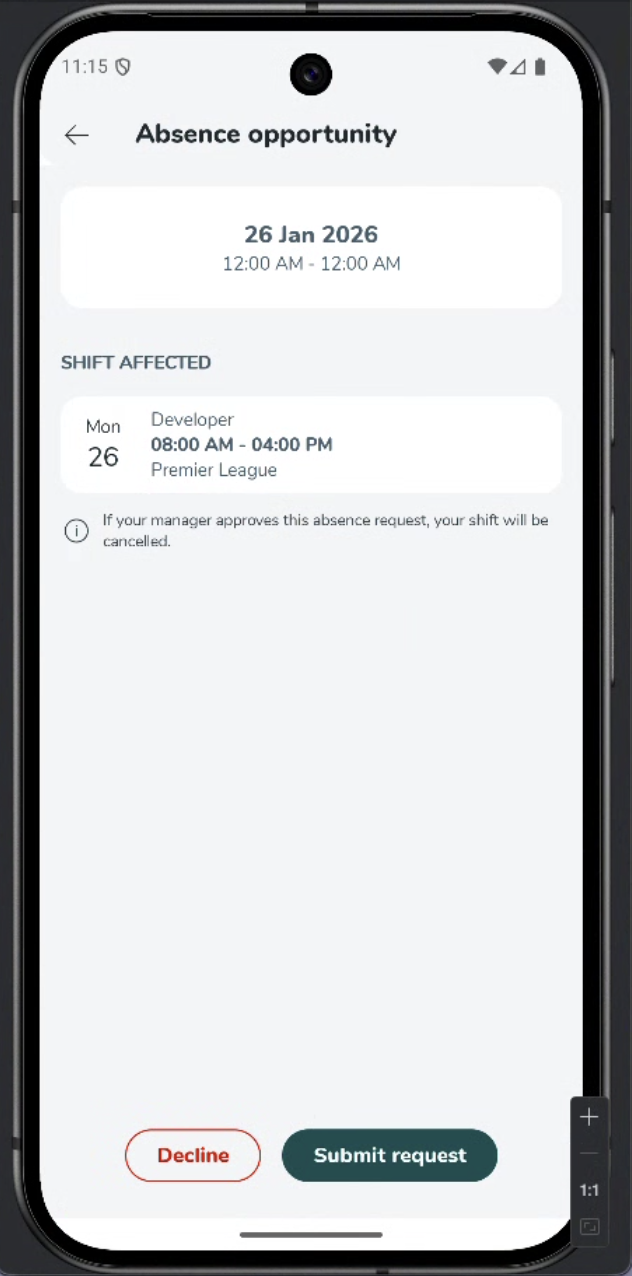
To submit a request to be considered for an absence opportunity, select submit request and then okay to confirm.
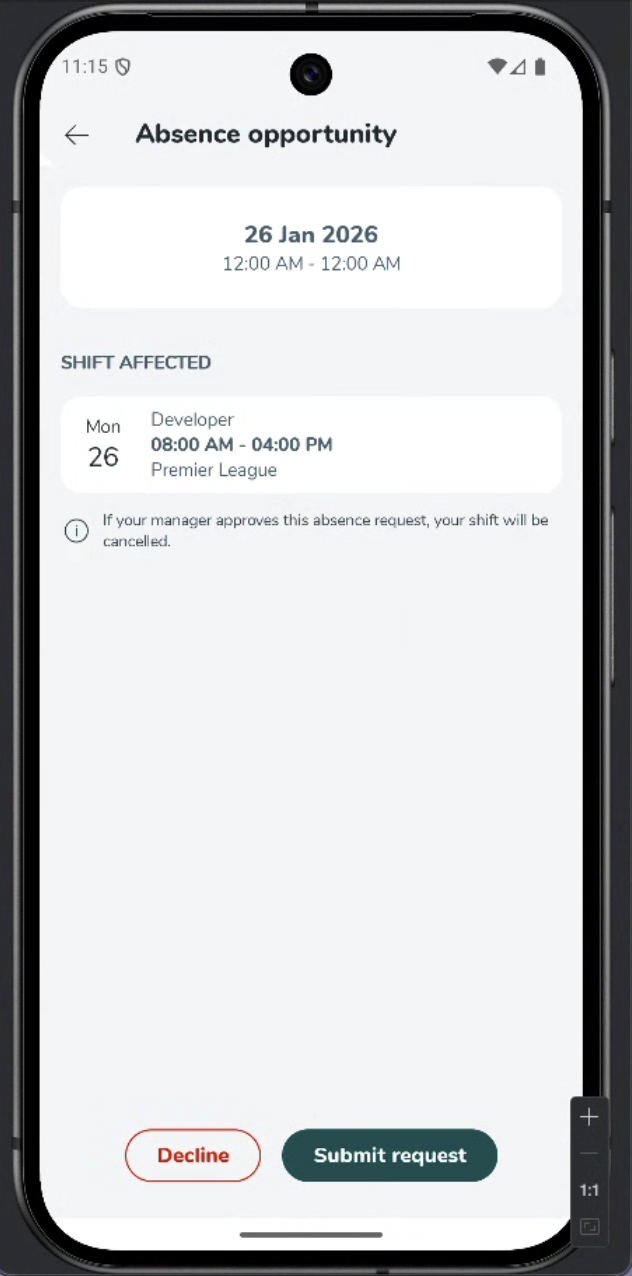
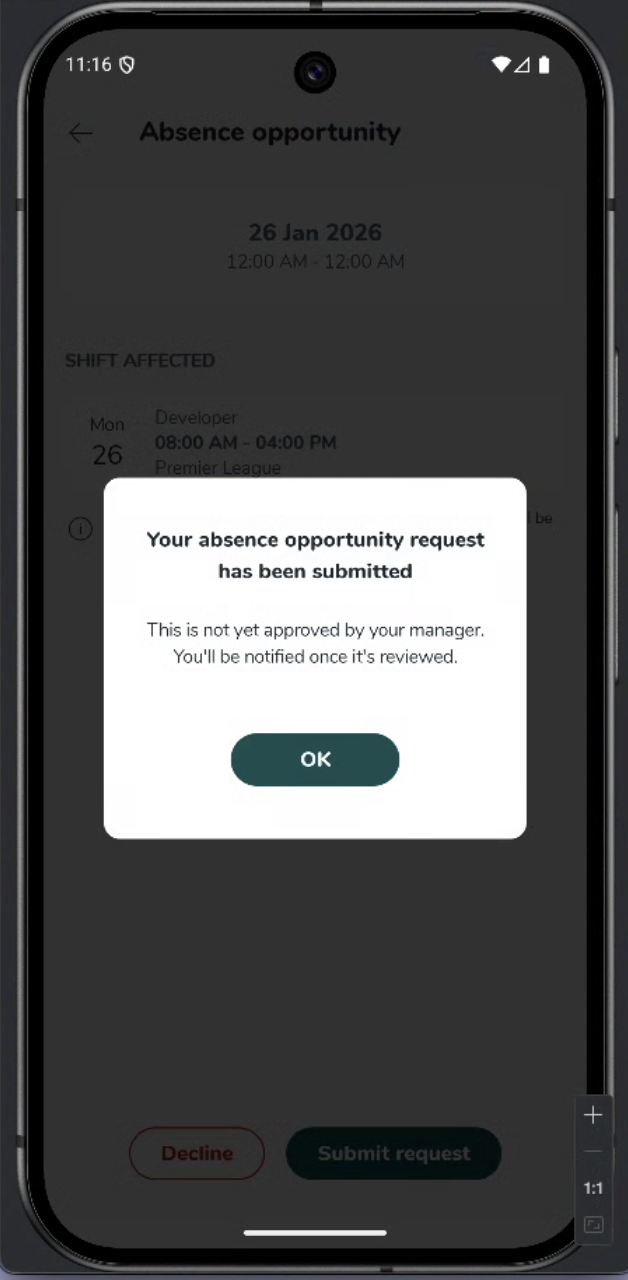
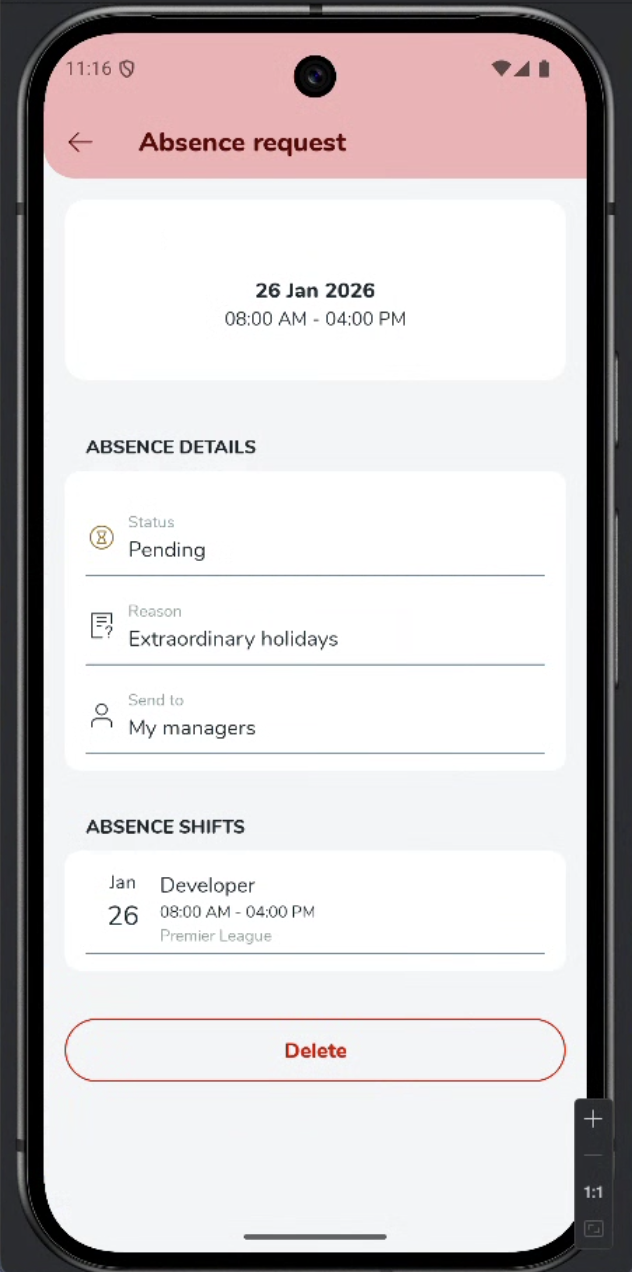
You will see your absence request in a pending state until your manager approves. Select the pending absence request to view its details.
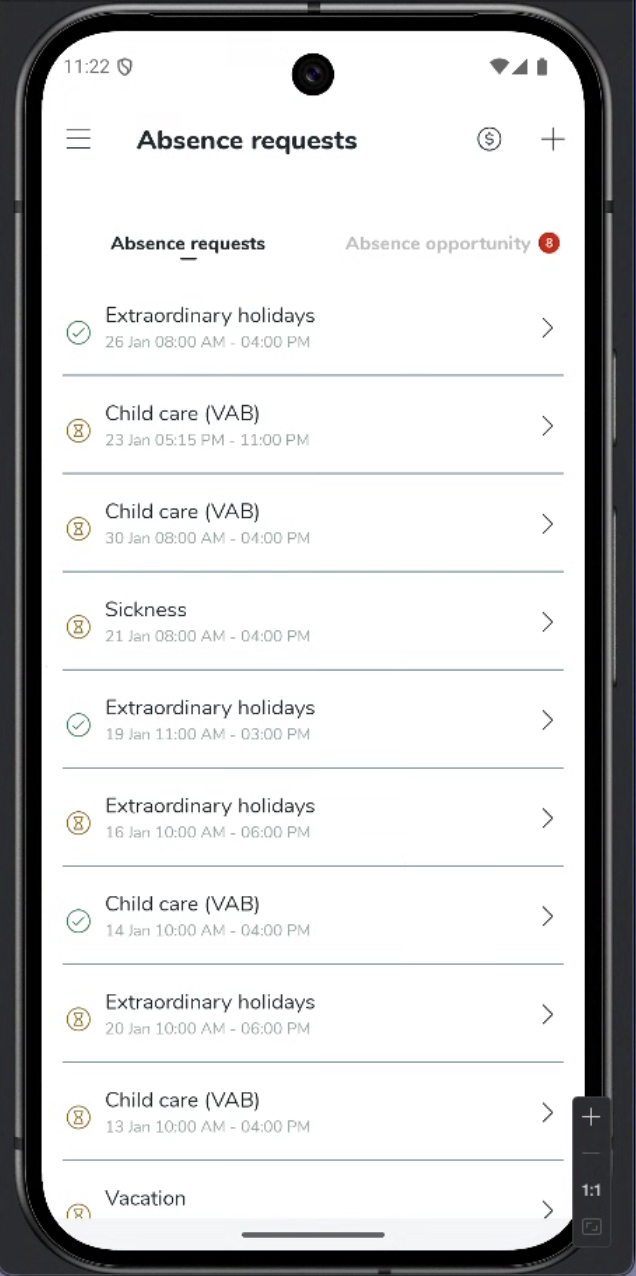
Once your manager has approved your absence request, the status will update to "Approved".
Compliance everywhere: Schedule Compliance for mobile actions!
Besides validation schedule actions on web-portal, we are from the release of version 0228 validating shift actions using configured rules in Schedule Compliance! This means that shift creation, shift swap, and other actions will use the configured rules.
The schedule compliance rules are as follows:
Rule is archived
Manager - Don't show warning
Employee - Don't show warning
Rule severity = Silent
Manager - Don't show warning
Employee - Don’t show warning
Rule severity = Warning
Manager - Show overridable warning
Employee - Show non-overridable warning
Rule severity = Non-overridable
Manager - Show non-overridable warning
Employee - Show non-overridable warning
New scheduling rules: Simplify compliance and protect your team
Navigating the complexities of labor laws and collective agreements can be challenging. To help you automate this process and ensure your workforce is scheduled fairly and legally, we have expanded the rule sets available in Schedule Compliance, Auto Assign, and Compliance Checker.
These new rules enable you to configure precise constraints—reducing the risk of non-compliance and ensuring your schedules align with both legal standards and employee contracts.
Overview of new rules
Below is a summary of the new configurations available.
Working time
- Max working days per period: Limits the number of days an employee can be scheduled within a specific rolling period (e.g., max 5 days in any 7-day window).
- Max working weekends per period: Caps the number of weekends an employee can be assigned shifts within a defined timeframe.
- Max shift length: Prevents shifts from exceeding the maximum duration defined in an employee’s agreement.
- Nominal hours should be reached: Ensures the total scheduled time meets the employee's contracted nominal hours.
- Available in Compliance Checker and Auto Assign only.
- Min hours per period: Guarantees that employees are not scheduled for fewer than their minimum required hours over a set rolling period of weeks.
- Available in Compliance Checker and Auto Assign only.
Rest
- Min consecutive days of rest: Mandates a minimum block of consecutive rest days that must be provided to the employee.
Availability
- Earliest shift start: Restricts shift assignments to ensure they do not start earlier than the specific time. provided.
- Latest shift end: Restricts shift assignments to ensure they do not end later than the specific time provided.
Item trail for absences and absence requests
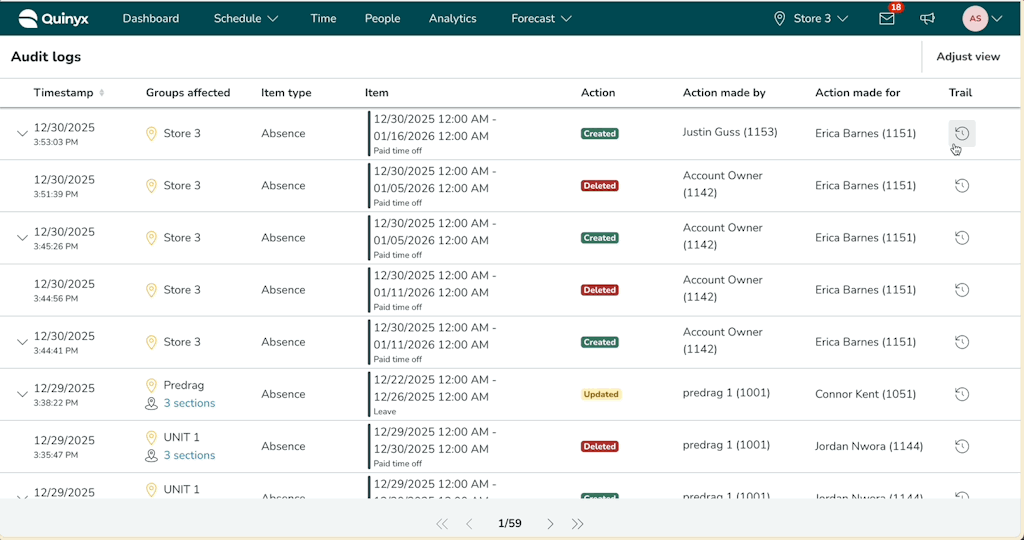
We're releasing the Item Trail for absences and absence requests in the Audit Logs.
The Item Trail provides a chronological overview of every change that has happened to an absence item, helping you understand the full context behind it - essential when investigating disputes or resolving issues related to workforce planning.
Where to find it
- Audit logs: When searching in the Audit logs, the right-most column of your results now contains a link to the item trail for each absence or absence request. Selecting it will display the full history of actions and updates.
- Schedule View for absences: You can also access it by opening any absence in the schedule. In the Edit absence panel, select Show absence history to view the complete item trail.
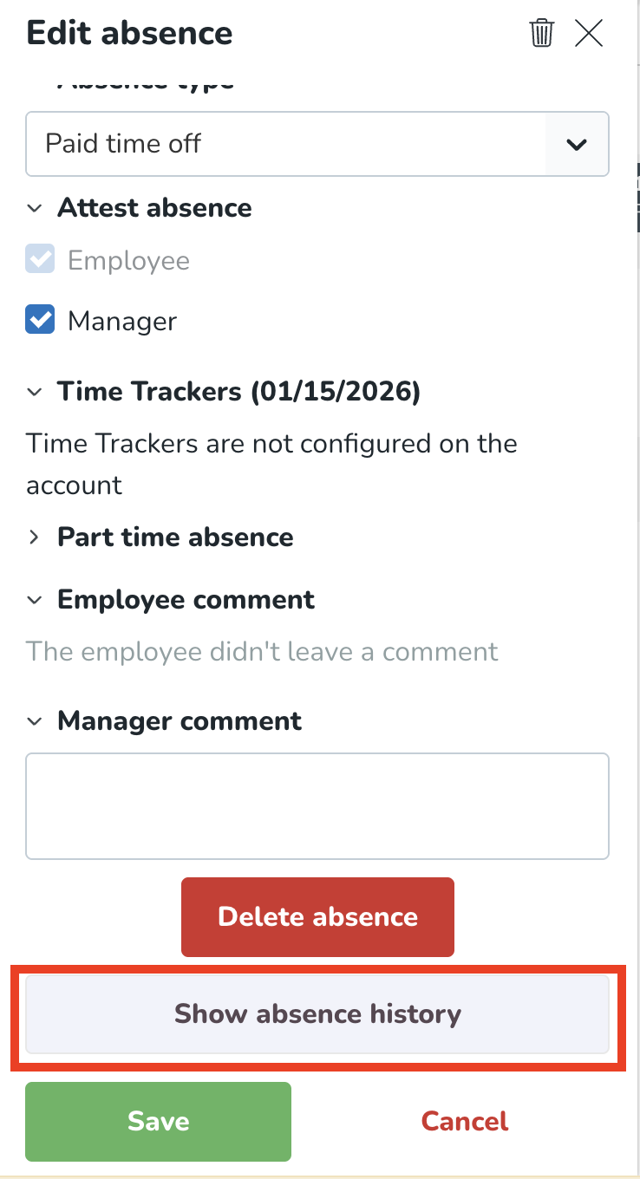
This enhancement gives you clearer visibility into how absences have evolved over time, making it easier to resolve any issues quickly and confidently.
Functional expansion
Enhancement: Shift type rules can now be configured on section level in Auto Schedule
What's new
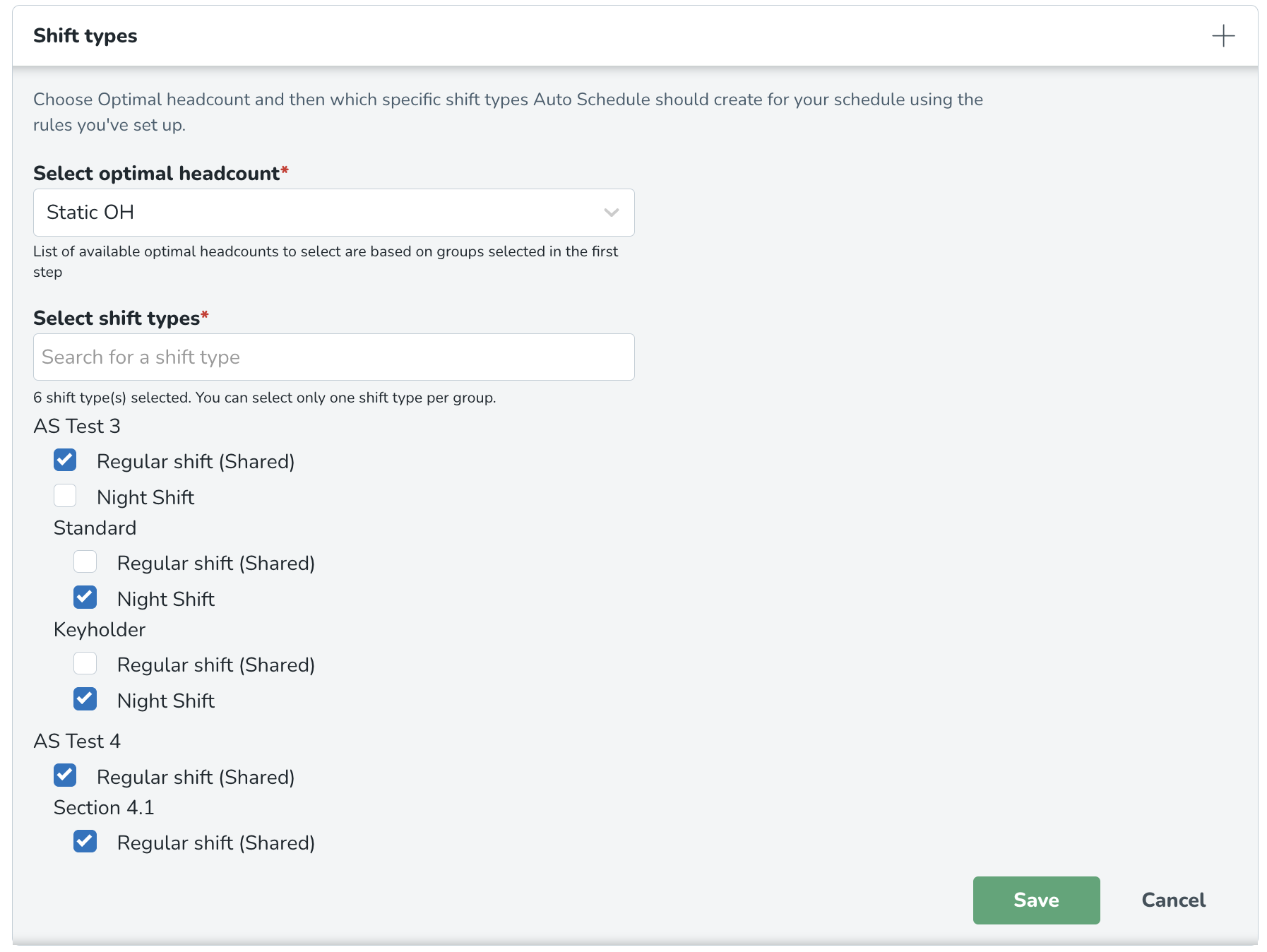
You can now configure shift type rules on the section level in the Auto Schedule configuration — not only on unit level. This means Auto Schedule can correctly generate shifts for staffing demand defined at section level.
Why this matters
Many customers define Optimal Headcount (OHV) requirements per section rather than per unit. Previously, Auto Schedule only validated shift rules at unit level, which could prevent shift creation even when valid demand existed.
With this update
- Section-level OHV demand is correctly matched to shift rules.
- Auto Schedule generates shifts as expected.
- Fewer gaps, less manual follow-up, and clearer outcomes.
What's changed in the UI
Section is now available as a selectable level when configuring valid shift rules in Auto Schedule.
- The selection logic and experience follow the same pattern used in OHV labour standards.
- You can mix unit and section rules as needed.
Impact
✅Shifts are created correctly for section-based staffing models.
✅Improved support for real-world organisational structures.
✅Reduced scheduling failures and support cases.
Updates and performance improvements
General performance improvements
Quinyx has reduced database complexity in order to improve the overall performance in some of the most called services like organisation. There is no change in functionality due to these changes.
Bug fixes
- Resolved an issue where the section of a shift in the base schedule would disappear if you assigned it to an employee.
- Resolved an issue in Base schedule that caused individual warnings to not be selectable when rolling out.
- Resolved an issue that caused an internal server error when rolling out a base schedule.
New HelpDocs content
Employee Hub web app Version 0228
Release date January 21, 2026
New functionality
None at this time.
New functionality requiring configuration updates
None at this time.
Updates and performance improvements
None at this time.
Bug fixes
- Resolved an issue that caused the deletion date on items "pending deletion" to reset when a user tries to delete the item again, instead of retaining the original date/timestamp of deletion for the 30 day countdown.
New HelpDocs content
SOAP API / Web service updates
Tag Categories API update: Deprecation postponement
We are providing an update regarding the deprecation timeline for the unpaginated Tag Categories API endpoint.
The change
The planned deprecation date for the old API endpoint, GET /categories/{categoryExternalId}/tags has been postponed.
Detail | Original | Updated |
Old Deprecation Date | December 10, 2025 (Release 0226) |
|
New Deprecation Date |
| February 4, 2026 (Release 0229) |
Why the Change?
This extension to the dual-run period is being implemented to provide our customers with additional time to successfully migrate their integrations to the new, performant, and paginated API (GET /v2/categories/{categoryExternalId}/tags).
We remain committed to supporting a smooth transition to the new endpoint, which resolves critical performance issues (such as 504 Gateway Timeouts and OutOfMemoryError) experienced by customers using the old endpoint with large datasets.
Action required (for users still on the old API)
Customers using the old API are strongly encouraged to complete their migration to the paginated API as soon as possible.
- Old Endpoint (No Pagination, to be deprecated):
GET /categories/{categoryExternalId}/tags - New Endpoint (With Pagination, required for future stability):
GET /v2/categories/{categoryExternalId}/tags
The deprecation warning will be updated in our official Swagger documentation to reflect the new February 4, 2026, date.
Please make sure to forward this information to the party within your company responsible for integrations.
