Configuring preconditions for Time Trackers
 Updated
by
Victor Jespersen
Updated
by
Victor Jespersen
- Setting it up
- How it works
- Frequently Asked Questions
- Q: Does the balance still accrue while the precondition is not met?
- Q: What period types are supported for the precondition duration?
- Q: Can multiple agreement templates be selected?
- Q: What if an employee switches agreement templates with no gap?
- Q: What happens if an employee switches to a second agreement template that has different Time Tracker associations?
- Q: Does this work for Periodized Time trackers as well?
- Q: Do the "Include all employee data" and "Apply only on main agreement" checkboxes affect the precondition?
- Q: Does this apply in the staff portal and mobile?
You can configure a Precondition on a Time Tracker to control when employees can use their accrued balance — for example, XL days (extra leave days).
Employees can use their accrued Time Tracker balance at any time, but with a precondition: usage is locked until the employee has been continuously employed on an eligible agreement template for a minimum period set by the administrator. Accrual is never affected — balance always builds up as normal. Only the ability to book against it is gated.
Setting it up
The precondition is configured per Time Tracker under Account settings > Agreements > Time Trackers.
- Open or create a Time Tracker.
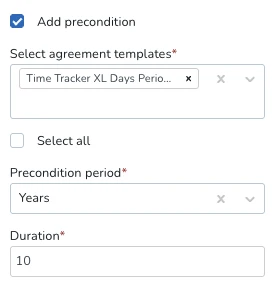
- Tick Add precondition — this reveals the precondition fields.
- Under Select agreement templates, choose which agreement templates count toward the employee's eligibility period.
- Choose a Precondition period: Days, Weeks, Months, or Years.
- Enter a Duration (for example: period = Weeks, duration = 1 means the employee must be on an eligible agreement template for at least 1 week before they can use their balance).
- Save the Time Tracker.
How it works
Eligibility counter
Quinyx looks at the employee's agreement history and finds the earliest start date of an uninterrupted chain of agreements on the selected agreement templates. It adds the precondition duration to that date to determine when the balance becomes available.
Example: An employee's agreement starts on 01 January 2026. The Time Tracker has a precondition of 1 week. The balance becomes available from 08 January 2026 onwards.
Rules for what counts
- Consecutive agreements with no gaps are treated as one continuous period. The counter runs from the start of the earliest agreement in the chain.
- Any gap between agreements — even a single day — breaks the chain and resets the counter. The count restarts from the beginning of the next eligible agreement.
- Overlapping agreements on eligible agreement templates are merged into a single continuous coverage window. The system measures the total combined span they cover together — so if overlapping eligible agreements collectively add up to the precondition duration, the precondition passes. Overlapping agreements on non-eligible agreement templates are ignored as always.
- Only the agreement templates selected in the precondition configuration count. If an employee has agreements on multiple agreement templates, but only some are selected in the Time Tracker precondition, only those eligible agreements contribute to the counter.
What employees see
While the precondition has not yet been met, the Time Tracker balance in the employee's timecard will be displayed with a date when the employee can start using the Time Tracker.
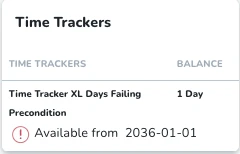
The accrued value is still visible, but employees cannot book absence against it.
Once the precondition is met, the balance appears normal with no restrictions, and employees can use it to book absences.
Frequently Asked Questions
Q: Does the balance still accrue while the precondition is not met?
A: Yes. Accrual continues normally at all times. Only usage is restricted.
Q: What period types are supported for the precondition duration?
A: Days, Weeks, Months, and Years.
Q: Can multiple agreement templates be selected?
A: Yes. Agreements on any of the selected templates will count toward the eligibility period, as long as they form a continuous chain with no gaps.
Q: What if an employee switches agreement templates with no gap?
A: If both templates are in the precondition list, the chain continues uninterrupted.
Q: What happens if an employee switches to a second agreement template that has different Time Tracker associations?
A: The precondition check still applies based on the second Agreement Template's eligibility. If the precondition passes for the second agreement template, the Time Tracker associations from that active agreement template will be used.
Q: Does this work for Periodized Time trackers as well?
A: Yes, the precondition also works with periodized Time Trackers. All period balances are subject to the same precondition. Every balance will show "Available from: DATE" until the single shared threshold is met, at which point all balances become available at once.
Q: Do the "Include all employee data" and "Apply only on main agreement" checkboxes affect the precondition?
A: No. These settings have no effect on the Time Tracker precondition logic.
Q: Does this apply in the staff portal and mobile?
A: Yes. The balance availability and hard stop apply across all channels.
