REST Tag API
 Updated
by
Victor Jespersen
Updated
by
Victor Jespersen
The REST Tags API allows you to manage tag categories and tags in Quinyx through REST endpoints. It follows the same REST design principles and authentication model as other Quinyx v2 Integration APIs.
This API can be used to:
- Create and retrieve tag categories
- Create, update, retrieve, and delete tags
API-docs for rc: https://api-rc.quinyx.com/v2/docs
API-docs: https://api.quinyx.com/v2/docs
Access rights
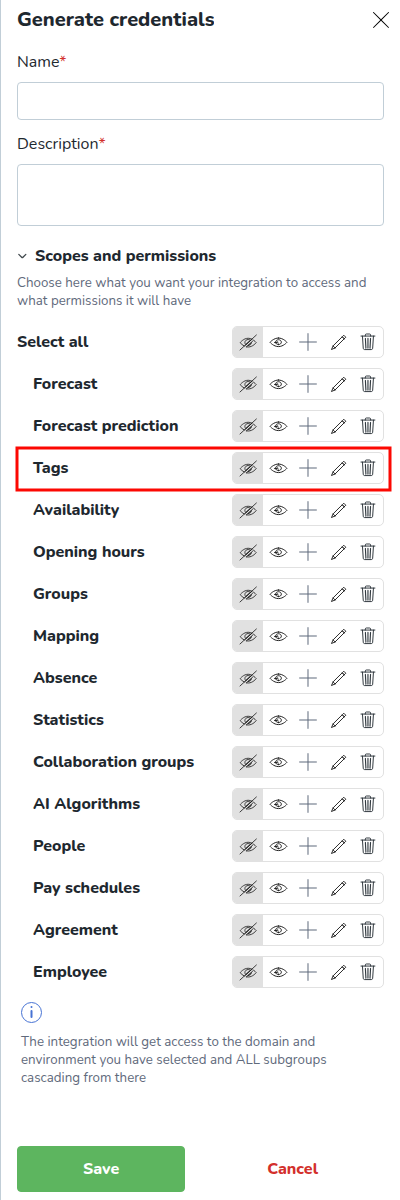
To be able to send requests to the REST Tags API, you need to add access rights for Tags on your integration credentials in account settings:
Tag Categories
Tag categories are used to group related tags.
Get all Tag Categories
Retrieves all tag categories.
Endpoint: GET /categories
Example response:
[
    { "name": "Store Locations",
      "tagType": "PROJECT",
      "color": "#FF5733",
      "externalId": "LOC-001"
    },
    { "name": "Services",
      "tagType": "ACCOUNT",
      "color": "#32CD32",
      "externalId": "SRV-002"
    }
]
Get Tag Category by External ID
Retrieves a single tag category referenced by the given external ID.
Endpoint: GET /categories/{categoryExternalId}
Query parameters:
categoryExternalId- Tag Category external ID.
Example response:
{
    "name": "Store Locations",
    "tagType": "PROJECT",
    "color": "#FF5733",
    "externalId": "LOC-001"
}
Tags
Tags belong to a specific category and unit.
Create Tag
Creates a new tag under the specified category.
Endpoint: POST /categories/{categoryExternalId}/tags
Path parameters:
categoryExternalId- Tag Category external ID.
Mandatory fields in the request body:
externalId- Tag external ID. There cannot be two tags with the same external ID within the same category.categoryExternalId- Tag Category external ID.unitExternalId- Unit external ID. For account-level tags, it should be an empty string.name- Tag name
Example request body:
{
    "externalId": "STORE-001",
    "categoryExternalId": "LOC-001",
    "unitExternalId": "UNIT-01",
    "name": "Downtown Store",
    "uniqueScheduling": false,
    "periods": [],
    "coordinates": [],
    "customFields": [],
    "information": "Main location",
    "startDate": "2025-01-01",
    "endDate": "2025-12-31"
}
Example response:
{
    "externalId": "STORE-001",
    "categoryExternalId": "LOC-001",
    "name": "Downtown Store",
    "uniqueScheduling": false,
    "periods": [],
    "coordinates": [],
    "customFields": [],
    "information": "Main location",
    "startDate": "2025-01-01",
    "endDate": "2025-12-31"
}
Update Tag
Updates an existing tag. Replaces the entire resource (tag) with the new content. The request body should contain the complete, new state of the resource (not just the fields being changed).
Endpoint: PUT /categories/{categoryExternalId}/tags/{tagExternalId}
Path parameters:
categoryExternalId- Tag Category external ID.tagExternalId- Tag external ID.
Mandatory fields in the request body:
externalId- Tag external ID. There cannot be two tags with the same external ID within the same category.categoryExternalId- Tag Category external ID.unitExternalId- Unit external ID. For account-level tags, it should be an empty string.name- Tag name.
Example request body:
{
    "externalId": "STORE-001",
    "categoryExternalId": "LOC-001",
    "unitExternalId": "UNIT-01",
    "name": "Downtown Store",
    "uniqueScheduling": false,
    "periods": [],
    "coordinates": [],
    "customFields": [],
    "information": "Main location",
    "startDate": "2025-01-01",
    "endDate": "2025-12-31"
}
Example response:
{
    "externalId": "STORE-001",
    "categoryExternalId": "LOC-001",
    "name": "Downtown Store",
    "uniqueScheduling": false,
    "periods": [],
    "coordinates": [],
    "customFields": [],
    "information": "Main location",
    "startDate": "2025-01-01",
    "endDate": "2025-12-31"
}
Delete Tag
Deletes the specified tag.
Endpoint: DELETE /categories/{categoryExternalId}/tags/{tagExternalId}
Path parameters:
categoryExternalId- Tag Category external ID.tagExternalId- Tag external ID.
Get Tag by External ID
Retrieves a specific tag.
Endpoint: GET /categories/{categoryExternalId}/tags/{tagExternalId}
Path parameters:
categoryExternalId- Tag Category external ID.tagExternalId- Tag external ID.
Example response:
{
    "externalId": "STORE-001",
    "categoryExternalId": "LOC-001",
    "unitExternalId": "UNIT-01",
    "name": "Downtown Store",
    "uniqueScheduling": false,
    "periods": [],
    "coordinates": [],
    "customFields": [],
    "information": "Main location",
    "startDate": "2025-01-01",
    "endDate": "2025-12-31"
}
Get All Tags for Tag Category
Retrieves all tags in a category, using cursor-based pagination. To retrieve the next page, include the returned nextCursor value in the next request. (see Cursor-based pagination)
Endpoint: GET /v2/categories/{categoryExternalId}/tags
Path parameters:
categoryExternalId- Tag Category external ID.
Example response:
{
    "content": [
      {
        "externalId": "STORE-001",
        "categoryExternalId": "LOC-001",
        "unitExternalId": "UNIT-01",
        "name": "Downtown Store",
        "uniqueScheduling": false,
        "periods": [],
        "coordinates": [],
        "customFields": [],
        "information": "Main location",
        "startDate": "2025-01-01",
        "endDate": "2025-12-31"
      }
    ],
    "page": {
      "contentSize": 1,
      "nextCursor": "eyJjdXJzb3IiOiIxMjM0In0="
    }
}
Cursor-based pagination
Cursor-based pagination uses a cursor to retrieve a chunk (page) of data. The cursor for the next call (the next chunk of data) is provided in the response of the current service call.The following is an example of how to use cursor-based pagination to retrieve all tags belonging to the category with externalId: ext-123:
- Make the first call to fetch tags. The first cursor-based pagination call doesn’t have the cursor query parameter. The absence of this query parameter in the call indicates that this is the first call and tells the service to return the first page of results. The size parameter indicates how many items each page of results will have. It can be omitted, and then the default value will be used.
GET /v2/categories/ext-123/tags?size=100
In the response, thecontentfield will contain a list of 100 tags, and thenextCursorfield will contain the cursor value for the next call. Let's say the service returnednextCursor: "NDY3NTM=" - Using the
nextCursorvalue, make the second call to fetch the next page of results.GET /v2/categories/ext-123/tags?size=100&cursor=NDY3NTM=
The response will contain a list of the next 100 tag records and the cursor value for the next call. - Repeat step 2 until all tags are retrieved, i.e., until the
nextCursorfield in the response is empty. - The last page of tags will not have a cursor in the response. The absence of a cursor value indicates that the current response is the last page of the results.