Version 0236
 Updated
by
Daniel Sjögren
Updated
by
Daniel Sjögren
- Release summary
- Important information
- Quinyx web app Version 0236
Release summary
Release date May 13th, 2026
Short on time and want a high-level summary? 🚀 Quinyx web app Version 0236 New functionality
New functionality requiring configuration updates
Updates and performance improvements
Bug fixes
Employee Hub Version 0236 New functionality
New functionality requiring configuration updates
Updates and performance improvements
Bug fixes
REST API / Web service updates
|
Important information
Upcoming webinar: Quinyx Unlocked
Join us for the May installment of Quinyx Unlocked, our monthly webinar series built exclusively for our customer community. In just 30 minutes, we’ll dive into how our latest updates simplify complex scheduling and improve your workforce planning accuracy.
- When: May 13th at 16:00 CEST (10:00 EDT)
- Duration: 30 minutes
- Topic
- Automation & Compliance Made Easy: Unlocking the Power of Historical Data.
👉 Register here!
Quinyx web app Version 0236
Release date May 13th, 2026
New functionality
Filter shifts by start and end time
Managing schedules across multiple shift patterns just got easier.
You can now filter shifts in the schedule view by their start and end time, so instead of scanning through an entire day's worth of shifts, you see only what is relevant to you right now. Whether you are coordinating a morning rush, reviewing afternoon coverage, or planning evening staffing, the view adapts to your focus.
- Toggle the filter on or off without losing your set time range - your values are saved to your profile and persist across sessions, even after logging out.
- Default values:
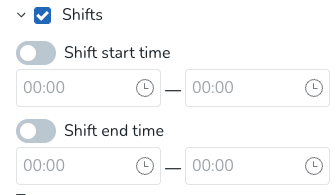
- Once values are set:
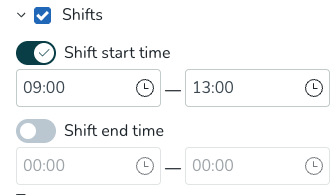
- The filter works independently for the shift start and end time, giving you precise control over the window you want to review.
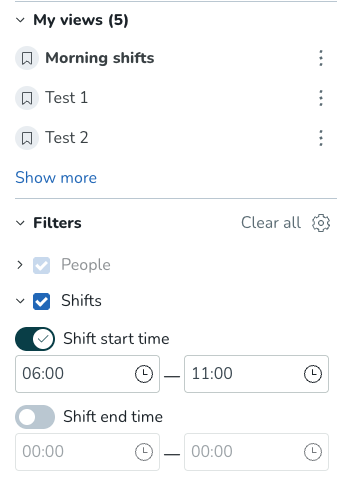
- This filter also pairs well with your saved or shared views to create reusable views like "Morning shifts" or "Evening shifts," tailored to how your team defines each part of the day, because every operation runs on its own rhythm.
Track shift coverage at a glance in Business view
Knowing how many shifts are filled versus open is one of the most fundamental questions in workforce planning, and now you can see the answer without leaving Business View.
The new Assigned/Unassigned Shifts metric gives managers an at-a-glance picture of coverage across every group in the view, making it faster to spot gaps, act on them, and keep operations running smoothly.
- Enable the metric from the Display Options panel using the Metrics toggle.
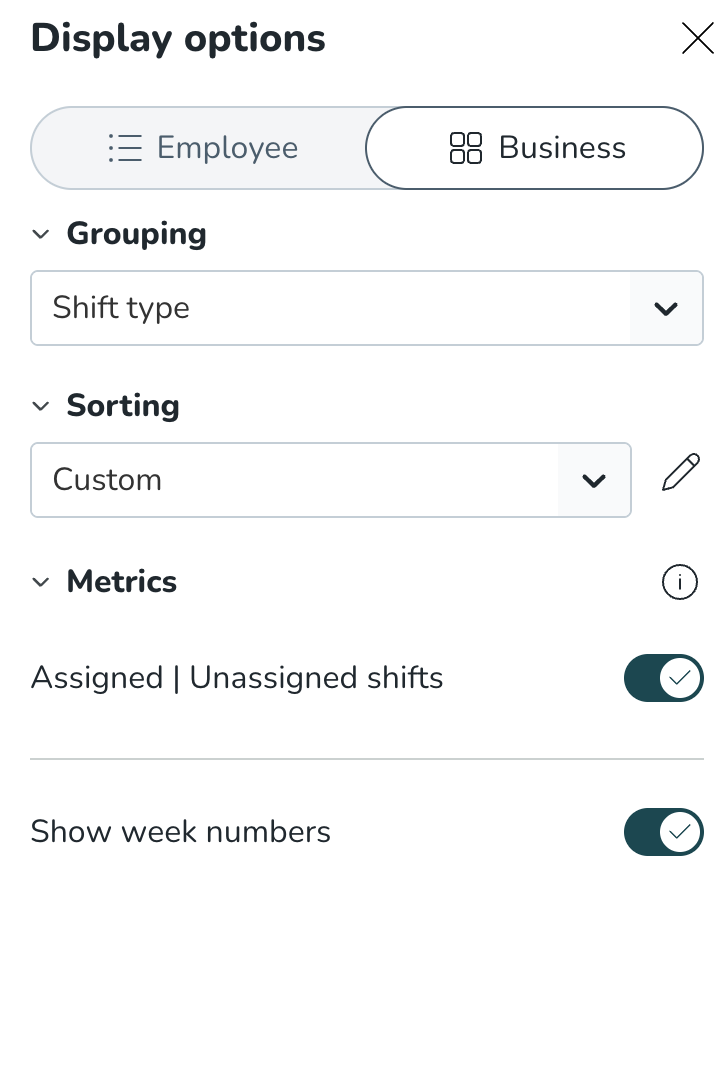
- Counts are shown per row (by section or shift type, depending on your grouping) across the selected time period - day, week, month or custom - so the data always matches how you are looking at your schedule.
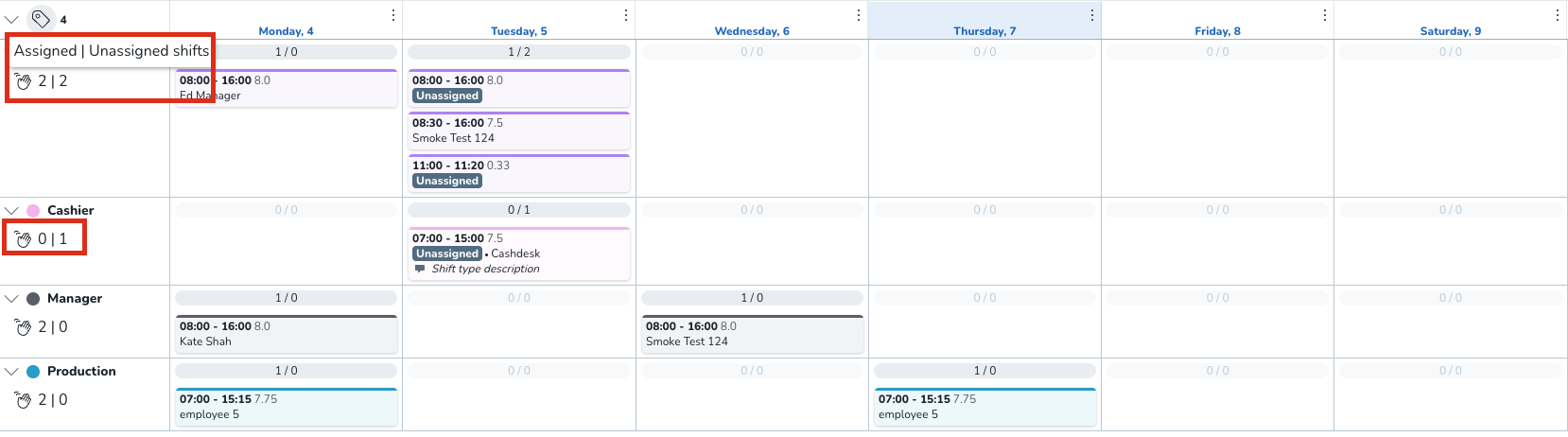
Next up: Scheduled Employees, Assigned/Unassigned Hours, and Worked/Scheduled Hours.
Pay schedules - Member assignment from the Pay schedules settings
As of this release, you're able to assign employees to a pay schedule directly from the pay schedules settings page — without having to navigate to individual employee agreements to do so.
Some examples of where this comes in handy
- Payroll rollout at scale — when setting up a new pay schedule, you can assign all relevant employees in one place rather than opening each profile individually. Particularly useful during initial setup or organisational restructuring.
- New-hire onboarding — once a new employee is added to the system, you can link them to the correct pay group straight from the pay schedule settings page, keeping the onboarding workflow in one area.
- Pay group corrections — when an employee moves to a different department or employment type, you can update their pay schedule assignment centrally without navigating to individual People profiles.
- Pre-payroll auditing — payroll admins can review and correct assignments to a given pay schedule from a single view, making pre-payroll checks faster and more reliable.
Previously, linking an employee to a pay schedule required opening their profile in People, selecting the relevant agreement, and picking the schedule from there. For admins managing large teams or setting up a new pay schedule for the first time, this meant repeating the same steps across many profiles.
You can now search for employees from within Account settings → Payroll settings → Pay schedules and assign them in a single flow. The system automatically validates agreement eligibility, so only agreements that are compatible with the selected pay schedule — matched by employee type and payroll file — are displayed. This removes the risk of misconfiguration and speeds up the assignment process considerably.
To assign a member, open the relevant pay schedule in the settings page, use the employee search to find the person you'd like to assign, select an eligible agreement, and confirm. The change applies immediately.
New functionality requiring configuration updates
None at this time
Updates and performance improvements
Select and manage shift types faster in Compliance rules
Configuring compliance rules that apply across many shift types just got significantly faster.
Previously, adding shift types to a compliance rule meant selecting them one by one — a time-consuming process for organisations running dozens or hundreds of shift types, and difficult to maintain as shift libraries grew.
The shift type field on compliance rule records is now a searchable multi-select dropdown. You can:
- Select all shift types with a single click
- Search for a specific shift type and select or deselect it directly from the results
- Deselect all visible search results in one step
- Deselect all shift types at once
- The dropdown stays open while you make selections, so you can build and review your list without losing your place
This update is especially valuable for organisations with large shift type libraries and for administrators setting up compliance rules from scratch. Initial setup is faster, ongoing maintenance is simpler, and the risk of accidentally missing a shift type is reduced.
Improved "Needs Attention" panel behavior
We’ve updated the "Needs attention" panel in the Dashboard so that multiple sections can now stay expanded at the same time. Previously, opening one section automatically collapsed any section that was already open.
This made it harder to review several alert categories in parallel, e.g. Absence Requests, Upcoming Birthdays, and Unassigned Shifts.
With this update:
- Expanding one section no longer closes the others
- Users can manually collapse sections when needed
- The default load state remains unchanged
Empty state for Employee Attendance widget
We’ve added a clearer empty state to the Employee Attendance widget when no employees match the selected filter. Previously, the widget could appear broken or show incomplete text when a filter returned no results. Now, users will see a clear message, such as “No employees found”, with guidance to select a different category.
View Employee Metrics by balance period in the schedule
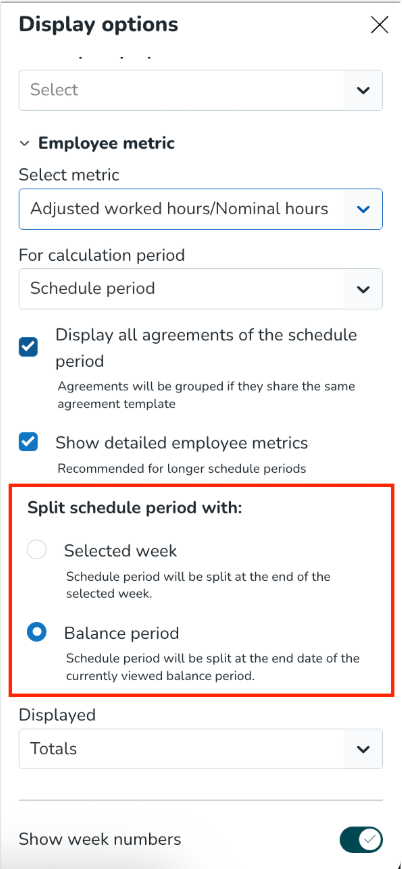
We have added a new grouping option for Employee Metrics in the Schedule view. Managers can now choose to view detailed employee metrics by Balance period instead of only week by week.
Previously, when enabling Show detailed employee metrics, the Schedule showed employee balance week by week. This weekly view is still available and remains the default. With this update, customers using agreements with balance periods, such as 3-week balance periods, can now follow the balance according to the agreement setup.
This is especially useful for collective agreements where managers need to review worked hours, nominal hours, and running balance per balance period rather than per calendar week.
How it works
When Balance period grouping is selected, the Employee Metrics section will:
- Group values by balance period from the employee agreement
- Sum worked hours and nominal hours per balance period
- Show the running balance at the end of each balance period
Example: BP1: 134.5 / 112.5 (+17.5) BP2: 101 / 112.5 (+6)
The value in brackets shows the running balance at the end of that balance period.
The existing weekly grouping is unchanged and remains available.
How to use it
To view employee metrics by balance period:
- Go to the Schedule page.
- Open Display options.
- Enable Show detailed employee metrics.
- Change the grouping from Week to Balance period.
- Once selected, the Schedule will show detailed employee metrics grouped by balance period, where this is supported by the agreement setup.
Limitations
Balance period grouping is shown only when the agreement setup supports it. For example, values may not be shown when:
- Balance periods do not align with the Schedule period
- Balance periods do not follow a week-based cadence
- A balance period ends mid-week
- An employee has several agreements where the balance period start date or length does not match
The general logic is that the split happens at the end of the current balance period or at the end of the schedule period, whichever comes first. The Adjusted worked hours / Nominal hours metric is currently not available in District Schedule.
Bug fixes
- Resolved an issue with a notification service that could cause slowness to build up in the US region.
- Resolved an issue with an endpoint, causing error message 404 to be returned when running the call from a browser session.
- Resolved an issue with some users being unable to log into the web app after clicking the verify email link sent via mail.
- Resolved an issue in Optimisation settings where some variables could still appear as ungrouped, even though they belonged to a display group.
New HelpDocs content
- None at this time
Employee Hub web app Version 0236
Release date May 13th, 2026
New functionality
None at this time.
New functionality requiring configuration updates
None at this time.
Updates and performance improvements
In this release, we have focused on some smaller quality-of-life improvements:
- We've made it possible to change the names of saved audiences.
- We've addressed an issue where the back button in the audience picker returned users to the first step “Choose selection method” instead of the previous one.
- We have removed the field
"earliest actions from"inside Forms cards, because at times it could be confusing and had a negative impact on performance.
Bug fixes
- Resolved an issue causing error messages to be received when trying to bulk-move multiple files to a new folder.
- Resolved an issue in the All-in-one solution where tasks were incorrectly shown as completed.
- Resolved an issue with scheduled stories not being published.
New HelpDocs content
None at this time.
REST API / Web service updates
None at this time.
Please make sure to forward this information to the party within your company responsible for integrations.
