Version 0237
 Updated
by
Victor Jespersen
Updated
by
Victor Jespersen
Release summary
Release date May 27th, 2026
Short on time and want a high-level summary? 🚀 Quinyx web app Version 0237 New functionality
New functionality requiring configuration updates
Updates and performance improvements
Bug fixes
Mobile app New functionality
New functionality requiring configuration updates
Updates and performance improvements
Employee Hub Version 0237 New functionality
New functionality requiring configuration updates
Updates and performance improvements
Bug fixes
REST API / Web service updates
|
Important information
Introducing the Quinyx Developer Portal
We've launched a dedicated developer portal at developer.quinyx.com, centralizing all integration resources in one place.
The portal includes API reference documentation, step-by-step guides, and quick-start resources for both SOAP and REST APIs. Documentation is versioned across v1, v2, and v3, so you can reference the docs that match your current implementation.
Upcoming change (Version 0238): Clearer total aggregation for calculated variables
We are introducing an explicit aggregation setting for calculated variables used in Statistics and Forecasts.
This change makes it clearer how totals for calculated variables are calculated. Previously, the total value was calculated separately from the individual time bucket value. As a result, the total could in some cases differ from simply summing or averaging the calculated values shown in the buckets.
With the new aggregation setting, you will be able to define whether the calculated variable total should be based on Sum or Average.
Existing calculated variables will use Sum as default aggregation. You do not need to make any changes if Sum is the expected behavior.
We recommend that you review your calculated variables* and update the aggregation setting where the expected total should be an Average rather than a Sum.
We recommend checking calculated variables that:
- Combine multiple statistics, forecasts, configured values, or custom inputs.
- Are used in totals or period-level reporting.
- Are important for follow-up, planning, or operational decisions.
This update helps make calculated variable totals more predictable and easier to validate against your intended business logic.
Swedish hospitality customers: Master Schedule Compliance!
In the hotel and restaurant industry, schedules are rarely static. But did you know that minor shift deviations could be costing you more than you think? We are hosting an exclusive webinar tailored specifically for our Swedish hospitality users. On May 27 at 16:00 CEST, David Andersen (Product Manager – Schedule Compliance) will demonstrate how to configure Quinyx to automatically detect and flag scheduling breaches.
Suitable for you if you are: An operations manager, scheduler, HR manager, or system administrator at a hotel or restaurant chain that already uses Quinyx or is thinking about starting.
The 30-minute session will be conducted in Swedish.
👉 Register here!
June Quinyx Unlocked webinar
Join us for the June installment of Quinyx Unlocked, our monthly webinar series built exclusively for our customer community. In just 30 minutes, we’ll dive into how our latest updates simplify complex scheduling and improve your workforce planning accuracy.
- When: June 10th at 16:00 CEST (10:00 EDT)
- Duration: 30 minutes
👉 Register here!
Quinyx web app Version 0237
Release date May 27th, 2026
New functionality
None at this time.
New functionality requiring configuration updates
None at this time.
Updates and performance improvements
None at this time.
Bug fixes
- Resolved an issue where the absence schedule ID got lost if a base schedule was rolled out twice under an absence.
New HelpDocs content
- None at this time
Mobile apps
New functionality
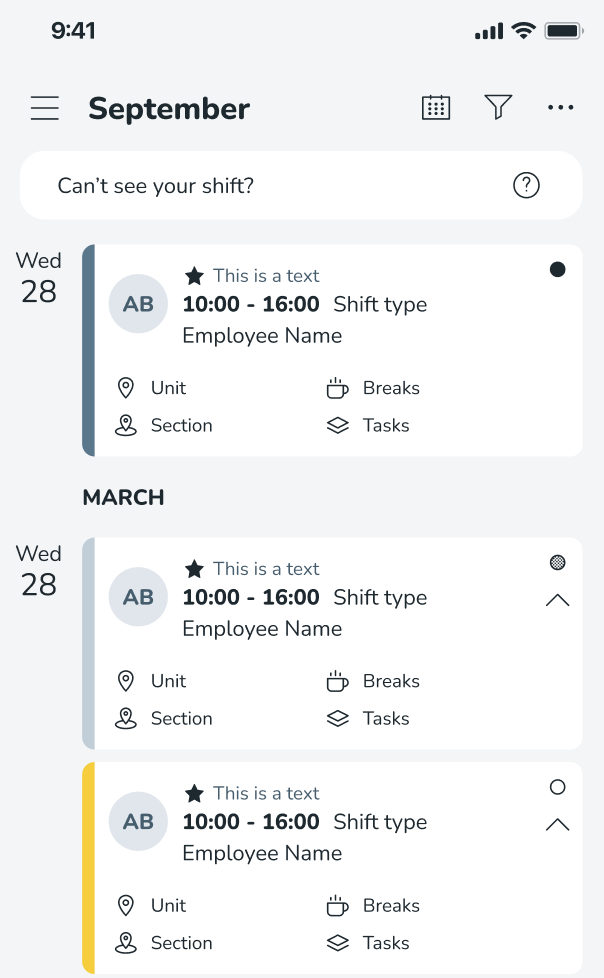
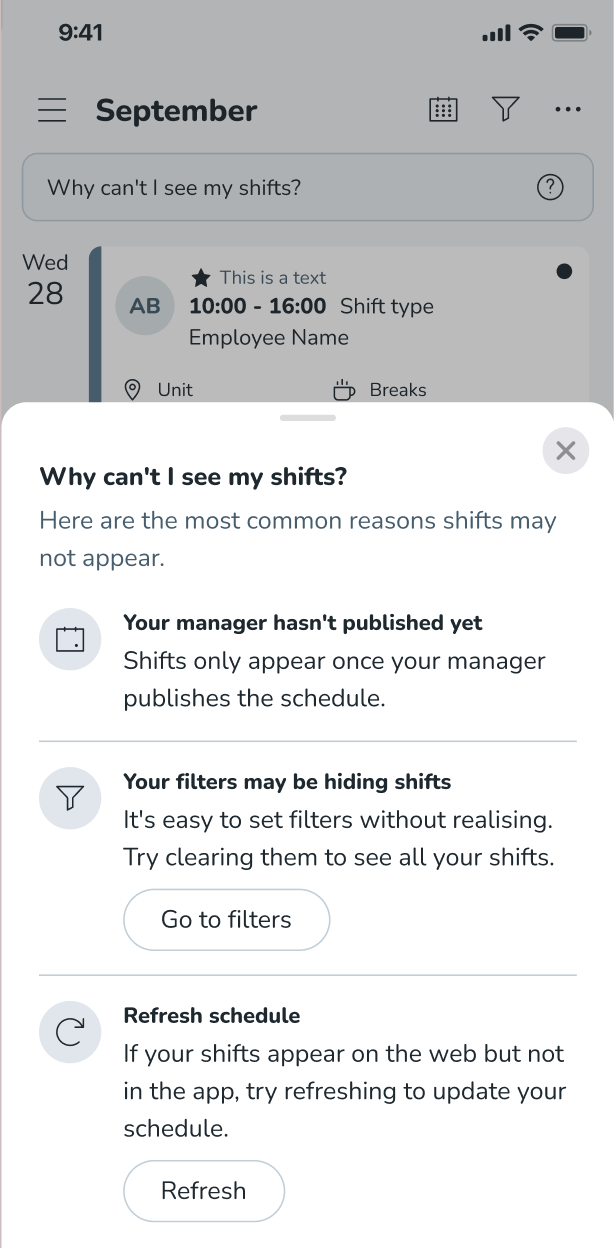
New "Can’t see your shift?" info button
We often receive reports that users are struggling to find their shifts and do not understand why. There are various reasons why your shifts are not showing:
- Your manager may not have published your schedule
- You may have filters applied that need clearing
- You may need to refresh your schedule
If you believe you are missing shifts, we have now introduced a new "Can’t see your shift?" info button that explains why this might be the case.
Terminate session with Identity Provider (IdP)
Prior to this release, when users logged out of the Quinyx Mobile App on a shared device, the Identity Provider (IdP) session was not always terminated correctly. This meant the next user who logged in via SSO could be automatically authenticated as the previous user, gaining unauthorised access to their profile. Given that the web portal already supports IdP session termination, we have now extended this capability to the iOS and Android mobile apps.
This will ensure your session is always terminated fully when logging out of a shared device.
Please find more information regarding SAML single sign-on here.
New functionality requiring configuration updates
None at this time.
Updates and performance improvements
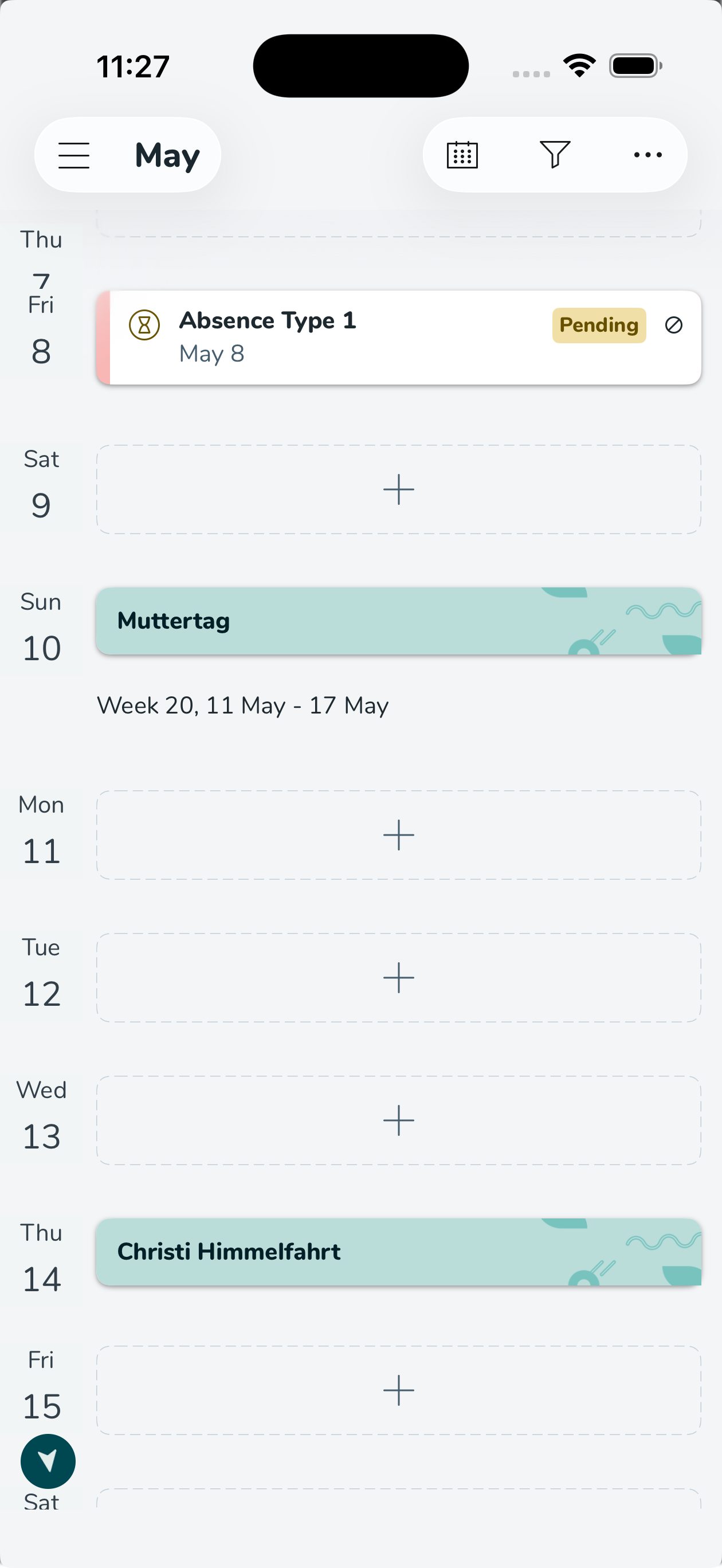
Improved bank holiday card UI
Before this release, bank holiday cards were indistinguishable from regular shift cards. Given how significant bank holidays are in retail, we have now made them visually distinct, making them easier to spot in your schedule!
Improved absence request UI
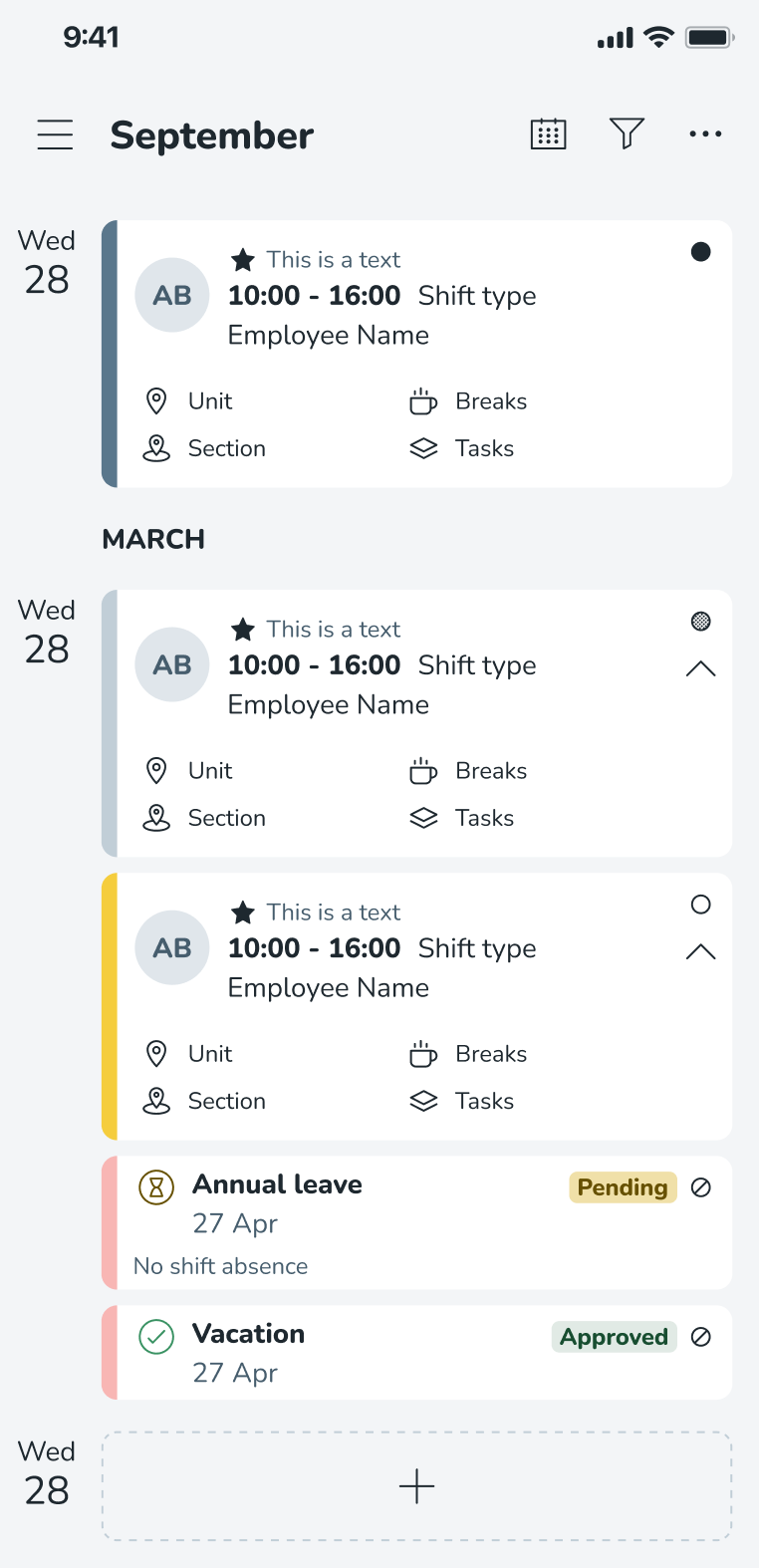
Before this release, we had received reports that it was difficult to tell the difference between absence requests that were awaiting approval and those that had been approved. The text shown was small and shown in red, so at first glance, all appeared to have been denied.
We have made the following improvements to try to make the status of your absence requests clear:
- Removal of your employee avatar to free up space - you can only ever see your own absence requests
- New status icons and corresponding badges, i.e., pending, approved, etc.
Time tracker improvements
Previously, the UI for time tracker balance showed as separate line items for each year, making it difficult for you to get a quick, clear overview of your total vacation balance in the mobile apps.
We have improved clarity by grouping your balances as follows:
- Aggregated balances instead of listing each year separately, with an option to drill down into specific year-based details when needed
- Grouped per balance type, e.g., Statutory vs non-statutory
This means you can now more easily plan and apply for holidays based on your availability.
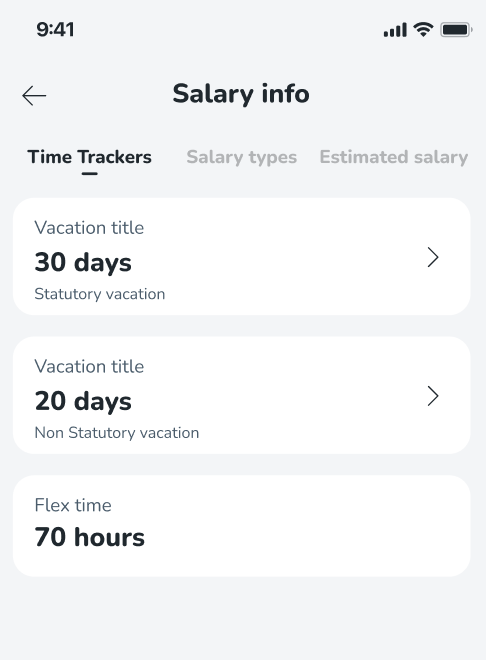
Time tracker list view - lists all time trackers
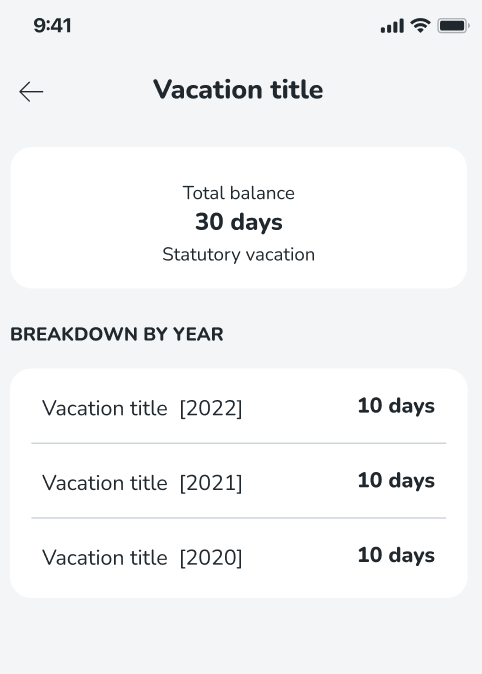
Time tracker detail view - shows total balance and yearly breakdown for a specific time tracker
Employee Hub web app Version 0237
Release date May 27th, 2026
New functionality
None at this time.
New functionality requiring configuration updates
None at this time.
Updates and performance improvements
None at this time.
Bug fixes
- Resolved an issue where users with active tasks couldn't access and complete said task due to an incorrect message, "Sorry, this has been removed, or you no longer have access to it" appearing.
- Resolved an issue where task and story notifications weren't received by distributor role users.
New HelpDocs content
None at this time.
REST API / Web service updates
None at this time.
Please make sure to forward this information to the party within your company responsible for integrations.
