Version 0238
 Updated
by
Victor Jespersen
Updated
by
Victor Jespersen
- Release summary
- Important information
- Introducing the Quinyx Developer Portal
- Upcoming webinars
- Quinyx web app Version 0238
Release summary
Release date June 10th, 2026
Short on time and want a high-level summary? 🚀 Quinyx web app Version 0238 New functionality
New functionality requiring configuration updates
Updates and performance improvements
Bug fixes
Employee Hub Version 0238 New functionality
New functionality requiring configuration updates
Updates and performance improvements
Bug fixes
REST API / Web service updates
|
Important information
Update on calculated variable aggregation (announced in Version 0237)
The aggregation setting for calculated variables previously announced for this release will not be included in version 0238. During final preparation, we identified edge cases that require further refinement to ensure the change behaves consistently across all configurations.
We are continuing to work on this and will communicate a new release timeline when available. No action is needed on your part — your existing calculated variables are unaffected.
Introducing the Quinyx Developer Portal
We've launched a dedicated developer portal at developer.quinyx.com, centralizing all integration resources in one place.
The portal includes API reference documentation, step-by-step guides, and quick-start resources for both SOAP and REST APIs. Documentation is versioned across v1, v2, and v3, so you can reference the docs that match your current implementation.
Upcoming webinars
June Quinyx Unlocked webinar
Join us for the June installment of Quinyx Unlocked, our monthly webinar series built exclusively for our customer community. In just 30 minutes, we’ll dive into how our latest updates simplify complex scheduling and improve your workforce planning accuracy.
- When: June 23rd at 16:00 CEST (10:00 EDT)
- Duration: 30 minutes
👉 Register here!
Quinyx web app Version 0238
Release date June 10th 2026
New functionality
Bulk import Time Tracker transactions
Managing Time Tracker transactions is now faster and easier with our new bulk import feature.
To use this feature, navigate to Account settings and select Time Trackers under the Import tools section.
You can upload up to 5,000 transactions at once using an Excel file, making it straightforward to create large volumes of Time Tracker records without entering each one manually.
To help you get started, Quinyx provides a downloadable import template with pre-filled drop-down options based on your account setup. This makes it easier to enter the right information and reduces the risk of mistakes.
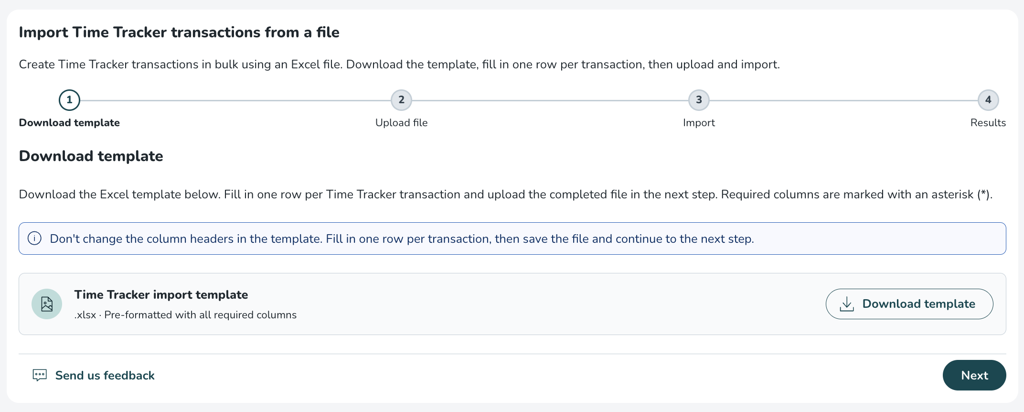
Before the actual import, Quinyx automatically validates the entire file and shows you how many rows are ready for import. Once validated, you can review the summary and start the import.
Each transaction supports the following operations: Set to, Add, and Subtract, giving you full flexibility to adjust balances in either direction. Both Statutory and Non-statutory transaction types are supported.
If any rows can’t be imported, you can download an error report in Excel format to quickly review what needs to be corrected.
Business View - New metrics
Get a better overview of your schedule at a glance
Managing a schedule means constantly asking the same questions: Are we adequately staffed? How many hours are planned vs. actually worked? Are there gaps that need filling? Until now, getting those answers required filtering, scrolling, and mentally adding up numbers across your Business view.
We started this journey with the release of the Assigned | Unassigned shifts metric, and with this release we're wrapping up the Business view metrics chapter by adding three more. Together, they give you a complete at-a-glance summary for each shift type or section - without any extra navigation. You stay in context, and the numbers come to you.
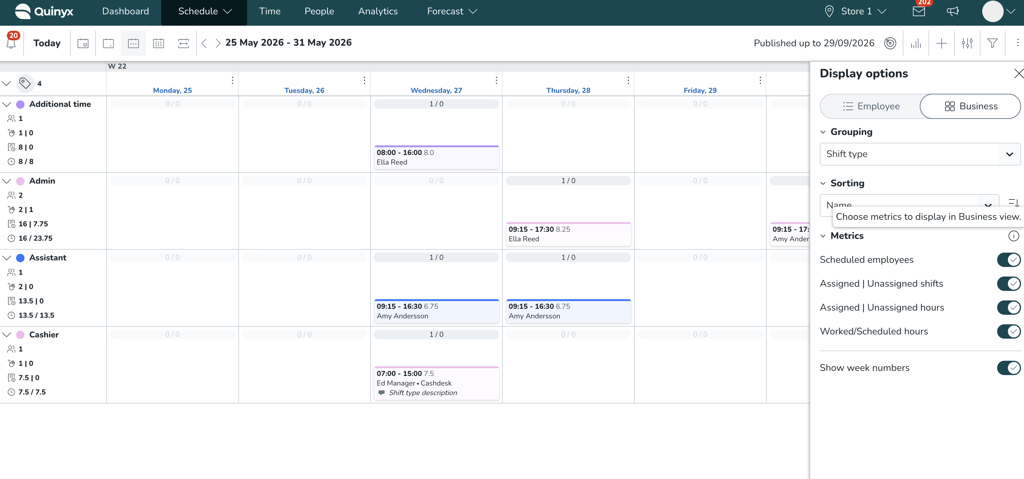
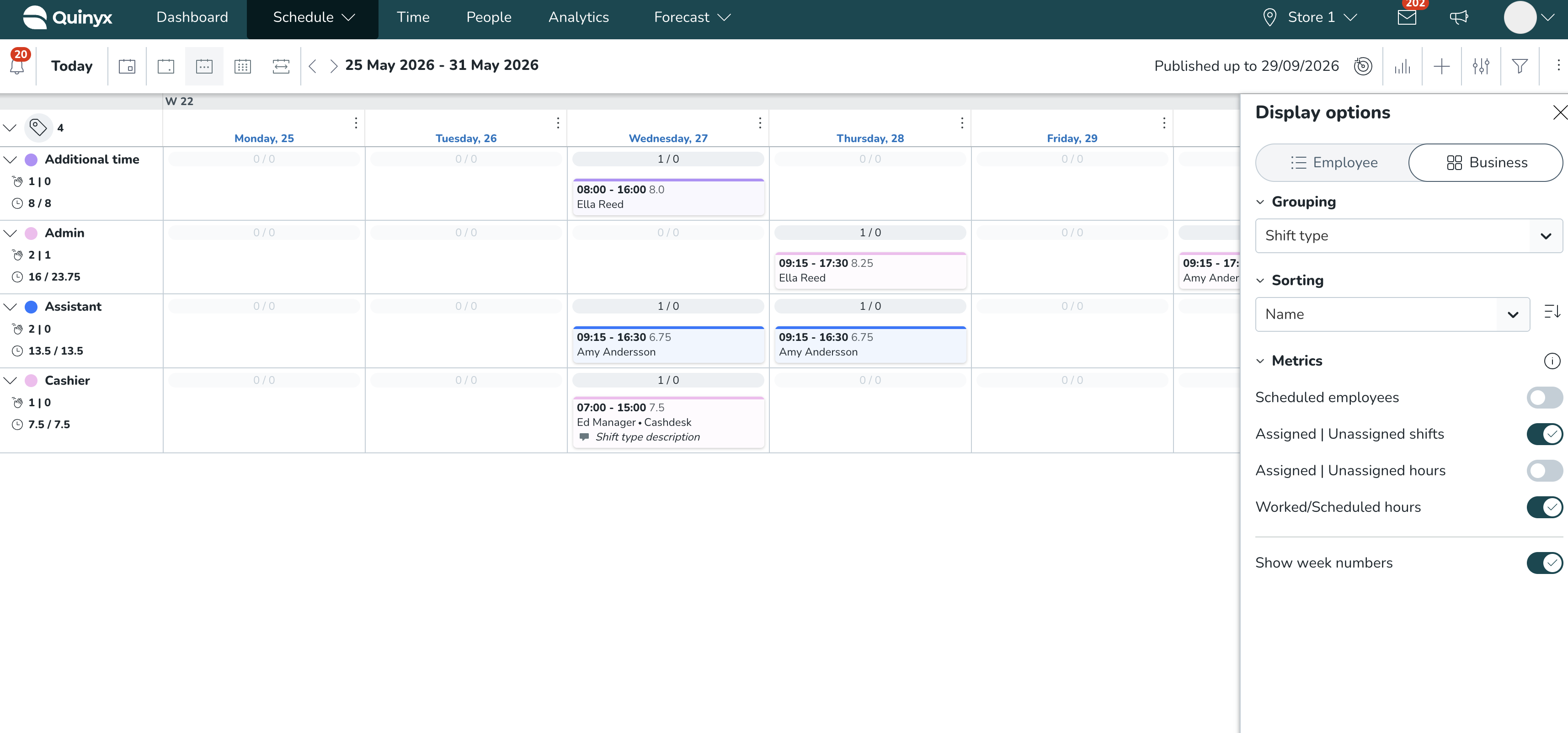
Scheduled employees
Know instantly how many employees are scheduled in each group during the week. Rather than counting shift blocks manually, the Scheduled employees metric shows you the number of unique employees with at least one shift in a given group.
This is particularly useful when checking coverage across shift types or sections - you can see staffing levels for each group side by side, and act quickly if something looks off.
How to turn it on: Open Display options → Metrics → toggle on Scheduled employees.
Assigned | Unassigned hours
See the total number of assigned and unassigned hours per group, right in the Business view. This makes it easy to spot where shifts are still open and understand how much of your planned schedule is actually covered.
The numbers reflect any filters you've applied in the view - so if you're filtering by a specific shift type, the hours shown are scoped to that selection.
How to turn it on: Open Display options → Metrics → toggle on Assigned | Unassigned hours.
Worked/Scheduled hours
Understand how actual worked hours compare to what was scheduled for each group. Worked hours are calculated as punched hours plus any absences that count as worked hours. Scheduled hours reflect the total of both assigned and unassigned hours, accounting for any break settings.
This gives managers a quick read on execution: where is the schedule being followed, and where are there deviations worth looking into?
How to turn it on: Open Display options → Metrics → toggle on Worked/Scheduled hours.
How it looks
What's coming next
These metrics are the first step in a broader effort to give you richer, more actionable data without leaving your schedule view. In upcoming releases, we'll be bringing daily metrics — the same insights broken down day by day, available in both the Business and Employee views — so you can track staffing and hours at the level of granularity that matters most to your operations.
Daily forecast data in Optimal Headcount
Daily forecast configurations can now be used in Optimal Headcount calculations for Linear and Dynamic labour rules.
For Optimal Headcount, we follow a similar logic as for calculated variables, but instead of distributing the daily value across the full 24-hour day, the value is distributed only across the configured opening hours.
This means that the daily forecast value is used during the relevant opening window, rather than being spread across hours when the business is closed.
If opening hours are configured, the daily value is distributed across the opening hours window. If the day is closed, no demand is generated for that day. If no opening hours are configured, the system falls back to full-day behaviour.
Daily resolution support for calculated variables and Optimal Headcount
We have extended support for daily-resolution data in optimization. With this release, daily-resolution variables can now also be used in more optimization workflows, including calculated variables and optimal headcount.
This is useful for customers who plan to use daily demand values, such as parcels, orders, visitors, bookings, or required headcount. Previously, customers often had to work around this by placing a daily value on a single hour or manually spreading it across the day. This could lead to misleading results when the values were used in calculations, statistics, or labour planning.
What's new
- Use daily-resolution variables in calculated variables, including as primary input or operand
- Use daily forecast configurations in linear and dynamic labour rules for Optimal Headcount calculations
- View daily-based calculated variables more accurately in schedule statistics
- View daily-based productivity KPI values using the correct daily summary value
- Use daily values in calculations without relying on single-hour workarounds
Daily values in calculated variables
Daily-resolution variables can now be used when creating calculated variables. When a daily value is used in a calculated variable, Quinyx distributes the value across hourly buckets based on the variable’s aggregation type:
Aggregation type | Behavior |
Sum | The daily value is divided across the 24 hour buckets |
Average | The same value is retained across all hourly buckets |
This allows daily values to be used in calculations together with other variables, while still following the expected aggregation logic.
New functionality requiring configuration updates
More control over how compliance periods are calculated
Three compliance rules now support flexible period configuration, making it easier to match Quinyx to collective agreements and local labour law.
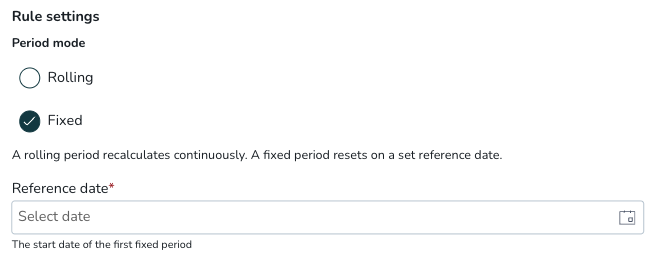
Minimum weekends off per period
Two new settings give you greater control over this rule. First, a new Period Mode setting (Rolling or Fixed): Fixed mode anchors the period to a reference date that repeats on a recurring cycle, supporting agreements such as Finnish half-year periods (Period Mode = Fixed, Period type = Days, Period length = 182, Reference date = 1 January). All four settings — Period Mode, Period type, Period length, and Reference date — are required when Fixed is selected.
Second, Months is now available as a period type alongside Weeks, with the period length capping dynamically at 3 months or 12 weeks — supporting collective agreements such as HORESTA/3F in Denmark. When switching between period types, the period length automatically adjusts, with a notification if the value is reduced.
To configure: open your compliance rule set and select Minimum weekends off per period.
Maximum workdays per period
The Custom configuration now offers full period flexibility: Period mode (Rolling or Fixed), Period type (Days, Weeks, or Months), Period length, and — for Fixed mode — a Reference date that anchors the period cycle. Supports Finnish half-year periods and similar fixed-window requirements.
To configure: open your compliance rule set, select Maximum workdays per period, and choose the Custom configuration.
New rule: Change in published period
A new compliance rule, Change in published period, triggers when a shift is created, updated, deleted, or offered (as a shift offer request) by a scheduler, or rolled out from a base schedule, within an already-published period.
The rule does not trigger for shift bookings, shift swaps, or shift offer approvals — actions initiated by employees or processed through the approval workflow are excluded by design.
Default severity is overridable — users with override permissions can proceed; you can raise it to a hard stop via rule set configuration. No mandatory parameters are required; optional filters let you scope the rule by employee or shift type. The rule also applies to unassigned shifts when active in the default rule set.
To configure: open your compliance rule set and add the Change in published period rule. Adjust severity and optional filters to match your requirements.
Updates and performance improvements
Improved display and aggregation
Daily-based values are now handled more accurately in the relevant schedule statistics and KPI views. For daily calculated variables, Quinyx uses daily aggregation where needed to preserve the correct daily value. This helps avoid cases where a daily value is split into hourly buckets and then summed back into a different total.
Examples:
- In a single-day Schedule Statistics view, daily calculated variables can be shown as a daily value
- In multi-day views, daily aggregation continues to be used
- Productivity KPI cards based on daily calculated variables show the correct daily summary value
Print now respects your custom sorting
If you've sorted shift types or sections in a custom order in the Business view, that order is now correctly applied when you print the schedule. Previously, printed schedules defaulted to sorting by start time, which could make printed output inconsistent with what you saw on screen.
Excel worksheet titles in reports have been standardized
The casing of some Excel worksheet titles in reports has been standardized as part of report generation reliability improvements (for example, payrollsummary is now PayrollSummary ). Integrations or automation that use case-sensitive worksheet name matching may require updates. We recognize this may impact existing report-based integrations and apologize for any inconvenience.
Bug fixes
- Resolved an issue where adding or deleting shifts in the Business view had no visible effect while a task filter was active; changes now update correctly without needing to clear filters or refresh the page.
- Resolved an issue where Hazelcast IMap failed to deserialise stored entries for two concrete classes.
New HelpDocs content
Employee Hub web app Version 0238
Release date June 10th 2026
New functionality
None at this time.
New functionality requiring configuration updates
None at this time.
Updates and performance improvements
None at this time.
Bug fixes
- Resolved an issue in Employee Hub where attempting to start or complete a task incorrectly displayed an "Unable to start task" error message; the action was completing successfully in the background, but users had no way of knowing this. Tasks now confirm correctly without triggering a false error.
New HelpDocs content
None at this time.
REST API / Web service updates
New REST Shift API
A new REST endpoint for getting shifts is being released under /v3/shifts. The release covers getting the shift operation endpoint, which requires bearer-token authentication, and operates against api.eu.quinyx.com.
Read more under: Quinyx API Documentation
Please make sure to forward this information to the party within your company responsible for integrations.
