Version 0242
 Updated
by
Victor Jespersen
Updated
by
Victor Jespersen
- Release summary
- Important information
- Quinyx web app Version 0242
Release summary
Release date August 6, 2026
Short on time and want a high-level summary? 🚀 Quinyx web app Version 0242 New functionality
New functionality requiring configuration updates
Updates and performance improvements
Bug fixes
Mobile app New functionality
New functionality requiring configuration updates
Updates and performance improvements
Employee Hub Version 0242 New functionality
New functionality requiring configuration updates
Updates and performance improvements
Bug fixes
REST API / Web service updates
|
Important information
Introducing the Quinyx Developer Portal
We've launched a dedicated developer portal at developer.quinyx.com, centralizing all integration resources in one place.
The portal includes API reference documentation, step-by-step guides, and quick-start resources for both SOAP and REST APIs. Documentation is versioned across v1, v2, and v3, so you can reference the docs that match your current implementation.
📣 Join us for the next Quinyx Unlocked: Introducing audits in Employee Hub
9 September 2026 | 16:30 CEST / 10:30 EDT | 30 minutes
Running consistent checks across multiple locations usually means spreadsheets, email chains, and follow-ups that quietly go missing. Our new Audits feature brings the whole cycle into one place — build a template once, run it the same way at every site, and track every action through to completion.
In 30 minutes we'll cover:
- Why standardised audits matter for multi-location organisations
- How Audits works end to end, from template to follow-up
- A live product demo, plus Q&A with the team
Not using Employee Hub yet? You're still very welcome — this session is a good look at how the Employee Hub supports day-to-day operational work beyond scheduling.
Register now — Quinyx Unlocked is our monthly 30-minute deep dive, built exclusively for our customer community.
Quinyx web app Version 0242
New functionality
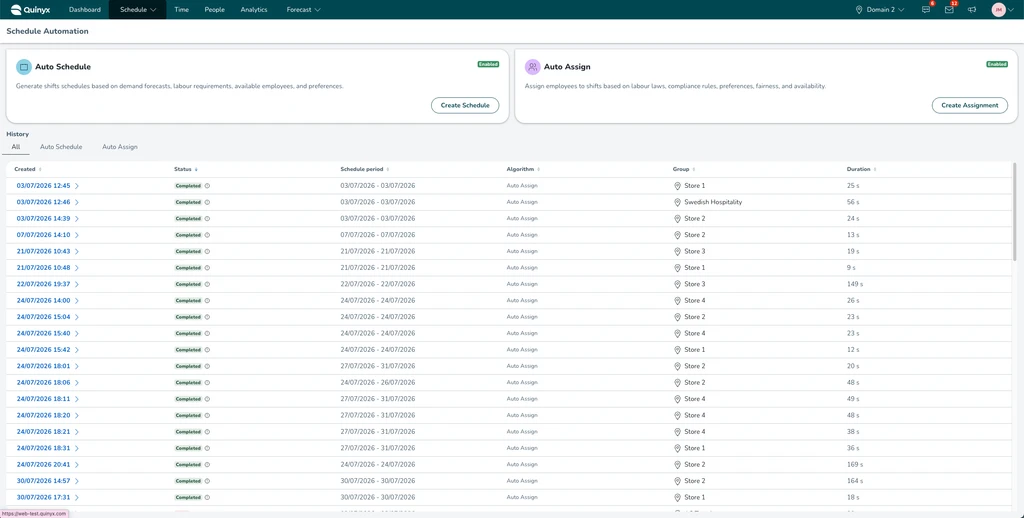
Schedule Automation View
Navigation: Schedule > Schedule Automation in the navigation headers.
Quinyx's optimisation algorithms, Auto Assign and Auto Schedule, are now centralised into one user-friendly view: the Schedule Automation page. Previously, Auto Schedule (automatic generation of anonymous shifts) and Auto Assign (automatic assignment of those anonymous shifts to employees) had dedicated pages of their own, meaning you had to move between screens to run both steps of the process. Now you can configure and launch either algorithm from a single place.
What's new
- One page for both algorithms: Set up and launch Auto Schedule and Auto Assign runs from the same view, instead of switching between separate pages.
- Improved unit selector: Search directly in the unit tree instead of scrolling, and see organisation and district names with a live counter of how many units you've selected within each.
- Improved history view: Time filter on the historical runs to increase visibility.
- Various UI improvements: Aligned UI components with the rest of the Quinyx application.
New functionality requiring configuration updates
Set up Norwegian self-certified sick absence (egenmelding) yourself
If you operate in Norway, you can now configure your self-certified sick absence limits yourself instead of asking Quinyx to do it for you.
Open an absence type in Account settings, go to Advanced settings and tick Special Norwegian self-certified sick absence. Four fields appear, where you set the maximum days in one leave occasion, the maximum number of leave occasions in a rolling period, the length of that period, and the maximum days allowed across it.
The setting is off by default on all existing absence types unless you have already turned it on prior to this release.
When your rules change, whether through a legal update, a collective agreement or your own policy, you can now apply it the same day.
Manage day count absence groups in Quinyx
Day count absence groups let several absence types share one day count. You can now create and manage them yourself and link absence types to them.
To create, rename, or delete a group, go to the absence types page in Account settings, open the three dots menu and select Day count absence groups. Each group shows the absence types linked to it. A group cannot be deleted while it is still linked to one. Day count absence groups is located in the top right-hand corner.
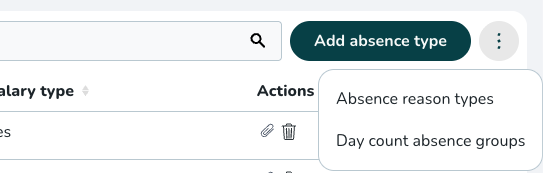
To link an absence type, open it in Account settings, go to Advanced settings, tick Link day count absence group and choose the group. Group settings take priority over the absence type's own settings, as before.
This was previously a configuration request handled by Quinyx, so you no longer need to raise a ticket or wait for us.
Updates and performance improvements
Clearer menu when managing absence settings
The three dots menu on the absence types page now reads Absence reason types and Day count absence groups, and has been rebuilt to display correctly now that it holds more than one option.
Removed: "Shifts with this tag cannot overlap" tag setting
We've removed the Shifts with this tag cannot overlap checkbox from Tag settings (in both Account and Group settings). This setting was never enforced by the scheduling engine — enabling it had no effect on whether overlapping shifts could be scheduled. To avoid confusion, we've removed the option entirely.
uniqueScheduling field in the Tags integration API (v2) is now deprecated and non-functional. It's retained for backward compatibility only; any value sent is ignored. No action is needed. If you previously had this setting enabled, your scheduling behaviour does not change, as the setting never altered it.Bug fixes
- None at this time.
New HelpDocs content
- None at this time.
Mobile apps
New functionality
- None at this time.
New functionality requiring configuration updates
- None at this time.
Updates and performance improvements
- None at this time.
Employee Hub web app Version 0242
New functionality
- None at this time.
New functionality requiring configuration updates
- None at this time.
Updates and performance improvements
- None at this time.
Bug fixes
- None at this time.
New HelpDocs content
- None at this time.
REST API / Web service updates
None at this time.
Please make sure to forward this information to the party within your company responsible for integrations.
