Version 0244
 Updated
by
Leigh Hutchens
Updated
by
Leigh Hutchens
- Release summary
- Important information
- Quinyx web app Version 0244
Release summary
Release date September 8th, 2026
Short on time and want a high-level summary? 🚀 Quinyx web app Version 0244 New functionality
New functionality requiring configuration updates
Updates and performance improvements
Bug fixes
Mobile app 3.58
Employee Hub Version 0244 New functionality
New functionality requiring configuration updates
Updates and performance improvements
Bug fixes
REST API / Web service updates
|
Important information
⚠️ Swedish Overtime Limit Compliance Rule Delayed
The upcoming Schedule Compliance rule, "Overtime limit can't be exceeded," is temporarily paused and will not be released as previously scheduled. During final validation, our engineering team identified a technical issue that affects the accuracy of overtime tracking. To ensure full confidence in your scheduling compliance and prevent inaccurate warnings, we are holding the release while we resolve this issue.
- Impact: The feature will remain unavailable in your environment until the issue is resolved.
- Next Steps: We are actively working on a fix and will announce a revised release date shortly.
Join us for the next Quinyx Unlocked: Introducing audits in Employee Hub
9 September 2026 | 16:30 CEST / 10:30 EDT | 30 minutes
Running consistent checks across multiple locations usually means spreadsheets, email chains, and follow-ups that quietly go missing. Our new Audits feature brings the whole cycle into one place — build a template once, run it the same way at every site, and track every action through to completion.
In 30 minutes we'll cover:
- Why standardised audits matter for multi-location organisations
- How Audits works end to end, from template to follow-up
- A live product demo, plus Q&A with the team
Not using Employee Hub yet? You're still very welcome — this session is a good look at how the Employee Hub supports day-to-day operational work beyond scheduling.
Register now — Quinyx Unlocked is our monthly 30-minute deep dive, built exclusively for our customer community.
Quinyx web app Version 0244
New functionality
Support for Turkish language and currency
The Manager portal now supports Turkish language and currency. Mobile app and Staff portal supported it from before.
New functionality requiring configuration updates
Keep Minijobbers inside their statutory earnings limits
A German-market rule, named Minijobber Annual Earnings Limit, keeps Minijob employees inside their statutory earnings limits. It runs three checks against the Cost Limit settings on the employee's agreement template:
- Annual earnings — actual earnings (time punches, absences) plus simulated earnings (shifts without a punch) across the assessment period, against the pro-rated limit.
- Double monthly limit cap — a hard ceiling; no single month may be scheduled above 2× the monthly limit.
- Safe earnings enforcement — optional, catches over-earning relative to today's date, so an employee who leaves mid-year has not already breached their pro-rated entitlement.
The assessment period is configurable per rule as calendar year (the default when unset) or rolling 12 months, and a rule set may hold several Minijobber Annual Earnings Limit rules evaluated independently.
Customer impact
Highest-stakes rule of the two. Exceeding a Minijob limit revokes the employee's tax-free status retroactively, with tax and social insurance consequences for both sides. German customers currently manage this in spreadsheets or not at all.
Configuration and enablement
Five prerequisites:
- Add the rule Minijobber Annual earnings limit to the Rule Set.
- A salary must be configured on the agreement.
- Cost periods must be 1 calendar month starting on the 1st. If not exact, no validation runs.
- Cost period values should also start on the 1st.
- Salary types need Salary cost configured, and
Include in total costenabled. - Absence reason types need Salary basis enabled to contribute to costs.
Also worth briefing: mid-period limit changes split the assessment period at the effective date rather than blending limits, and rolling periods re-anchor to a fresh 12 months from the change date.
For any data outside of this ~5-month window, the rule relies on salaries being transferred to payroll. If you haven't transferred previous months to payroll, the system cannot capture those earnings, and your totals will be inaccurate.
Targets for Scheduling accuracy KPIs
Scheduling accuracy KPIs can now be compared against customer-defined targets directly in the Schedule view.
Targets are supported for:
- Underscheduled hours
- Overscheduled hours
- Hit percentage
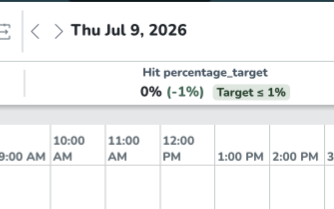
This allows you to define what an acceptable result looks like for your organisation and immediately see whether the current schedule meets or misses that target.
Targets can be configured for a unit or section and a specific date or date range, with support for different comparison types such as above, below, exact, and between. Hour-based KPIs use hour targets, while Hit percentage uses percentage targets. The target is shown together with the KPI in the Schedule view, making it easy to see whether the current result meets or misses the configured target.
More control when editing Forecast and Statistics
We’ve updated how values can be distributed when making adjustments in Forecast & Statistics.
A dedicated Distribution method option is now available, giving you more control over how an adjusted value is applied across the selected time period.
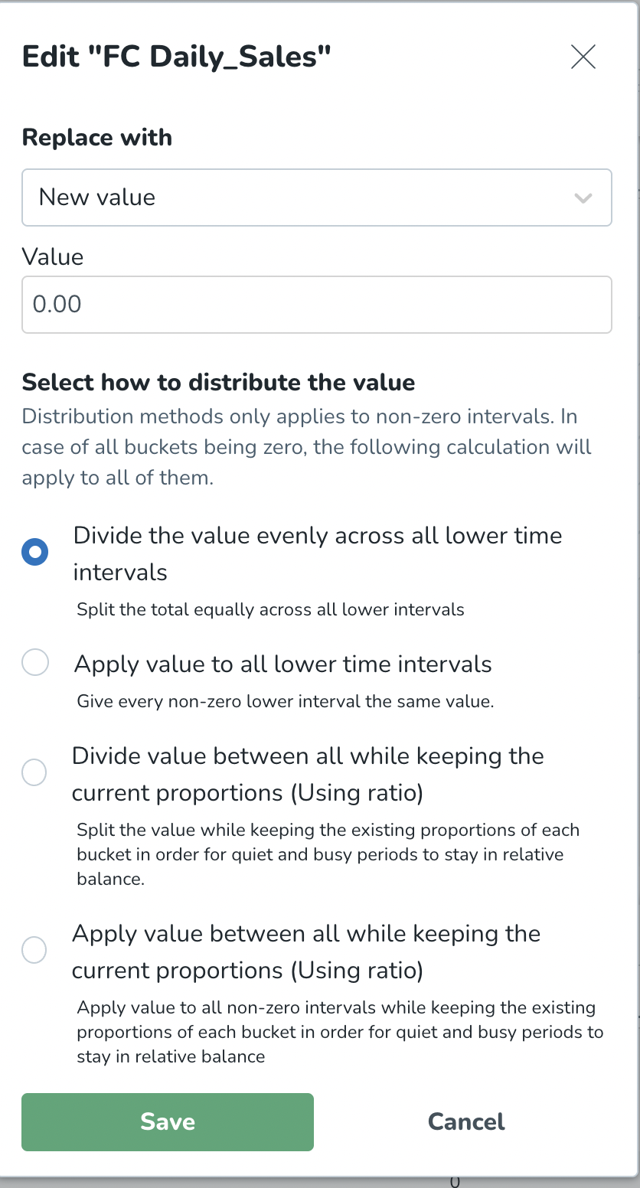
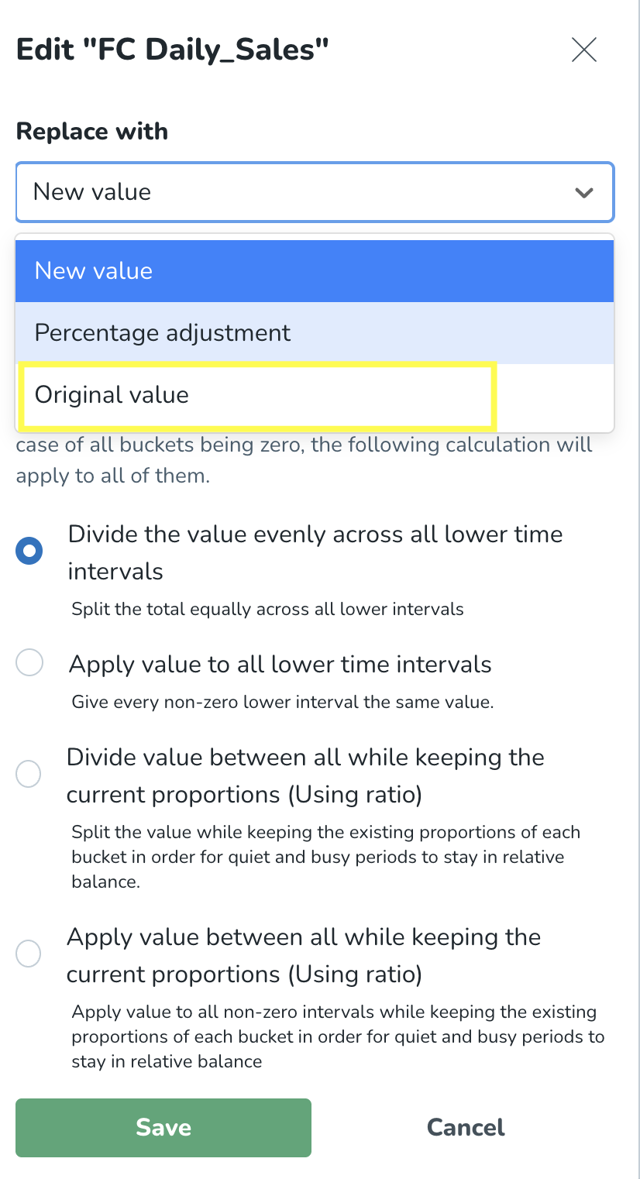
Restore values to their original state
You can also now undo bulk edits without having to manually recreate the original data. A new Original value option is available under Replace with. Selecting it resets the chosen variable to its original value for the selected time period.
Edited cells are also easier to identify, with an edit indicator and additional interaction when hovering over values that have already been changed.
New controls for cross-unit scheduling
We have made updates to how you can switch on the Cross-Unit Scheduling feature. Two settings control this feature:
- Permissions - who can use it
Set per role in Role Management. Controls what an individual manager can do.
Access level What they can do
Off: No cross-unit scheduling access
Read: See cross-unit shifts and details, but not edit them
Write: See, create, edit, and delete cross-unit shifts
- Unit enablement - where it can be used
Set per unit in Account Settings > Group Management > Select Unit > Advanced Settings > Functionality. Controls whether a unit can be scheduled into by other managers.
If a unit has the feature switched off, it won't appear in the Unit dropdown within a shift panel — no one can schedule into it, regardless of their permissions.
If a unit has the feature switched on, managers with the right permissions can schedule into it.
Permissions control who can cross-schedule. Unit enablement controls which units can be scheduled into. Both need to be in place for a manager to schedule a shared employee into another unit.
For customers who currently have the Cross-Unit-Scheduling module enabled:
The module has now been replaced by the permissions and unit settings described above. Cross-unit scheduling remains switched on for all of your units, and all managers have kept their existing permissions.
If you want to restrict access, you can turn off cross-unit scheduling for specific units, or remove permissions from specific managers, using the instructions above.
Updates and performance improvements
Clearer password guidance and a smoother path into the Quinyx app
We have improved several password and login flows so users can get started with Quinyx and complete password actions successfully the first time. The updates cover clearer password guidance on the web, fewer repeated steps when resetting a password, better support for users on a mobile device, and clearer onboarding instructions.
Password guidance is clearer when creating a password
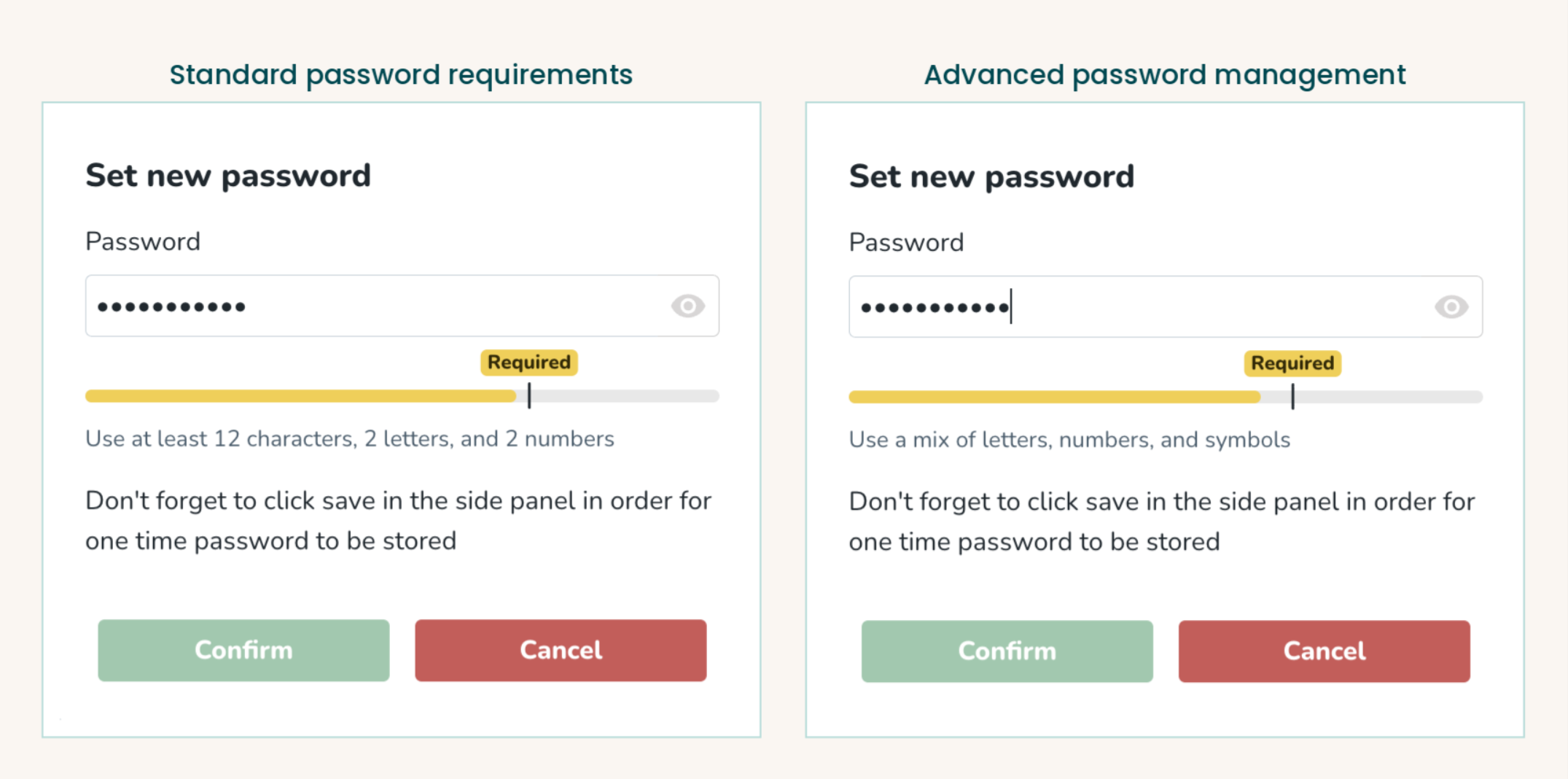
When users create or reset a password on the web, the strength indicator is now anchored to the requirement that actually applies to them, instead of showing a generic rating. It stays amber until the password meets the threshold, turns green only once the requirement is met, and gives actionable feedback such as suggesting a longer password. The Continue button is enabled at the same point the requirement is met.
- Without Advanced password management, the indicator reflects the standard requirements: at least 12 characters, 2 numbers and 2 letters.
- With Advanced password management, it reflects the entropy level your organization has set, including the separate levels for employees and managers.
Managers see the same indicator when they set a one-time password for an employee from People details, replacing the generic strength meter that could turn green before the requirement was met.
Forgot password is smoother from the mobile app
Selecting Forgot password in the mobile app now takes users straight to the page where they enter their email address to receive reset instructions, instead of opening the web login page where they had to select Forgot password a second time.
Open the app after setting a password
When a user sets a password on a mobile device, the confirmation screen now offers two options: open the Quinyx app or continue in the browser. On desktop, nothing changes.
Previously, the only way forward on that screen was to log in in the browser, so users who belong in the app took the path in front of them and stayed on the web. Now the app is offered first, which makes the easiest next step also the right one.
Mobile login and onboarding are easier to follow
On the Quinyx login page in a mobile browser, the email field now opens a keyboard with lowercase letters and the @-key available, so the email address is easier to type. The first Welcome to Quinyx email is now written as numbered steps: set your password, download the app, then log in.
Why this matters
These updates reduce confusion during onboarding and password reset, help users complete login actions faster, and lower the risk of failed password attempts and avoidable support requests.
Bug fixes
- Resolved an issue where managers were unable to approve a salary type in the time card if it was generated by a meal break rule.
- Resolved an issue where Free day shifts sent notifications to employees.
- Resolved an issue where users received "Upcoming shift" notifications after the shift was reassigned to another employee.
New HelpDocs content
- None at this time.
Mobile apps 3.58
Want to know more about the new mobile app version? Click here to check the mobile release notes.
Employee Hub web app Version 0244
New functionality
- None at this time.
New functionality requiring configuration updates
- None at this time.
Updates and performance improvements
- None at this time.
Bug fixes
- Resolved an issue with the audience preview count not being accurate.
New HelpDocs content
- None at this time.
REST API / Web service updates
None at this time.
