Version 0247
 Updated
by
Leigh Hutchens
Updated
by
Leigh Hutchens
Release summary
Release date October 21st, 2026
Short on time and want a high-level summary? 🚀 Quinyx web app Version 0247 Announcement!
Important notice
New functionality
New functionality requiring configuration updates
Updates and performance improvements
Bug fixes
Mobile app
Employee Hub Version 0247 New functionality
New functionality requiring configuration updates
Updates and performance improvements
Bug fixes
REST API / Web service updates
|
Quinyx help and training have moved
Quinyx Knowledge Base
Starting Wednesday 21st October, Quinyx product help has a new home. Introducing the Quinyx Knowledge Base at help.quinyx.com. It replaces HelpDocs as the official home of all Quinyx product documentation. Like HelpDocs, it's open to everyone, with no login needed. The one exception is Quinyx Academy for customer training, which has its own login (see below). Nothing changes in Quinyx itself, only where the help lives.
On release day, you'll see a dialog in Quinyx with a link to the Quinyx Knowledge Base, and the Quinyx WFM app and mobile apps will link to the new knowledge base instead of HelpDocs.
What's new
- Eddy AI. Ask a question in your own words and get a direct answer, with links to the articles it came from.
- Summaries and read-aloud. Get the key points quickly, or have an article read aloud.
- Feedback on every article. Tell us what's helpful and what's missing.
- Dark mode. Choose between light and dark themes to suit your workspace preference.
- Four languages. English, German, Dutch and Swedish. We're refining the translations based on your feedback.
What to do
- Update your bookmarks to help.quinyx.com
- Update HelpDocs links in any of your organization's Confluence pages, decks, guides, and other documentation by early November.
- Looking for an article you used in HelpDocs? HelpDocs links don't redirect to the matching article, but titles haven't changed, so search for the title in the Quinyx Knowledge Base.
What happens to HelpDocs?
HelpDocs will be phased out gradually over the coming months:
- Parallel updates through 4th November (Version 0248): Both platforms will be maintained until early November. We’ll confirm the exact date HelpDocs content is frozen in upcoming release notes.
- Read-only access until 1 January 2027: HelpDocs will remain accessible for reference until early 2027, when it will be permanently retired.
- Recommendation: Start using and linking to the new Knowledge Base today to ensure a smooth transition.
Customer training has moved, too!
Customer training has also moved. Quinyx Academy replaces Attensi, our previous training platform, and is where customers enrolled in Quinyx training take their courses. It's separate from the Knowledge Base and needs a login.
Where to go: Access it at help.quinyx.com (Quinyx Academy has its own dedicated login).
- Password reset: All existing passwords have been reset; users will need to set a new password.
Learn more
- Welcome to the new Quinyx Knowledge Base: A tour of what's new and how to find your way around.
- Quick Quinyx Knowledge Base demo: A brief demo showing features and navigation.
- How to get good answers from Eddy AI: Tips for asking questions that get clear, accurate answers.
- Quinyx Academy first-time login guide: How to log in to Quinyx Academy for the first time.
Important information
Important: Changes to Quinyx's sub-processors
We want to inform you of upcoming changes to the sub-processors engaged by Quinyx under your Data Processing Agreement.
Removal of sub-processor
Attensi AS, is no longer engaged as a sub-processor under your Data Processing Agreement.
New sub-processors
As of 2 November 2026, Document360 Limited, Unit 2 White Oak Square, London Road, Swanley, Kent, England, BR8 7AG, company registration number 13728159, United Kingdom (“Document360”) and Hookdeck Technologies Inc., 2001 Boulevard Robert Bourassa Suite 1700, Montreal, QC H3A 2A6 Canada (“Hookdeck”) are engaged as sub-processors under your Data Processing Agreement.
Document360 is used for onboarding and product training purposes. Hookdeck provides webhook infrastructure services. For clarity, Hookdeck is only relevant if you order webhook infrastructure services, which is a new service we intend to offer to our customers.
Processing is within the EEA/UK, unless otherwise agreed.
Other than the changes described above, no changes are made to the Data Processing Agreement and no further action is required on your part.
If you have any questions or feedback, please write to us at dataprivacy@quinyx.com.
Employee API v3: upcoming changes to /hr/v3/employees ( going live in release 248, 5 November 2026)
In release 248 we will make the Employee API v3 more consistent and more predictable according to our published API guidelines. Some of these changes can affect your integration. Please review the list below before 5 November 2026.
Action required if you use PATCH
- PATCH requests must use the header
Content-Type: application/merge-patch+json. Requests withapplication/jsonwill fail with 415 Unsupported Media Type. The response headerAccept-Patchshows the accepted content type. - In a PATCH request,
nullremoves the value ofdateOfBirth,managerId,costCentreIdandemploymentEndDate. Today,nullis ignored. - PATCH no longer accepts an empty string (
"") forbadgeNumber,email,firstName,lastNameandemployment.homeGroupId. - PATCH returns 422 for unknown properties, for system-set properties (
id,created,updated) and for values of the wrong type. Today, these are ignored or converted. - If the stored data of an employee is not valid, PATCH accepts only a request that corrects that data.
Please check if you use GET
- Responses no longer include properties that have no value. Today they return
null. This applies todateOfBirth,managerId,costCentreId,employmentEndDateandcreated. createdandupdatedare returned in UTC in RFC 3339 format, in whole seconds (for example2026-11-05T09:30:00Z). Today they are in Stockholm local time without an offset.- In the API specification,
idInitems are strings, not integers. The request itself does not change.
Changes to PUT
- PUT returns 422 for an empty string (“”) in dateOfBirth and employmentEndDate. Send null instead.
- For managerId and costCentreId, an empty string is still accepted. It clears the value, the same as null.
Changes to POST
- POST returns 422 for an empty string (“”) in dateOfBirth and employmentEndDate. Send null instead.
- For managerId and costCentreId, an empty string is still accepted. It means “no value”, the same as null.
Changes to validation and errors
- Error responses use the
application/problem+jsonformat (RFC 9457), withtype,title,status,detailanderrors[].pointer. Today they are a JSON array. errors[].detailcontains a readable sentence instead of a message key.- An invalid request body on POST, PUT or PATCH returns 422 instead of 400.
- A duplicate employee email returns 409 Conflict instead of 403.
- A non-numeric
idInvalue still returns 400, but with type/invalid-parametersand new detail text. - New length limits:
socialSecurityNumber30 characters,pictureURL128 characters. Longer values return 422. Today they are cut to fit.
What to do
- If you use PATCH, update the
Content-Typeheader before 5 November 2026. - If your code reads error messages, status codes or the
createdandupdatedfields, test it against the new behaviour. - If you generate your client from the API specification, generate it again after release 248.
- All changes can be tested in RC as of October 29th 2026.
Quinyx web app Version 0247
New functionality
Invite and manage people in your tenant from one place
Inviting people to your tenant used to be very limited; it was done via two separate pages, Invite member and Invite Quinyx user, and it was hard to see afterward who had been given access and why. We have replaced them with one page, Manage external users, under Account settings > Access rights > Manage external users. From this page, you invite users from other Quinyx accounts and Quinyx staff, and see and manage their roles.
What's new
- One form for every invitation. Click Invite external user and fill in Email, Employee ID, Role, Start date, End date and Invitation reason. Invite external users (such as Superusers who need access to all tenants in different countries) to any role in your tenant. Invite Quinyx staff, for example your application specialist, as Customer manager.
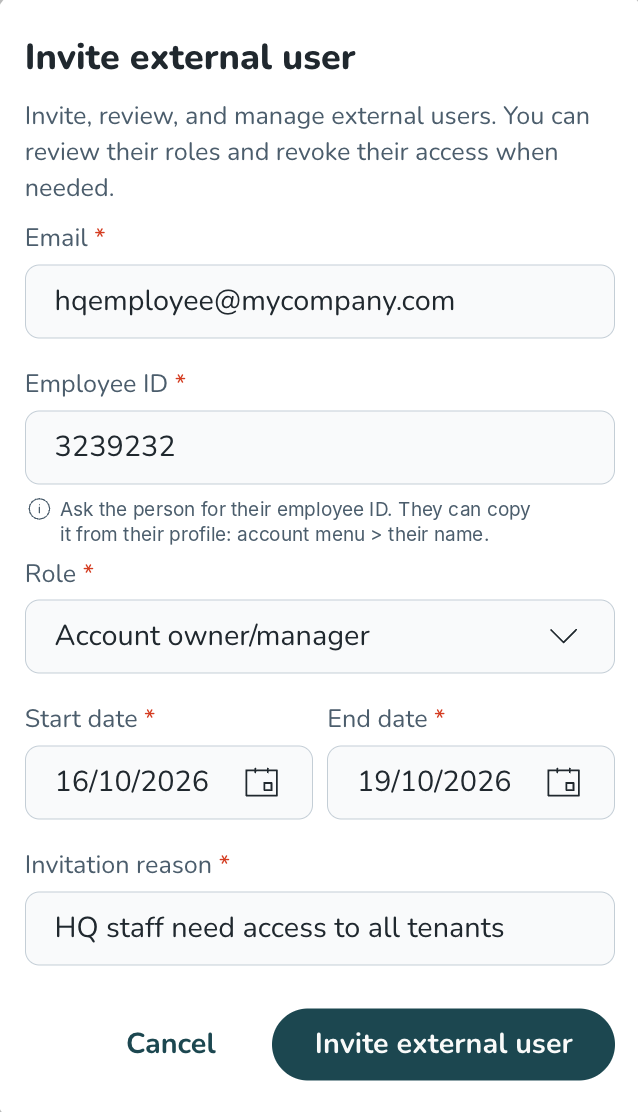
- External users accept before they get access. The invited user receives an email and gets access only once they accept. Invitations that aren't accepted within 14 days expire. Quinyx staff get access immediately.
- Time-limited access with a reason. Every invitation needs a start date, an end date and an invitation reason, so access is never open-ended or unexplained.
- One list of external users. On the Manage external users page, see everyone invited to your tenant: their role, access period, reason, who invited them and when. Sort the list, filter by role, change access dates or revoke access in a few clicks.
- Employee ID needed to invite an external user. When you invite someone from another Quinyx tenant, you enter their email address and their employee ID (not their badge number). The employee ID is unique across all of Quinyx, while email addresses and badge numbers are not.To find an employee ID:
- Your own (when you want someone to invite you): open the account menu and click your name. Your profile card opens, where you can copy your employee ID.
- A colleague's (when you want to invite them): go to People and click the info icon (i) at the end of their row to open their profile card.
- Invite link: on a profile card, click the button next to the email button to copy an invite link. Send it to the administrator of the tenant you need access to. When they open it while logged in, the invite form opens already filled in.
Once the user accepts the invitation to multiple tenants, they can switch between them from the Accounts’s menu.
Why it matters
You stay in control of who can access your tenant. Access is time-limited and documented; external users have to actively accept, and you can review or remove access at any time from one list. Inviting users doesn't require any additional licenses.
See and fix every schedule violation in one place
Until now, you found compliance rule violations one shift at a time, when a warning popped up as you saved. It was hard to get an overview of what was wrong across a whole schedule before you published it. The new Violations panel in the Schedule view shows every rule violation on the shifts in your view in one list, next to the schedule, so you can fix them all before you publish.
What's new
- All violations in one panel. In Schedule, select the Violations button (the warning icon) in the top bar. The panel opens beside the schedule and shows the total number of violations in your current view.
- Grouped by rule, not by shift. Violations are grouped by rule category (for example Working time, Rest or Break), then by rule, then by employee, with the shifts that cause each violation listed underneath. Every level shows a count, so you see at a glance where the problems are.
- From violation to fix in one click. Select a shift in the panel. Its edit panel opens and the schedule scrolls to that employee. Change the shift and save. The panel checks the employee again, and the violation disappears once it is fixed.
- Follows your view. The panel checks the shifts you can see. Change the period, units or filters, and the list updates. It works with up to 100 employees at a time.
Good to know: you need read access to Schedule, and the Violations button appears only when your browser window is wide enough. The panel doesn't block publishing. Rules set to block an action still do so when you save the shift. Read more about the rules in Schedule Compliance Rules.
Why it matters
Make the Violations panel the last step before you publish. When it shows No violations found, you know the schedule meets the labour law, union agreements and company rules you have set up, without hunting for problems shift by shift.
New functionality requiring configuration updates
Decide which roles can see audit logs
Until now, there was no separate permission for audit logs. A role that could work with schedules, punches or absences could also see the audit logs for them, and you couldn't remove one without the other. Now it is possible to keep these apart. For example, works councils in Germany often don't allow area managers to see audit logs, even though those managers have schedule access. With the new Audit log permission, you decide who can see audit logs without changing anything else a role can do.
What's new
- New Audit log permission on roles. Under Account settings > Role management > [role] > Edit role, set Audit log to Read or None.
- None removes all access to audit logs. Users with that role don't see the Audit logs link, can't open the current or the old audit log pages, and can't get audit log data through the API.
- Read works exactly as today. Users still only see logs for areas they have access to. For example, shift logs need at least read access to Scheduling. The Audit log permission is an extra switch on top of your existing permissions, not a replacement.
What this means for existing customers
Nothing changes at release. Every existing role that could already see audit logs (roles with read or write access to Scheduling, Punches, Absence, Availability or Account settings) gets Audit log set to Read automatically. Other roles get None, as they couldn't see audit logs before either. If you need to remove audit log access from a role, for example to meet a works council agreement, set Audit log to None on that role.
Good to know: new roles you create start with Audit log set to None. If a new role should see audit logs, set Audit log to Read.
Why it matters
You can meet works council and internal data protection requirements without taking away the access managers need for their daily work. Audit log access is now something you give on purpose, role by role.
New setting: Limit Advanced Additional Time to part-time employees
You can now choose whether an Advanced Additional Time method applies only to part-time employees. This is useful when full-time and part-time employees share the same agreement template. With this setting, only part-time staff build up additional time for hours worked beyond their schedule.
Where to find it
Go to Account settings, under the “Agreements” section, open Overtime methods. Open an Advanced Additional Time method. In the Settings section, tick “Only for part-time employees” and save.
How it works
- With the setting on: employees who are full-time for the whole calculation period get no Advanced Additional Time. Part-time employees get it as before. Other salary output for full-time employees, such as overtime and unsocial hours, does not change.
- Who counts as full-time: an employee counts as full-time only if their employment rate is 100% for the entire calculation period. If the rate drops below 100% at any point in the period, they count as part-time for the whole period. For example, someone who goes from 100% to 60% mid-period still gets Advanced Additional Time for the full period.
- No employment rate: an employee with no employment rate on their agreement is treated as full-time. They will not get Advanced Additional Time while the setting is on.
- When the setting applies: it only takes effect when the method's working time quota is set to Schedule. With other working time quotas, the setting has no effect.
What stays the same
- The setting is off by default. Your existing methods keep working exactly as they do today until you turn it on.
- The setting only appears on Advanced Additional Time methods. Overtime, Additional time and Minus time methods do not change
Updates and performance improvements
Better default settings for new customers
What's new
- 8 unsocial time periods by default. The main unit of a new tenant now has 8 unsocial time periods instead of 4, so there is room for all the unsocial time periods your collective agreements need from the start. You can find the setting under Account settings > Group management > [unit] > Advanced unit settings > Misc > Number of unsocial time periods.
- All notifications on by default. All notifications under Advanced unit settings > Messages are now enabled for new tenants. Before, two of them were off: notifying managers about shift requests that need approval and about swap requests. You can turn off any notification you don't need.
What this means for existing customers
Nothing changes for existing customers. The new defaults apply only to the main unit when a new customer is created. As before, new units copy the settings of the main unit.
Why it matters
New customers spend less time adjusting settings and get value from Quinyx faster, whether they set it up with our implementation team or on their own.
Hit rate in the Statistics chart
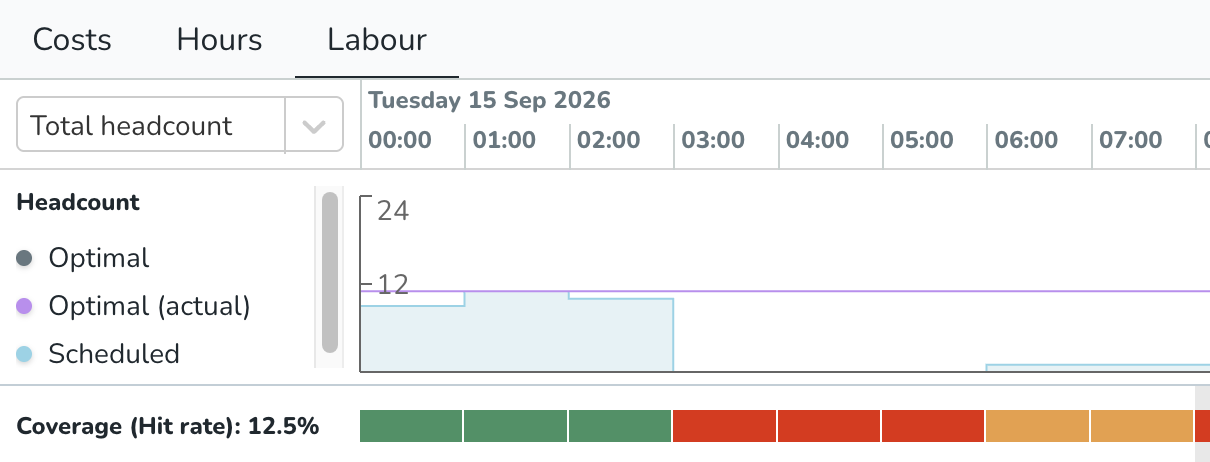
Hit rate, already available in the table view, is now also shown in the Statistics chart. A bar below the headcount chart shows each hour (single-day period) or day (week period) in green, orange, or red, based on your configured Hit rate margins. Hover over a segment to see scheduled and optimal headcount and how far over or under target you are.
Bug fixes
- Resolved an issue where the Budget in hours column in the Tag Follow-up report excluded the final day of any tag period configured with an end date(To date).
- The report now includes the final day when calculating budget hours for end-dated periods, aligning with both the search criteria and the hours columns (Scheduled and Punched).
- Remaining budget comparisons (
Budget − ScheduledandBudget − Punched) are now fully accurate. - Open-ended tag periods and existing scheduled/punched hours calculations remain unchanged.
- Resolved an issue where saved views in the schedule view reverted back to First name sorting.
- Resolved an issue with the Minijobber Annual earnings limit compliance rule that could raise an error during scheduling if the rule was added to a Group rule set.
New HelpDocs content
- None at this time.
Mobile apps
None at this time
Employee Hub web app Version 0247
New functionality
None at this time.
New functionality requiring configuration updates
None at this time.
Updates and performance improvements
None at this time.
Bug fixes
- None at this time.
New HelpDocs content
- None at this time.
